
What Happens When You Put Off iPhone Updates
Toggle Dark Mode
Skipping one or two iPhone updates won’t usually ruin your device overnight. Your iPhone will still turn on, run apps, take photos, and work normally.
That’s why it’s easy to ignore updates. If everything seems fine, then why bother? Maybe you don’t want to deal with a large download, maybe you’re worried about bugs, or maybe you just don’t feel like restarting your iPhone.

With that said, you’re likely to run into smaller issues over time. When you avoid updates for too long, your iPhone can become less secure, miss important bug fixes, lose compatibility with newer apps, and eventually feel more outdated than it needs to.
You usually don’t need to panic-install every major update the second Apple releases it, but ignoring updates for months is definitely not ideal. Here’s why.
Your iPhone Becomes More Vulnerable to Security Problems
The biggest reason to update your iPhone is security. iOS updates regularly patch vulnerabilities that can affect your most used apps, WebKit, and other parts of the operating system.
This doesn’t mean every outdated iPhone will automatically get hacked. Most people won’t notice anything dramatic just because they skipped one update. But if Apple has already fixed a security issue and your iPhone is still running an older version, your device can remain exposed to a problem that no longer exists.
Apple releases security notes for each iOS update, and those notes regularly list vulnerabilities fixed in newer versions. This can help you determine how urgent a software update is. Of course, you don’t need to understand every technical detail. The important part is that updates often close security holes, and delaying them leaves your iPhone — and your data — at greater risk. After all, the bad guys read Apple’s security notes too, so if they didn’t know about a vulnerability before, they will after it’s been published.
We all have sensitive information on our iPhones. You probably have a bunch of photos, emails, banking apps, saved passwords, and private messages. All of that data might be at risk just because you didn’t want to hit the Install Now button. Keeping iOS updated helps protect the system that holds all of that.
You Miss Bug Fixes and Performance Improvements

Updates don’t only add new features or change the design; many smaller iOS releases are mostly about bug fixes, performance improvements, and other similar changes.
Some of the most common (and annoying) iPhone problems aren’t hardware problems at all. Random app crashes, connection issues, battery drain, or charging problems can all sometimes be fixed by a simple software update.
If your iPhone is acting strange and you haven’t updated in a while, you may be experiencing a problem Apple already solved. That’s why most of us always recommend that you update your iPhone before trying any other fix, as that often does the trick.
Your Favorite Apps May Eventually Stop Working Properly
Apps typically support older iOS versions for a while, but nothing lasts forever. Developers eventually update their apps to use newer tools, newer APIs, and features that just didn’t exist for older iOS versions.
To be fair, this may not matter in many cases. Your apps will probably keep working normally, even if you skip a few updates. But over time, you may notice some apps stop receiving updates, crash more often, or you’ll miss out on a cool new feature everyone is talking about.
And this becomes more frustrating if you delete an app and later try to reinstall it. The App Store may require a newer version of iOS for the current version of that app. So there’s the possibility that you won’t be able to install that app until you install the latest iOS software update.
The longer you stay behind, the more likely it is that compatibility will be an issue. And for something that’s as easy as installing a new iOS update, it seems rather pointless.
You’re Missing Out on the Newest Features
This won’t affect your iPhone’s performance or compatibility, but it’s the one that hurts the most if you love trying everything new that Apple brings to the table. If you don’t update, you don’t get the latest iOS features your iPhone supports.
Your iPhone may keep working fine, but it won’t feel as up to date as it could. You may read about a helpful feature and realize you don’t have it simply because you haven’t installed the update.
On the other hand, some updates also improve existing features instead of adding completely new ones. You might miss better widgets, more controls for the Control Center, or the cool new Liquid Glass design that no one really asked for.
Of course, not every iPhone gets every feature. Like Apple Intelligence, some features require newer hardware. But if your iPhone supports the update, installing it gives you access to everything Apple made available for your model.
Automatic Updates Can Save You From Forgetting
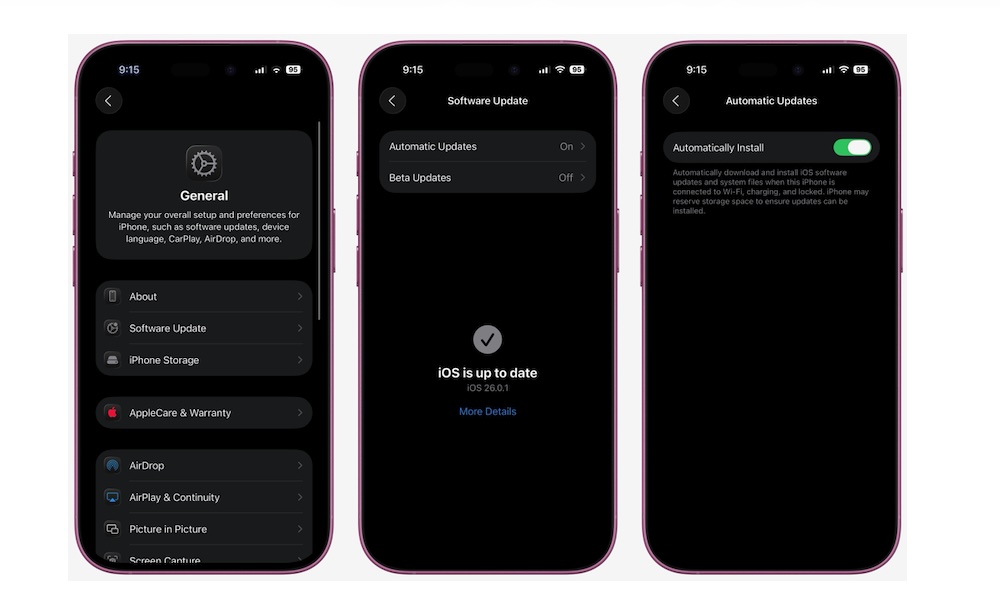
If you constantly forget to update your iPhone, automatic updates can help. Your iPhone can download and install updates overnight while it’s charging and connected to Wi-Fi.
So instead of putting off updates because you’re too busy using your iPhone, you let the iPhone do the job for you while it’s sitting there with nothing else to do anyway. Here’s how to turn on automatic updates:
- Open the Settings app.
- Scroll down and tap General.
- Tap Software Update.
- Select Automatic Updates.
- Turn on Automatically Install.
Now, all you need to do is leave your iPhone connected to the internet and a power source every once in a while, and your device will take care of the rest.
Keeping iOS Updated Helps Your iPhone Last Longer
Nothing dramatic will happen if you don’t update your iPhone. It’s likely to continue working normally for days, weeks, or even months. That’s why skipping updates can feel harmless.
But over time, you increase your risk of falling victim to a cyberattack, encountering bugs, or just missing cool new features. Not to mention that your iPhone can also miss improvements that help performance, battery life, connectivity, and stability.
Of course, as we said, you don’t need to install every update as soon as they’re available. But don’t ignore them for months either. Install an update when you’re at home, and you can keep your iPhone connected to a power source and your Wi-Fi.
Keeping iOS up to date is one of the easiest ways to keep an iPhone secure, stable, and useful for longer. It’s not the most exciting iPhone tip, but it’s one of the most important.






