
This AirPods Feature Will Blow Your Mind
Toggle Dark Mode
Apple has quietly turned recent AirPods into the smartest audio devices on the planet, thanks to a suite of features known as Adaptive Audio. These are available on most of the AirPods Apple has released over the past three years — the AirPods Pro 2, the AirPods Pro 3, or AirPods 4 with ANC — but you may not be taking full advantage of them.
All you need is one of those sets of AirPods and an iPhone running at least iOS 17, but if you’re still using an older model like the AirPods 3, these features could be enough to inspire an upgrade.

Conversation Awareness
Have you noticed that when you begin speaking to those around you while wearing your AirPods and listening to music or other media, the volume of whatever’s playing automatically lowers? People sometimes mistake it for a glitch because of how well it works.
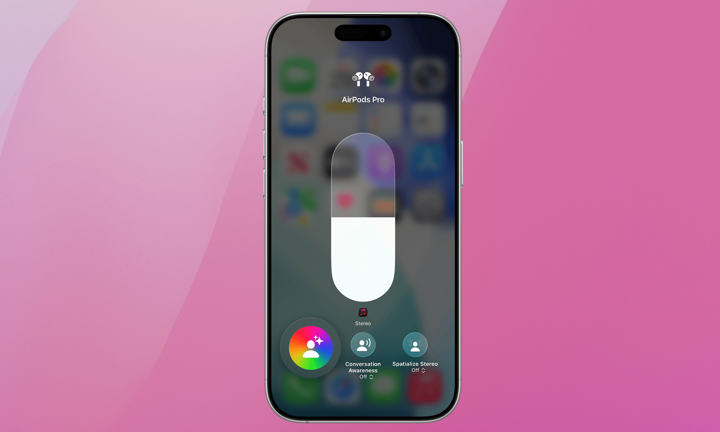
The feature is called Conversation Awareness. When enabled, your AirPods will recognize when you’re speaking to someone and seamlessly lower the media volume. At the same time, the voice of whoever you’re talking to will be enhanced. This allows AirPods wearers to have live conversations without fiddling with their iPhone or popping out an AirPod.
Here’s how to turn on Conversation Awareness:
- Make sure your AirPods are in your ears and connected to your iPhone.
- Open the Control Center by swiping down from the top-right corner of your iPhone screen.
- Touch and hold the volume slider until additional controls appear.
- Tap Conversation Awareness.
You can also enable this by selecting your AirPods in the Settings app and looking for the toggle there. Just be aware that singing and humming can also trigger it, so you may not want to leave it on all the time. You can quickly toggle it off by following the same steps above.
Adaptive Audio
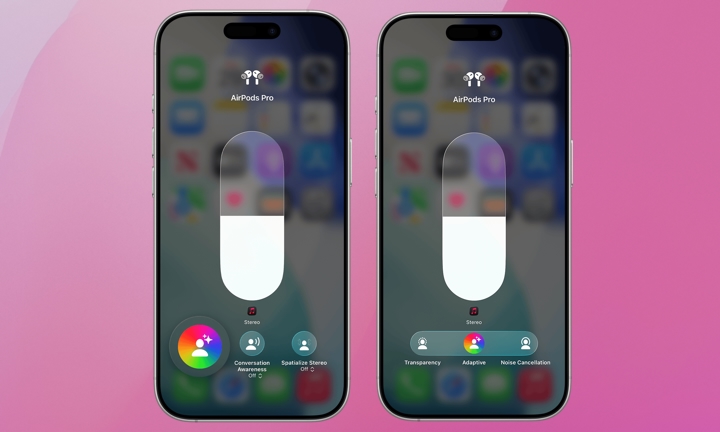
Conversation Awareness isn’t the only thing that Adaptive Audio has to offer. It can also blend Active Noise Cancellation (ANC) with Transparency mode to give you the best of both worlds. When Adaptive Audio is enabled, your AirPods will control what you hear in through the headphones based on your environment and what you’re listening to using an AI-powered algorithm.
It’s not 100% foolproof, but it generally works quite well. If you’re walking around outside in a busy area you’ll likely prefer it to the more extreme settings of ANC or Transparency mode, and it’s espeically great for commuters.
To activate Adaptive Audio, with your AirPods in and connected to your iPhone go to:
- Open Control Center by swiping down from the top-right corner of your iPhone screen.
- Touch and hold the volume slider until additional controls appear.
- Tap the Listening Mode button in the lower-left corner.
- Choose Adaptive.
You can use this same method to switch to Transparency and Noise Cancellation.
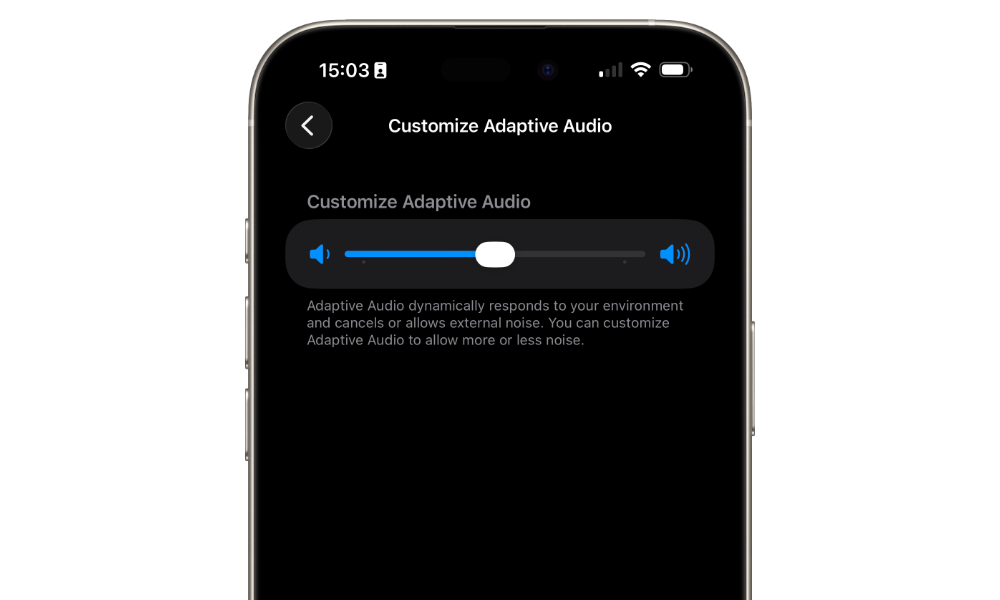
Pro Tip: You can customize your Adaptive Audio mix in the Settings app while wearing your AirPods. Select them from near the top of the settings, choose Adaptive Audio, and move the slider to the left to block more noise or to the right to hear more of your surroundings.
Personalized Volume
Finally, Apple’s Adaptive Audio allows users to set custom levels for Transparency and ANC with a Personalized Volume setting. Personalized Volume learns your listening habits over time and intelligently adjusts media volume up or down based on your settings and volume preferences.
Here’s how to set this up:
- Ensure your AirPods are in your ears and open the Settings app on your iPhone.
- Tap your AirPods near the top of the screen
- Scroll down and turn on Personalized Volume.
Note that it may take a few days for your iPhone and AirPods to “learn” your listening habits.
These AirPod capabilities may not be surprising. After all, the AirPods Pro 2 received FDA approval as hearing aids in 2024. Still, many users may not be aware of these features or how to best use them. If you have the right AirPods, be sure to give Adaptive Audio a try and switch between listening modes. If you find the standard settings disorienting, fine tune them further with Personalized Volume.
Our biggest gripe is that Conversation Awareness can sometimes be too sensitive, triggered by coughs or throat-clearing sounds rather than actual speech, and that it only activates when you speak first, not when someone else does. That’s understandable, as it might otherwise be constantly ducking your volume as everyone around you is talking. Perhaps Apple’s next trick for the AirPods will be a way to determine when someone is talking to you directly.






