
Make Low Power Mode Turn On Automatically at 40%
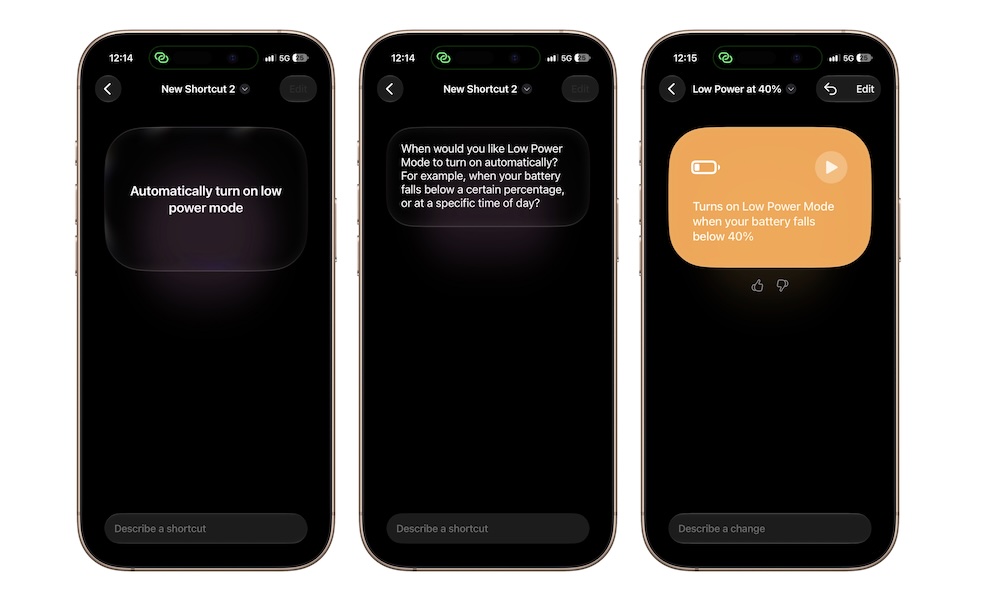
Low Power Mode can be turned on manually whenever you want, but you can use the Shortcuts app if you want your iPhone to turn it on for you.
For instance, you might want your iPhone to turn it on by itself once you reach 40% battery life (you can choose your “warning percentage”). Of course, that means that you’ll need to dabble with the Shortcuts app, which can feel a bit weird if you haven’t used it before.
However, if you already have iOS 27 installed on your iPhone, you can literally just ask Apple Intelligence to create the automation for you. This is how:
- Open the Shortcuts app.
- Tap the plus button at the bottom of the screen.
- Tap the text field and write something like “an automation that automatically turns on Low Power Mode after 40% battery life.”
- Give your iPhone a few moments, and it’ll get the automation ready for you.
You can hit the back button in the top right corner, and your automation will be added to your Shortcuts automatically. And that’s it; now all you need to do is go about your day normally and let your iPhone handle the rest.
This is still doable if you don’t have iOS 27, but you’ll have to add the steps manually:
- Open Shortcuts.
- Tap the Automation tab at the bottom center of the screen.
- Tap the plus button in the top-right corner to create a new personal automation.
- Scroll down the list and select Battery Level.
- Drag the slider until it says 40%.
- Select Falls Below 40%.
- Toggle on Run Immediately.
- Tap on the blank search bar and search for “Set Low Power Mode” and tap it.
- Ensure the action block reads “Turn on Low Power Mode.”
- Tap Done in the top-right corner.