
Stop Apps From Refreshing When They Don’t Need To
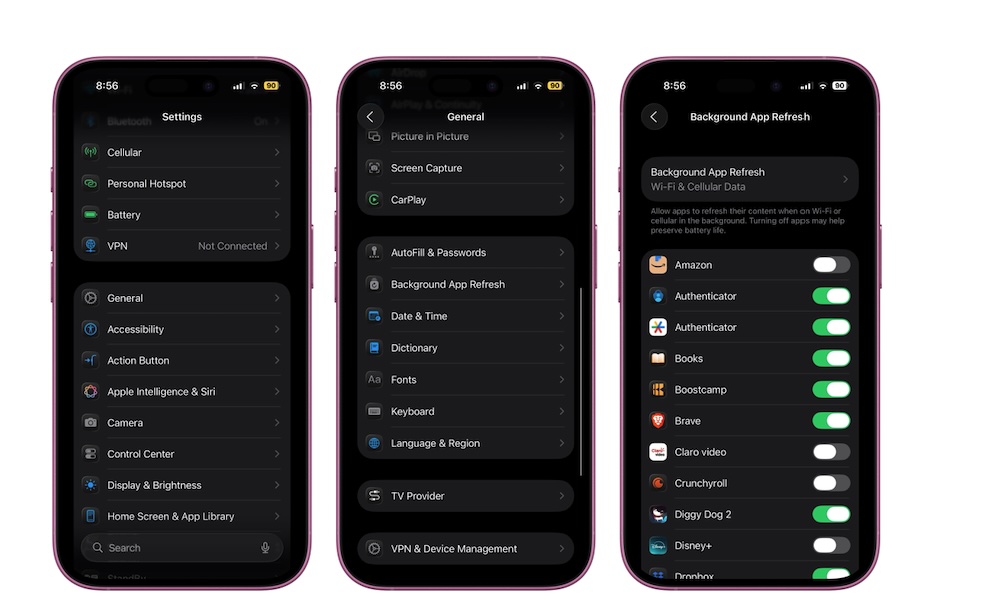
Background App Refresh is an iPhone feature that lets apps update automatically and fetch information, even if you’re not using them. This is extremely useful for apps like Instagram or Facebook, which are constantly updating their content. However, it’s also a feature that makes your iPhone work harder and consume more battery life than needed.
Sure, some apps, like Messages, might actually need to use this feature to work best, but not every app really needs to work 24/7 in the background. So the best thing you can do is manage your Background App Refresh settings by doing the following:
- Open the Settings app.
- Scroll down and go to General.
- Tap on Background App Refresh.
- Scroll through your installed apps and turn off the ones that don’t need to update in the background.
Depending on your situation, you might not need this feature at all. If you think that it’s not necessary on your iPhone, you can just turn off Background App Refresh completely.