
Let Adaptive Power Handle Some Of The Work For You
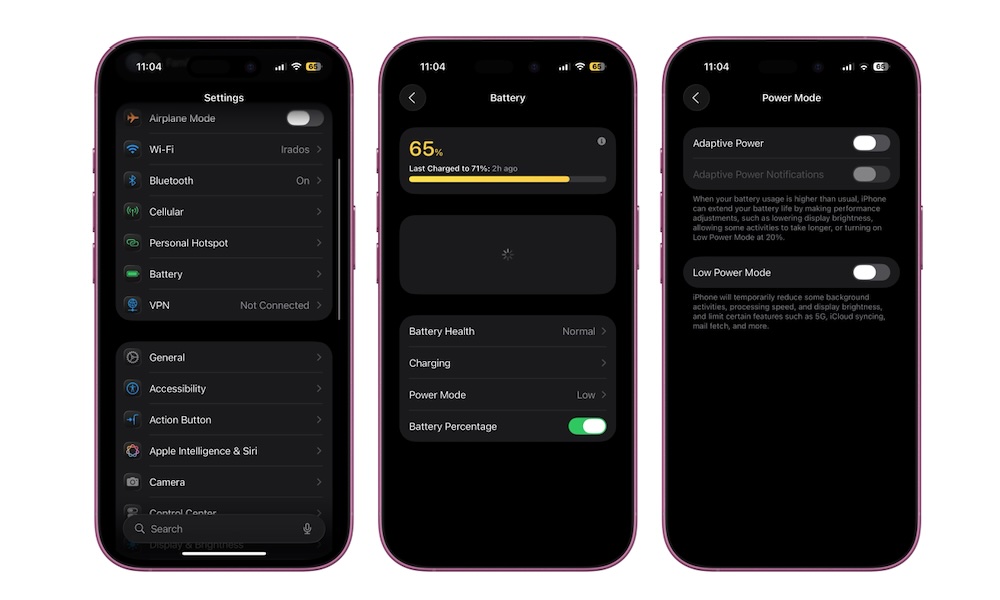
If you have a supported iPhone, Adaptive Power is probably one of the first features you should turn on (if it isn’t already). Instead of waiting until your battery is already low to start managing it manually, Adaptive Power watches how you normally use your iPhone and learns the times of the day when you’re consuming more power than usual.
When iOS predicts that you’ll need your battery to last longer, it can make small changes in the background. For instance, it may slightly lower your display brightness or limit some background activity. It can also make minor performance adjustments without interfering when you’re doing something demanding, such as using the Camera app or playing a game with Game Mode enabled.
Adaptive Power will also automatically turn on Low Power Mode when your battery reaches 20%. Once you turn it on, you can forget about battery management for a while. To start using Adaptive Power:
- Open the Settings app.
- Scroll down and tap Battery.
- Go to Power Mode.
- Turn on Adaptive Power.
Adaptive Power is enabled automatically on the iPhone 17 lineup and iPhone Air. On compatible iPhone 15 Pro and iPhone 16 models, you’ll need to turn it on yourself. Apple also says it takes at least seven days to learn your charging habits, so don’t expect it to begin making adjustments immediately.