
Switch Your 5G Mode
5G can give extremely fast cellular speeds, but you don’t need those speeds for everything you do.
If your iPhone is set to “5G On,” it will try to use 5G whenever the network is available. That can consume more power than necessary, especially when you’re doing something simple that doesn’t benefit much from the additional speed.
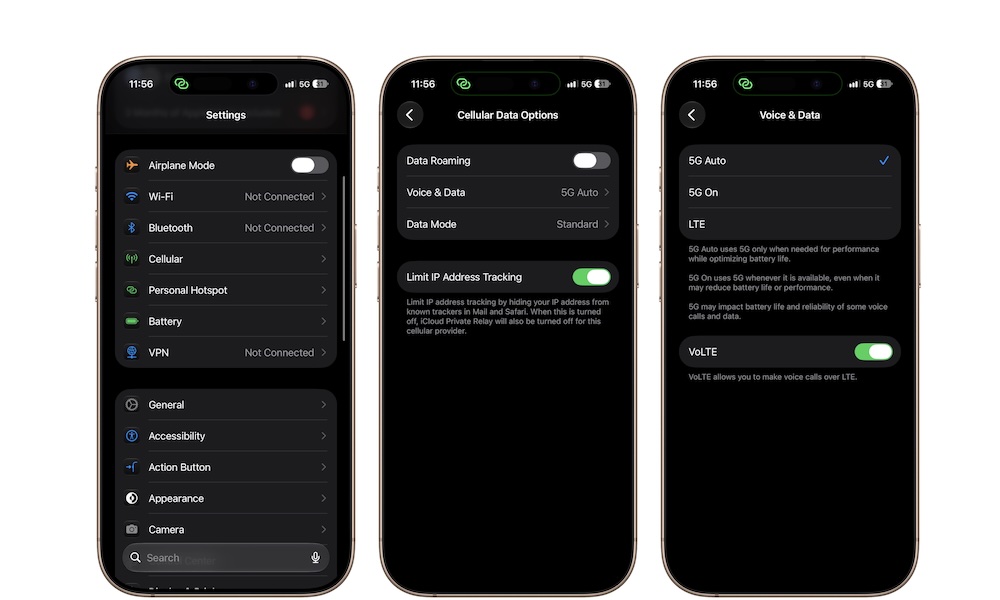
Instead, 5G Auto is a better choice for most people, as your iPhone uses 5G when the extra performance is useful, then switches back to LTE when it isn’t. To change it on your iPhone, you need to:
- Open the Settings app.
- Tap on Cellular.
- Go to Cellular Data Options.
- Tap Voice & Data.
- Select 5G Auto.
You can also select LTE when battery life matters more than cellular speed. For everyday use, though, 5G Auto is the best option overall.