Your MacBook Trackpad Can Now Talk — Even With the Speakers Muted
 Omar Tursi?
Toggle Dark Mode
If you’ve gotten tired of using your MacBook’s trackpad just to drift a pointer around the screen, then developer Cody Collier has some good news: you can now use it as a speaker.
Yes, you read that right. Collier has crafted a clever new open-source tool ironically named NO SPEAKER that will trick a MacBook’s trackpad into emitting sounds — even if the standard speakers are muted or completely blown out.
For those who are nervous about trying this trick on a $3,000 MacBook Pro of their own, Collier provides a short demo on X:
While this feels like a bit of a parlor trick, the science and engineering behind it are actually pretty fascinating. As Collier explains, the open-source app uses the haptic motor that’s built into every Force Touch trackpad — the part that makes the trackpad “click” like a real mechanical button when you press on it — and vibrates it to produce sound instead.
That’s some serious out-of-the-box thinking that might make one wonder if Cody Collier is wired quite right, but as Steve Jobs once famously said, “Here’s to the crazy ones.”
To be clear, this is far more proof of concept than practical solution. It doesn’t install as an audio driver that would let it act as a normal system audio output. Instead, the app just runs a series of canned sounds, including speech, a melody, a beat, and a short rap. It then allows you to place your finger on the trackpad and slide it around to play different frequencies. Lastly, you can type in any phrase to have your trackpad speak it back to you.
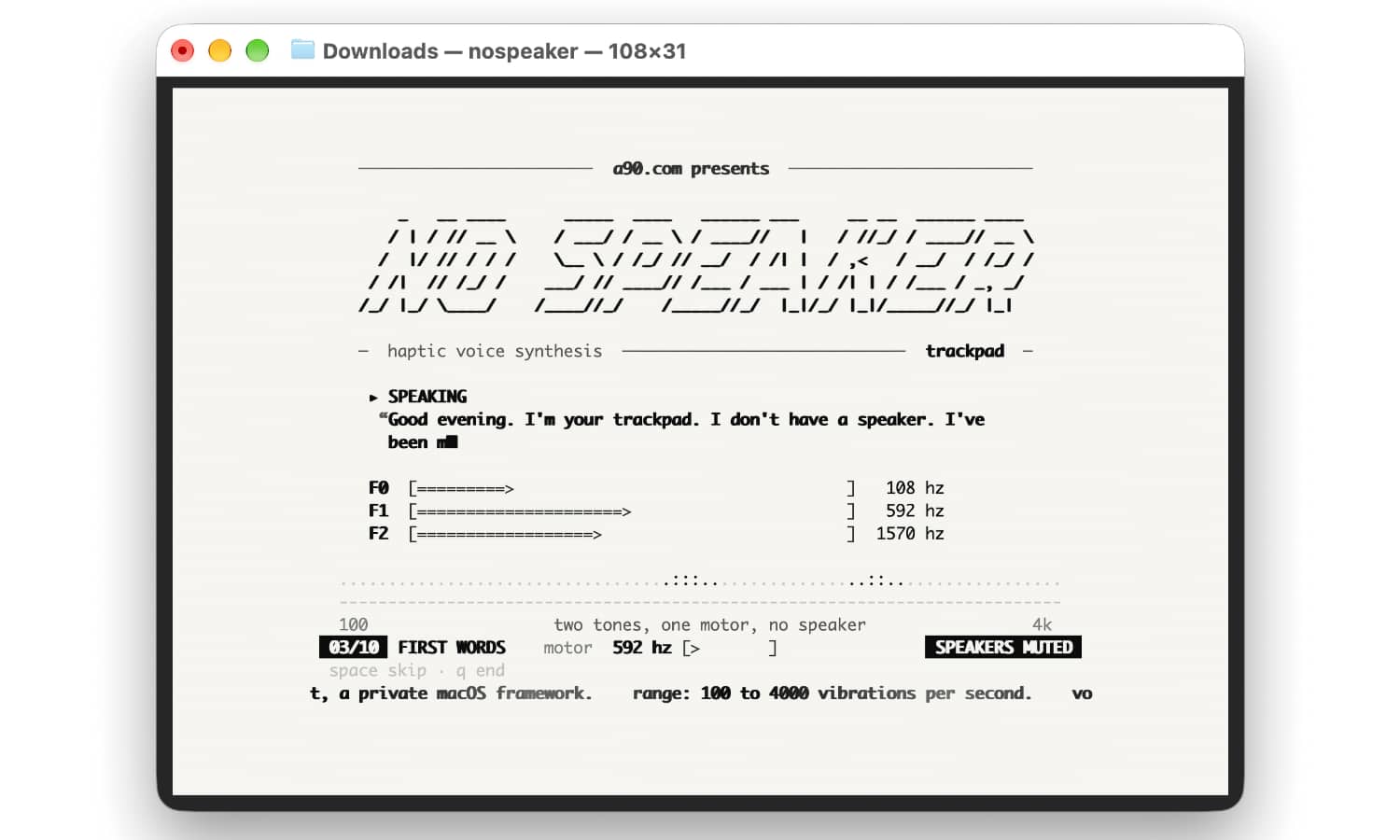
The voice isn’t anywhere near as clear as what you’d get out of the MacBook’s speakers, since it’s really bending the laws of physics a bit here. The speech is generated using the standard text-to-speech feature in macOS, but it’s not as simple as sending that audio stream to the haptic motor. First, it has to do a bit of translation, using linear prediction to find the two key frequencies, or formants, that make up the vowels. Sticking to only two resonances results in a clearer and louder sound as they place less demands on the haptic motor.
Collier notes that this “never drives the motor past its normal maximum strength,” which technically means it should at least be reasonably safe to try — but you still do so at your MacBook’s own risk. Plus, even if the haptic motor runs within its normal vibration range, it’s unlikely Apple designed it to vibrate almost constantly, considering it’s only supposed to activate when you press down on the trackpad — and most MacBook users aren’t clicking their trackpads like hummingbirds on crack.
The other caveat is that this is a classic case of an app using private and undocumented APIs (which comes as absolutely no surprise). That means that even though it works today (even on the latest macOS 27.3 beta), a future macOS update could break it — and we wouldn’t put it past Apple to do so deliberately if the company decided this was bad for the trackpad’s health.
Nevertheless, if you’d like to give it a spin, you can find both a compiled binary and the source code (one swift file with no dependencies) on Github. It’s an entirely command-line tool that runs through Terminal, and naturally requires a MacBook with a Force Touch trackpad, as well as macOS Monterey or later on Apple silicon, or macOS Ventura or later on Intel.