Waiting on Holiday Packages? Fight the Scammers with This iPhone Setting
 Tom Fenske / Adobe Stock
Toggle Dark Mode
Many of you have probably started your holiday shopping or are prepping for Black Friday deals. With the recent FAA flight stoppage and hackers targeting iPhones and iPads through dozens of high-profile websites yesterday, you may also be thinking about your online security. If not, here’s your reminder.
The FTC said people reported $470 million in losses to text scams in 2024. The actual harm was likely substantially larger because many frauds aren’t reported. Since then, scams of all kinds have skyrocketed — including text scams.
Fake package delivery alerts were the most common text scam of 2024, so if you’re ordering gifts online this week, keep reading.
How to Spot a Fake Delivery Text
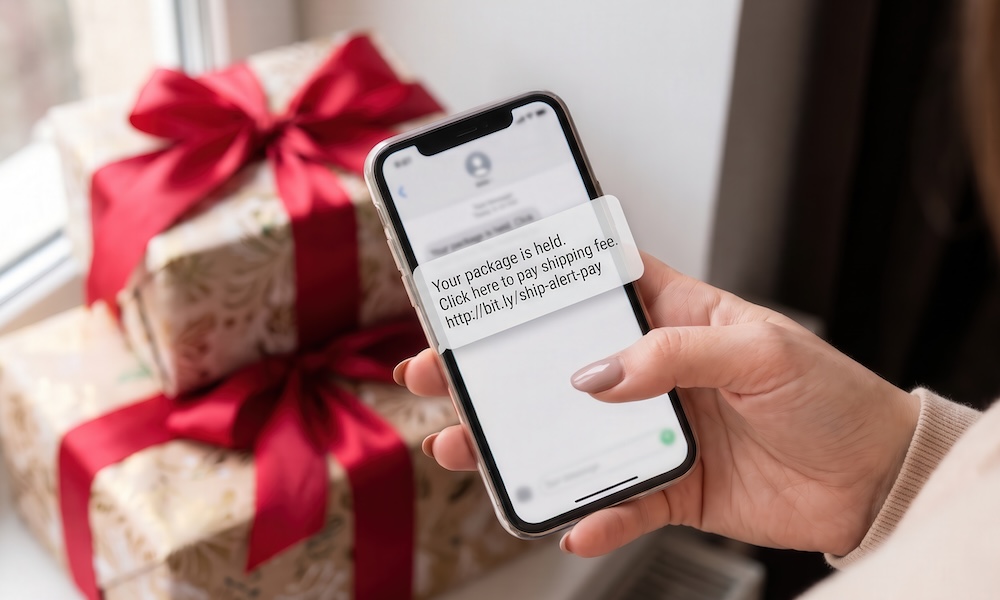
The FTC said most scam delivery texts in 2024 pretended to come from the US Postal Service. That doesn’t mean phony messages in the guise of carriers like UPS, FedEx, DHL, and Amazon are off the table. Hackers are hoping to catch you with your guard down.
The wording varies, but the story is almost always something like this:
- The failed delivery: “USPS: Your package could not be delivered due to an incomplete address. Update your details here.”
- The small fee: “Your parcel is on hold at our warehouse. A $1.99 delivery fee is required. Pay here to avoid return to sender.”
- The “reply Y” trick: “Reply Y, then open the link.”
- The customs charge: FedEx: An import fee is due on your international shipment. Click here to pay and release your package.”
This isn’t a complete list of possible schemes, so stay vigilant.
The “reply Y” trick may look odd at first, but it’s actually a way to trick people into bypassing Apple’s built-in security. By default, the Messages app disables links from unknown senders, preventing you from tapping on them. Replying to the message in any way both activates those links and confirms the scammer’s message has reached an actual human.
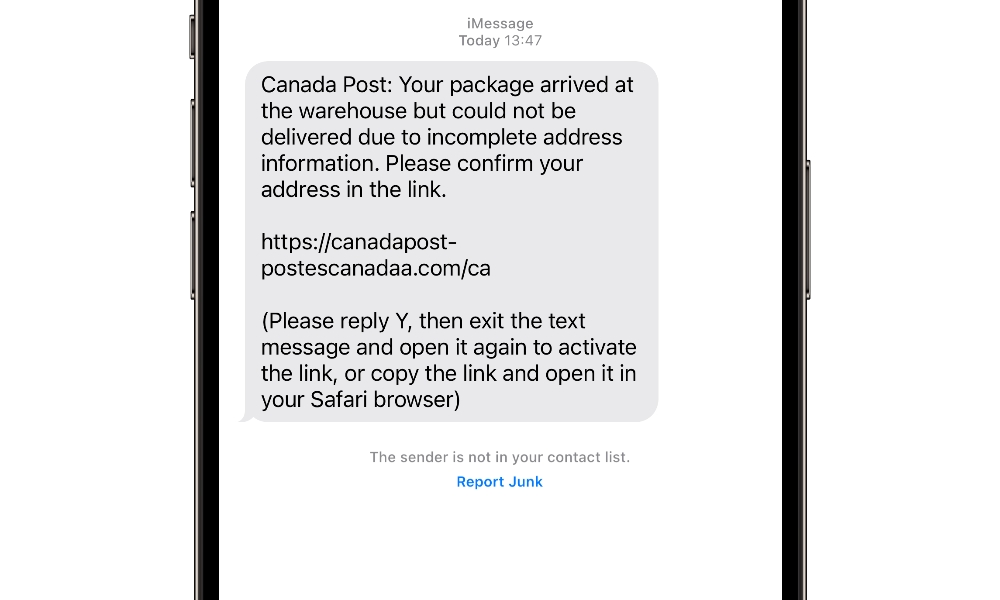
Nearly all the links you’ll find in these messages go to a fake website built to look nearly identical to the real carrier’s site. The small fee is the clever part. Some of us may not blink at a $1.99 fee for a gift to be delivered during the stress of the holidays. The $1.99 isn’t the real damage — it’s what the scammers do with your credit card number or Social Security number after.
Even if the site on the other end doesn’t try to collect a fee, it can still be phishing for other personal information such as your name or address, or even be a way to try and deliver malware to your device.
USPS only texts you about a package if you signed up for tracking that specific package on USPS.com or texted your tracking number to 28777 (2USPS). If you never did this, the “USPS” message isn’t from USPS.
Further, USPS tracking texts will never contain links and won’t ask for payment or personal information — and certainly not for credit card or Social Security numbers.
Additional red flags to look out for are lookalike links with extra words, odd endings, or misspellings like “usps-redelivery.help.” Texts from an email address or a long, random, or foreign number are also clues.
How to Hide These Texts on Your iPhone
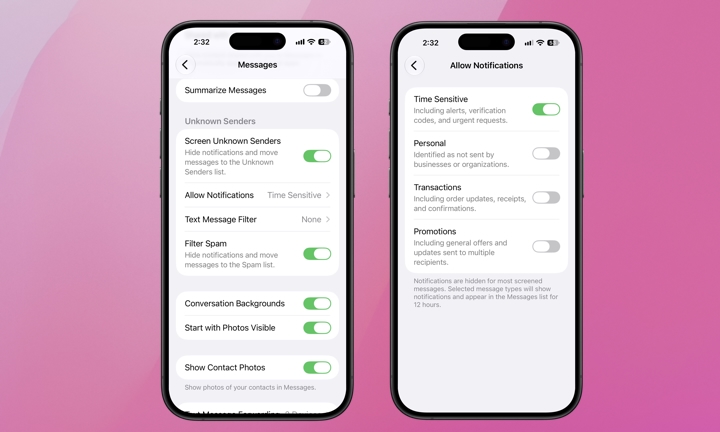
iOS 26 or 27 can move texts from numbers you don’t know into a separate folder, but this setting is off by default. It won’t make you bulletproof, but it’s a solid first line of defense. Here’s how to turn it on.
- Open the Settings app.
- Tap Apps, then tap Messages.
- Scroll down to Unknown Senders and turn on Screen Unknown Senders.
- On the same screen, make sure to toggle on Filter Spam, too.
From there, you may want to let some messages from unknown senders bypass the filter. Tap Allow Notifications to select which category of message you don’t want to miss, like time-sensitive alerts and verification codes.
The Bottom Line
One rule that will help you stay protected is to never use a link from a text you didn’t ask for. If you think a package might have a problem, start with the carrier’s own website, published contact information, and use the tracking number provided in the email confirmation from the store or app you made the purchase from.
If you don’t have Screen Unknown Senders enabled on your iPhone, now is probably a good time to take it for a test run. With it on, most of these texts shouldn’t make it to your inbox. Share this with a parent, grandparent, or friend who’s doing their holiday shopping. Scammers are counting on everyone being too overwhelmed to look twice.