
Things 3 Finally Fixes Its Most Infuriating Flaw

Toggle Dark Mode
Every once in a while, we see an update to a popular app that’s worthy of mention solely because of how it finally addresses a limitation that’s been around for so long that many had despaired of it ever being fixed.
Such is the case with today’s Things 3.23 update, which is much more significant than the minor 0.01 version bump suggests — especially on a philosophical level.
Cultured Code’s Things is one of the most popular task management apps within the Apple ecosystem, praised for its balance of simplicity, power, and great user interface design.
While the app goes back to the early days of the App Store, having earned an Apple Design Award for the original version in 2009, the current version, Things 3, significantly raised the bar over its predecessors. It scored another Apple Design Award upon its release in 2017, and has been so good that it’s managed to last almost nine years without a single major update.
Granted, Things 3 is not everyone’s cup of tea. You don’t have to look far to see folks abandoning ship to more full-featured solutions like Todoist or TickTick, and Apple Reminders has advanced to the point where it can give Things a run for its money. However, Cultured Code has maintained a fairly opinionated design that still resonates with a lot of people for its frictionless, uncluttered experience. While some long for a “Things 4” that will add more new features, there’s no indication that’s ever coming, and even if it does, it will likely just be a new take on the same minimalist approach.

Still, while there are reasons to celebrate a task manager that lets you spend more time doing than planning, Things 3 has had one particularly frustrating limitation from the start: an inability to complete repeating tasks early.
This is partly due to how Things 3 handles repeating tasks. Unlike most task managers, which apply a repeat to a single task that effectively just gets rescheduled each time it’s completed, Things actually splits its repeating tasks into two entities: the actual repeating task remains a fixed, future entry that spawns a new individual task for each repeat cycle.
That approach has its benefits — you can modify the current iteration of a task, adding notes or even changing the title without affecting the next occurrence. Of course, it also means that if you want to change something more permanently, you have to look ahead.
Most critically, it’s also created a barrier to rescheduling “after completion” repeat cycles, and completing a repeating task early has always been a no-go. The actual actionable task isn’t created until its start date arrives, and the actual repeating task is a fixed, non-completable entity.
Anyone who has ever used a task manager can see how frustrating this can be, and the few workarounds that folks have come up with have been unsatisfactory, at best.
It’s easily one of the most-requested features in Things 3, and the good news is that, while it’s only taken nine years, Things 3.23 finally fixes it — and true to Cultured Code’s style, the developers have done a pretty elegant job of addressing it. This isn’t a quick fix, but rather a sea change in how Things 3 handles repeating tasks.
Repeating to-dos are great for managing the routines in your life. There are two kinds. Some to-dos repeat regularly on a fixed schedule – for example, a weekly chore, a monthly bill, or a yearly birthday. Other to-dos repeat only after you complete them, such as watering the plants a few days after the last time, or getting a haircut a few weeks after the last one. Once you’ve set up the repeating rule you want, you can rely on Things to surface the next copy on the right day, making sure that nothing slips.
Cultured Code
First off, Things 3.23 has redesigned the visual layout for repeating tasks. While they previously showed a repeat symbol instead of a checkbox, the new UI moves the repeat symbol as a preface to the title, putting the checkbox right where it belongs, in-line with every other non-repeatable task.
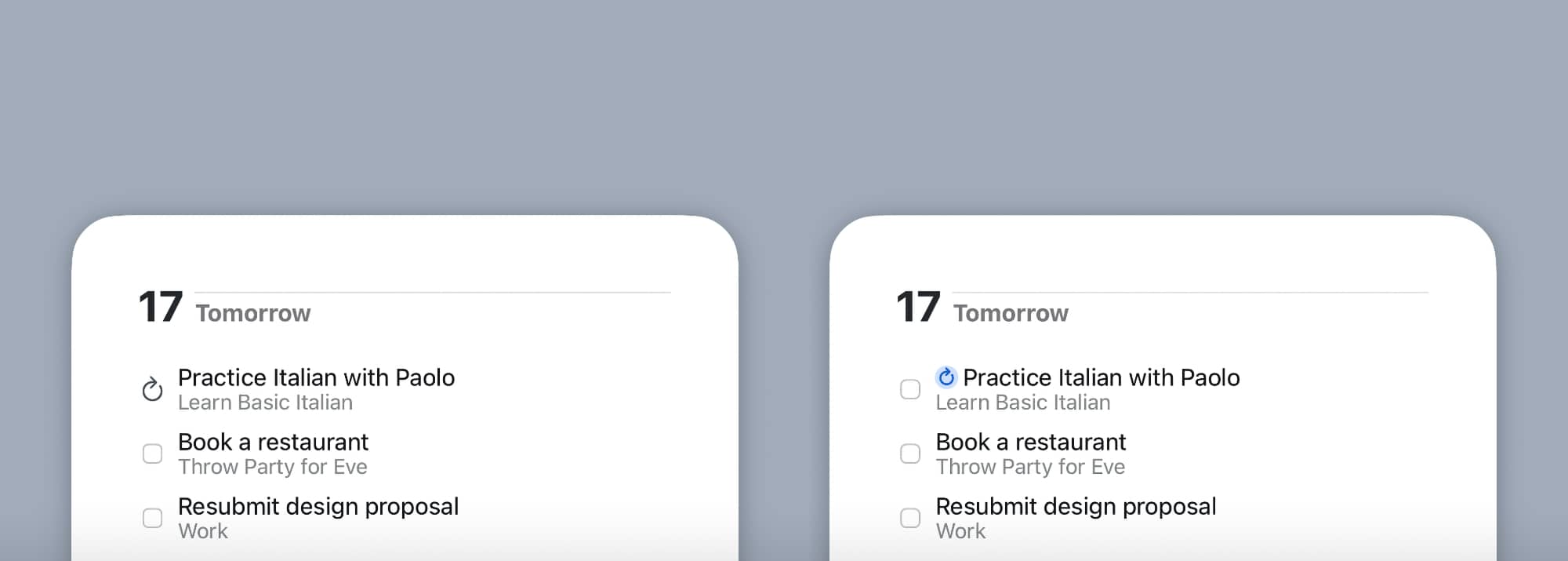
That makes repeating a task early as simple as checking it off, just like any other task. The next iteration of the task will be scheduled based on whatever rule was already set. Tasks that are set to repeat after completion will be scheduled for the next interval based on the early completion date, while tasks that run on a fixed schedule will be scheduled at the next interval after the current task. So, if you have a task that’s due this Friday and you complete it on Thursday, it will repeat next Friday.
Cultured Code has also gone one step further by making it much easier to reschedule repeating tasks. Until now, if you wanted to change the date of a repeating task, you had to open it up and go into the repeat settings. Now, with Things 3.23, you can simply reschedule it like any non-repeating task by using the date picker or dragging it to a new day in the Upcoming views.
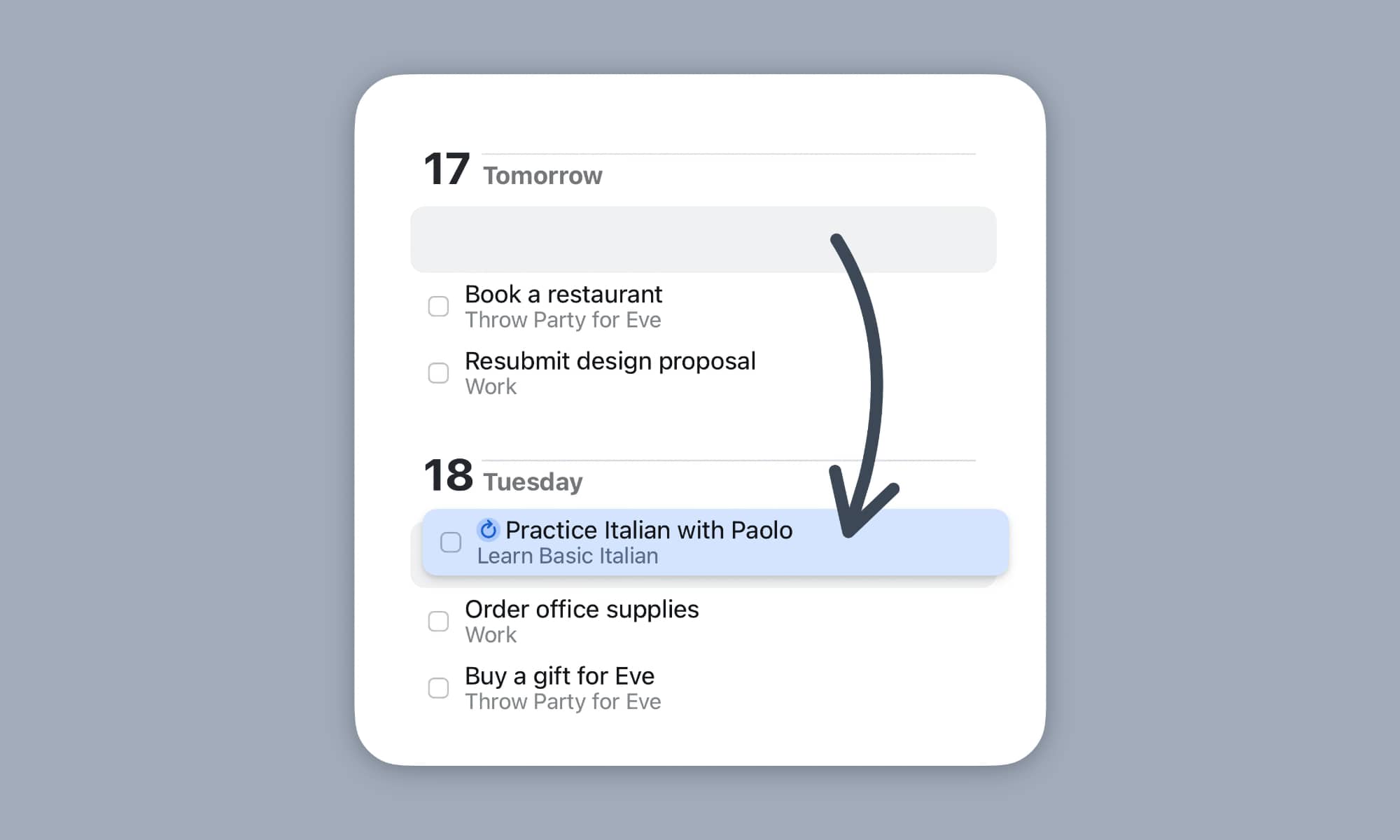
But it gets even better. When adjusting the date of a repeating task in this manner, you’ll be able to choose to either “Update Rule,” which affects the overall repeat schedule just as if you’d manually changed it in prior versions of Things, or “Make Exception” to move just one copy to the new date.
So, if you have a Friday repeating task that you don’t want to complete right now, but that you do know you’ll want to do on Thursday before heading off for a long weekend, you can reschedule it in advance without affecting future end-of-week tasks. This works the other way, too, letting you bump a holiday Monday task to Tuesday, for instance. These are both real pain points that I’ve personally experienced in my years as a Things 3 user. Until now, I had to wait until Monday morning to bump my start-of-week work tasks until Tuesday — the last thing I want to do when I’m trying to take the day off and keep my mind clear of work stuff.
These choices only apply to tasks on a fixed schedule. If a task repeats after completion, there’s no need to make a decision, as the next task will always appear based on when you completed the previous one.
Lastly, the Repeat option now opens a submenu rather than taking you directly into the rule-editing screen, with a new option to Create Next Copy to spawn a new copy of the task without impacting the current repeat schedule — so you could work on a Friday task on Wednesday but still have the repeating task show up on Friday, as scheduled.
These changes are accompanied by a few other important cosmetic tweaks, including a small grey repeat icon alongside the notes and tags indicators so you can know when you’re dealing with a repeating task. There’s also a redesigned dialog for setting up repeating rules, and the ability to pause, resume, and stop multiple repeating to-dos at once — something that was previously only available in the Mac version.






