
iOS 27 Is Rebuilding Shared Albums from Scratch — Here’s What to Expect
Toggle Dark Mode
Although Apple is bringing some big AI changes to Photos in iOS 27, there’s one other enhancement that’s flying a bit more under the radar as it’s as much a change on the back end as in the Photos app itself — but it’s also much more significant than it sounds at first glance.
During its Worldwide Developers Conference (WWDC) last month, Apple’s Stacey Ford briefly mentioned that Shared Albums would be getting two big improvements for broader and higher-quality sharing:
In Photos, your iCloud shared albums can now include all of the photos and videos from your latest adventures, because your friends on Android or Windows can join and contribute their own captures to the album. And what’s more, Shared Albums now support full-resolution sharing.
Stacey Ford, VP, OS Program Management
However, what she didn’t mention was how Apple is overhauling the entire Shared Album experience under the hood to deliver these two changes.
There’s more going on here than just flipping a switch to allow for higher-resolution photos and creating a Windows- and Android-friendly web experience.
Apple has changed how Shared Albums work in a few other crucial ways, which makes sense when you realize that the existing Shared Albums are essentially a 14-year-old “legacy” feature. There’s every indication Apple is rearchitecting and modernizing the whole thing under the hood, both in iOS 27 and the rest of its operating systems, and on the iCloud back end.
It was such a long time ago in iPhone years that you may be surprised to learn that Shared Albums actually pre-date iCloud Photos by two years. This feature launched with the original debut of iCloud in 2012, along with iCloud Photo Stream, back when iPhoto was Apple’s standard way of managing photos on the Mac (and the more advanced Aperture app still existed for pros).

The Legacy of iCloud Shared Albums

Apple’s strategy in those days was to provide a simple way for users to get photos from their iPhone to their Mac and share photos with others — all without worrying about taking up their free 5 GB of iCloud storage (yes, Apple hasn’t ever upgraded its free iCloud storage allotment either).
To accomplish this, iCloud Photo Stream provided a temporary cloud-based repository to store up to 1,000 full-resolution photos for up to 30 days (and only photos — not videos). This was intended to give users enough time to fire up iPhoto or Aperture and suck those photos down onto their Mac’s hard drive.
The other iCloud photo feature, Shared Albums, allowed users to store up to 5,000 photos at lower resolutions of around 3 to 3.5 megapixels. The limit was technically 2,048 pixels on the longest side, which meant that standard 4:3 shots were scaled down to 2048 x 1536. Videos could also be included in Shared Albums, but they were limited to 720p and up to 15 minutes in length.
This was arguably a fair compromise, as Apple didn’t count any of this against users’ iCloud storage allotments — you could create up to 200 Shared Albums of 5,000 photos each without using a single byte of your cloud storage. It was also more than reasonable in an era when the third-generation iPad’s 9.7-inch Retina display only offered the same 2048 x 1536 resolution as an iCloud shared photo, and the newly-launched iPhone 5 boasted an 1136 x 640 screen.
It’s like the old meme about Bill Gates allegedly saying in the 1980s that 640 KB of RAM should be enough for anyone. While Apple surely foresaw a day when Shared Albums might need to grow beyond these limitations, the code for this feature would remain virtually unchanged for the next 14 years — even as Apple introduced more advanced features like a full-featured iCloud Photo Library in 2014 (now known simply as “iCloud Photos”) and iCloud Shared Photo Libraries in 2022.
Shared Albums Finally Grow Up in iOS 27
Thankfully, Apple’s engineers have decided it’s time for this to change. However, they’re not so much upgrading Shared Albums as they are replacing them.
While the iOS 27 version of Shared Albums is remarkably similar to the one we’ve been using for years, there are several indications Apple has built an entirely new system under the hood. That’s not too surprising, considering Apple shuttered iCloud Photo Stream in 2023. It’s probably been looking for ways to do the same with the legacy Shared Albums feature.
Hence, what we’re getting in iOS 27 and the gang is something that’s familiar, but likely also entirely rebuilt from the ground up to be bigger and better than before.
I’ve taken the new feature for a spin in iOS 27, iPadOS 27, and macOS 27 Golden Gate, and while we’re still only in the developer beta stages, it’s working well enough to give me a pretty good idea of how much has changed and what we can expect.
Here’s a quick rundown on the improvements in the new Shared Albums:
- As Apple mentioned, all photos and videos will be stored in their original, full resolutions.
- Android and Windows users will be able to view and contribute to albums, presumably through an improved web interface (there’s no indication that Apple plans to release actual apps for this, but it’s possible that could be coming later).
- The Shared Albums will become more like a social feed, thanks to new ways to comment and react to photos.
- It’s now possible to create Temporary Shared Albums that automatically expire after 30 days.
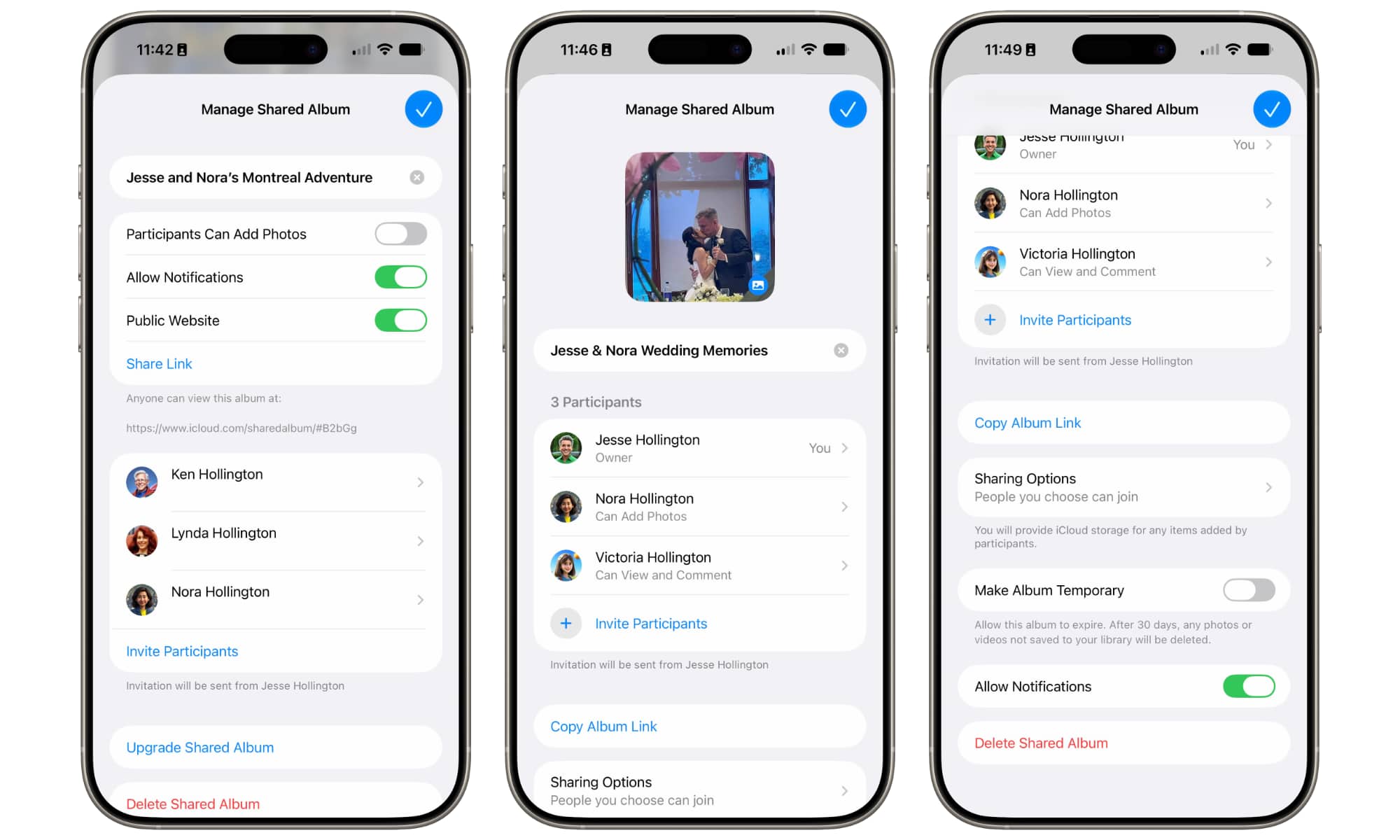
- More granular permissions will allow you to decide whether individuals can manage the whole album, only add photos, or only view and comment.
That last one is a big improvement over legacy Shared Albums, where the ability to add photos is currently a global switch — you had to either allow all participants to add photos, or nobody at all.
There’s also been no way before now to delegate full management of the Shared Album. Users could only delete photos they’ve contributed — and they still can in the new Shared Albums. There’s no way to prevent that; even switching a user to “View and Comment” still allows them to remove any photos they’ve previously contributed, but that seems fair.
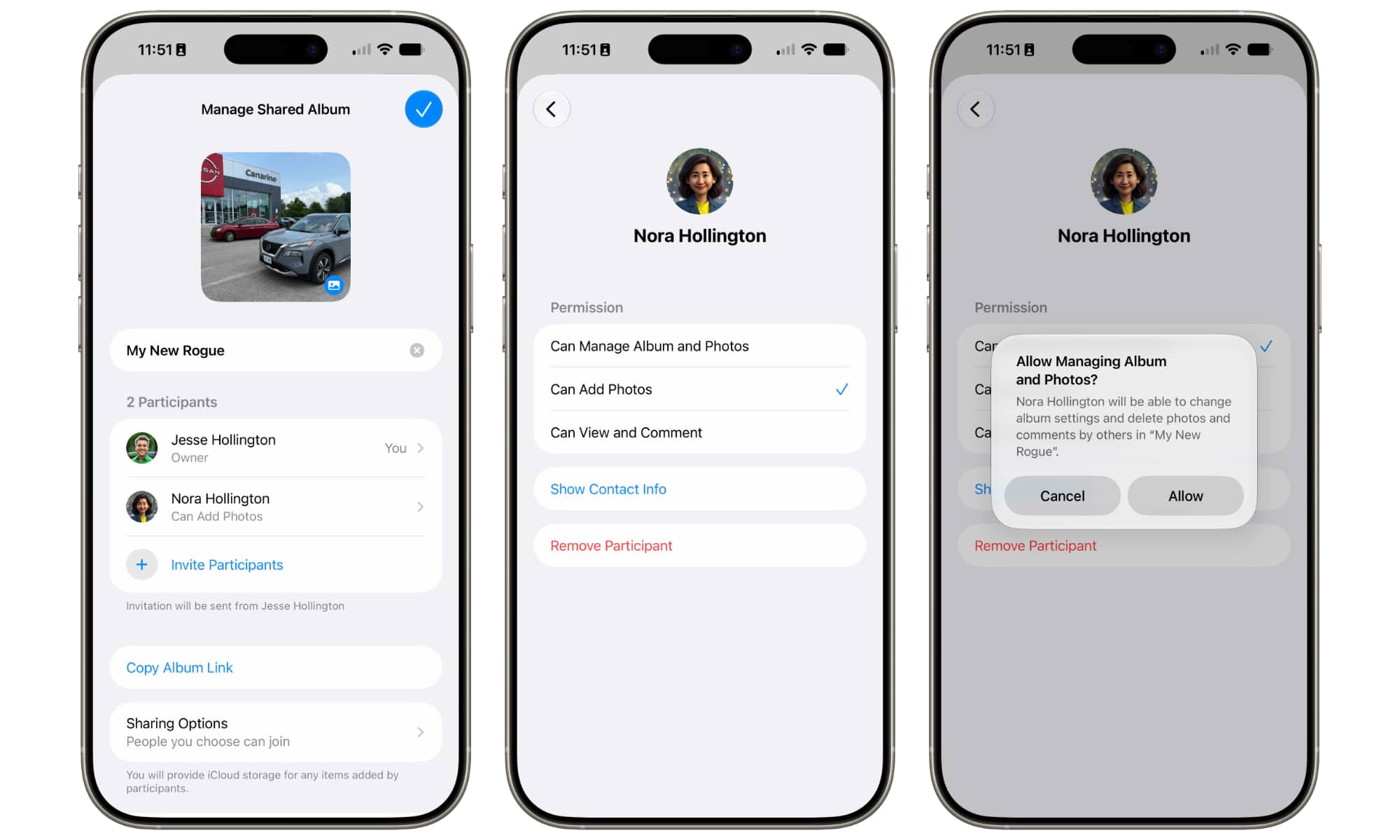
However, you can now give any user permission to “Manage Albums and Photos,” which lets them do almost anything the owner can, including deleting photos, changing sharing permissions, or renaming the album. About the only things a manager can’t do are removing the owner or deleting the album entirely (although they can delete everything in it).
One important caveat — for now at least — is that Android and Windows users will still need an Apple Account to contribute to Shared Albums. You don’t need to have an Apple device to sign up for a free Apple Account, so that’s a small but understandable security barrier, and it’s not all that different from how cross-platform collaboration works on other services like Google Photos.
However, instead of explicitly inviting people, you can also simply share the link to let them log in with their own Apple Account and request access. They won’t be able to see anything until you approve their request, at which point you can also choose an appropriate access level for them.
The new Shared Albums also lose the “Public Website” toggle from the legacy version, but this is effectively replicated by changing the sharing settings to allow “Anyone with the Link” to access the Shared Album, which has the added bonus of presenting the Shared Album in a far more modern and user-friendly web page — another sign that Apple has built an entirely new version of Shared Albums here.
Prepare to Leave Older Devices Behind
The biggest indication that the iOS 27 Shared Albums are something completely different is the fact that Apple has essentially partitioned them off from the legacy version.
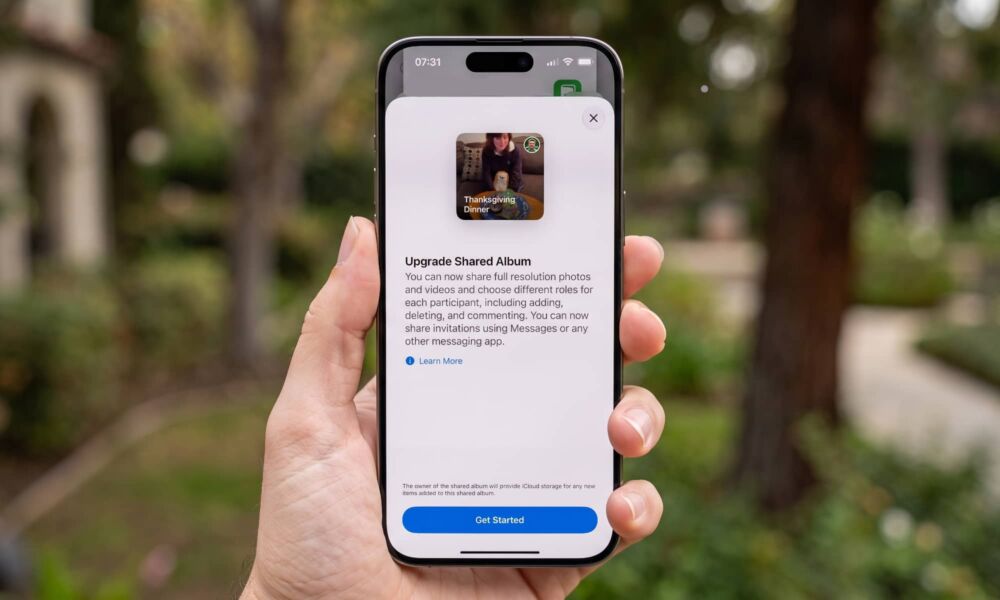
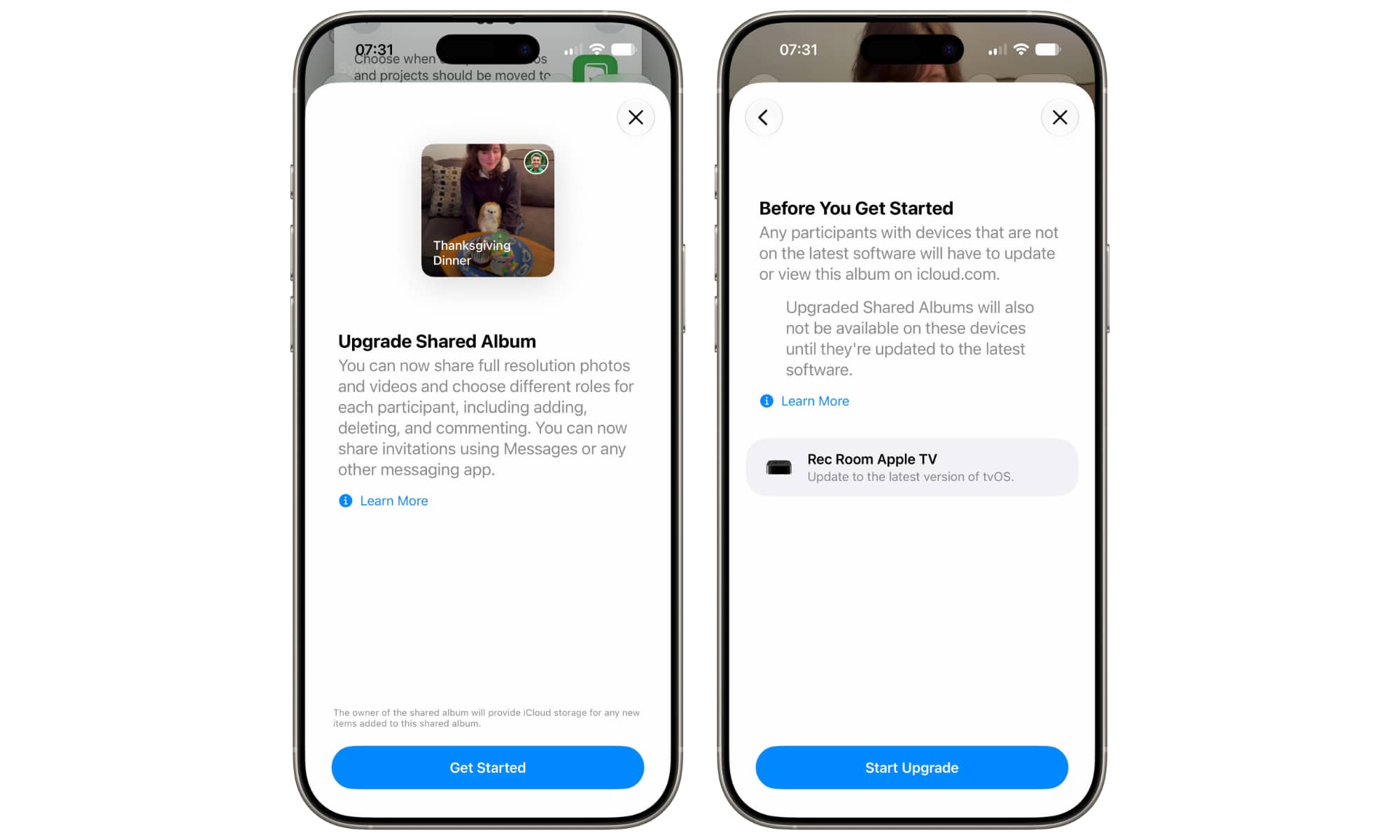
Installing iOS 27 or macOS 27 Golden Gate won’t let you suddenly begin sharing full resolution photos or inviting Android users into your current shared albums. Instead, you’ll have to “Upgrade” those to the new format — and in doing so, you’ll be cutting off anyone who isn’t running the latest OS versions.
- The good news is that your legacy shared albums will continue to work as before, at least in the iOS 27, iPadOS 27, and macOS 27 Photos apps. The old sharing options remain available, and you and others can continue adding photos to them — albeit at the same scaled-down resolutions as always.
- Existing Shared Albums can be upgraded to the new version with a single “Upgrade” option found in the album’s settings or on the context menu that appears with a touch-and-hold or right-click on the album. However, doing so will warn you that the album will be cut off from any devices that aren’t running OS 27 — including your own devices that haven’t yet been updated.
- Other album participants who haven’t upgraded will still be able to access and contribute to the Shared Album on the web, and Apple already has this up and running on its iCloud beta site (beta.icloud.com). However, it’s also worth noting that iCloud on the web may be drawing a hard line between the old and the new.
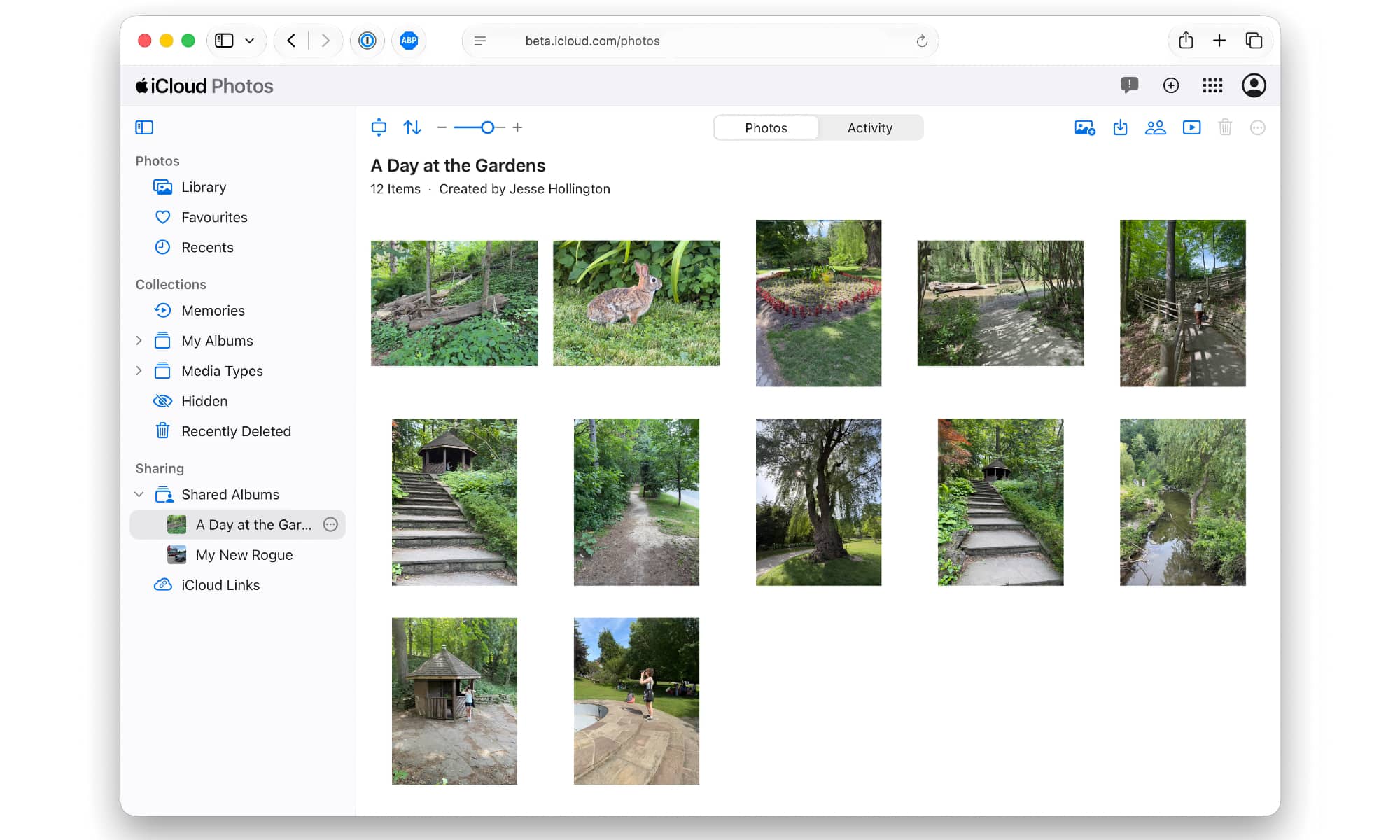
Logging into the production iCloud website will show your legacy Shared Albums, as it has since about two years ago (yes, it took Apple 12 years to add Shared Albums to iCloud on the web). However, flip over to beta.icloud.com, and you’ll see only the new Shared Albums (if any have been created). Everything is still in the early stages of the beta cycle, so it’s possible Apple could bring the legacy Shared Albums to the main iCloud site when it flips things into production this fall, but we’ll have to wait and see.
Permanent Shared Albums Will Use iCloud Storage
Perhaps the biggest “gotcha” for the new Shared Albums is that Apple will no longer be giving away free iCloud storage for your shared photos — at least not for permanent albums.
The good news is that Temporary Shared Albums won’t use any iCloud Storage. It seems Apple is okay with loaning out free storage for up to 30 days, but you’ll need to pay for any Shared Albums you want to keep around for the long haul.
When it comes to storage, permanent Shared Albums will work a lot like the iCloud Shared Photo Library feature that Apple added four years ago, with a few subtle differences that reflect the fact that these are albums, rather than an entire library.
- The owner will be responsible for providing all storage in a Shared Album, regardless of who contributes the photos.
- Photos added by the owner from their own iCloud Photos library will not count against their storage a second time.
- Photos added by others will count against the owner’s iCloud storage.
- Photos downloaded from a Shared Album that you’re not the owner of will also count against that user’s iCloud storage, since it’s effectively a second copy.
- Photos uploaded directly to a Shared Album will count against the owner’s iCloud storage, regardless of who uploaded it.
- Other than single-instance storage for the owner, photos in Shared Albums aren’t linked to the originals. Deleting a photo from your iCloud Photos library won’t remove it from a Shared Album.
- Similarly, photos deleted from a Shared Album won’t be removed from anyone’s iCloud Photos library, whether that’s the owner, the original contributor, or any other participant who saved a copy to their own library.
You can also flip an existing Shared Album to Temporary at any time to stop it from using your iCloud storage. The 30-day clock will start from the day you flip the switch. If you change your mind, you can also toggle it back to Permanent before it expires. Note that iCloud storage doesn’t appear to be freed up immediately during this transition. Some of that may just be back-end processing, but it could also be a way to prevent folks from cheating by switching back and forth every few weeks.
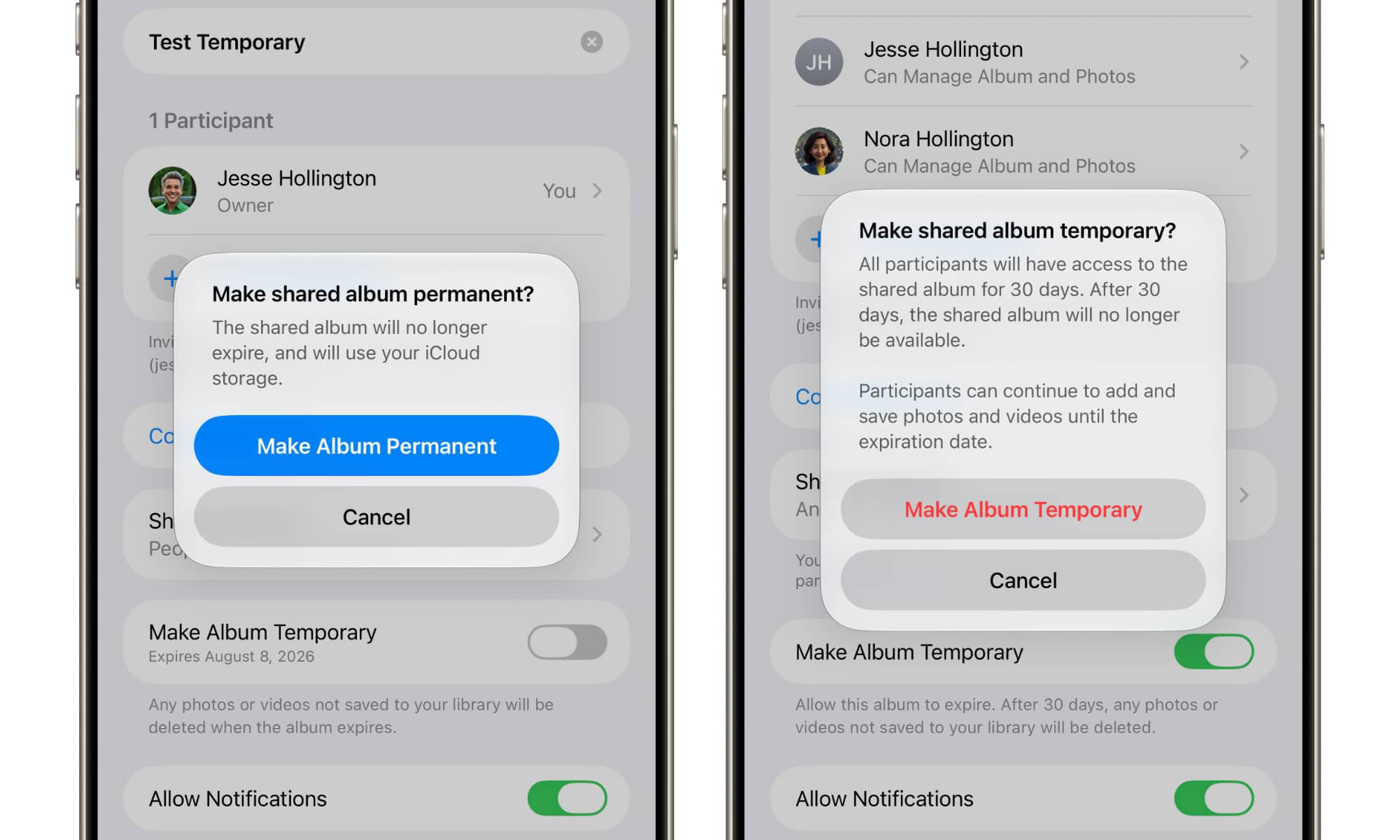
The fact that these now use iCloud Storage means you’ll want to be somewhat careful about who you invite to add photos and videos to your Shared Albums. While a Shared Album owner can easily delete anything to free up space, friends and family members could quickly eat up the remaining space in a lower-tiered iCloud storage bucket.
It’s also worth noting that while existing legacy Shared Albums will still work in iOS 27, you won’t be able to create these older-style Shared Albums. That means sharing with folks on iOS 26 or older versions won’t be as seamless as before. If that’s important to you, then before updating to iOS 27 you may want to create a few “dummy” Shared Albums to use as placeholders for later (or keep an older, non-updated device around to create them from).






