
You Can Finally Spend Amex Rewards with Apple Pay — Here’s How
 CardMapr.nl / Unsplash
Toggle Dark Mode
American Express has always had some of the tightest integration with Apple Pay, and now it’s taking it one step further with the ability for eligible US cardholders to pay with Membership Rewards points instead of their credit card balance.
The feature, which is dubbed with the rather awkward name ”Use Pay with Points with Apple Pay,” is seamlessly integrated into Apple Wallet to let users redeem points during a transaction just as easily as they can pay with cash.

“Card Members want rewards that fit naturally into how they shop and spend,” Lisa Kalhans, Executive Vice President of US Consumer Cards at American Express said in a press release. “With this launch, we’re making it easier than ever for Card Members to use Membership Rewards points on the purchases they make every day.”
Jennifer Bailey, Apple’s VP of Apple Pay and Apple Wallet, also weighed in, saying that “we’re excited to work with American Express to bring Card Members a powerful new way to redeem rewards when checking out with Apple Pay.”
While this sounds like a groundbreaking initiative, it may surprise you that the ability to redeem rewards using Apple Pay has been around in various forms for years. Apple first toyed with loyalty and store points back in 2015 with iOS 9, and Discover pioneered a bespoke cash back redemption program in late 2017. That inspired Apple to debut Pay with rewards using Apple Pay in iOS 18 — but it’s had so few takers since then that most folks have never heard of it.
In fact, until this week only two companies had ever been on board: Discover in the US and Zilch in the UK. Ironically, the new AMEX partnership won’t be increasing that number, either; it dropped to one after Discover left in April. As of today, Apple’s list of Apple Pay participating banks still only lists Zilch, but that was last updated on June 10.
It always seemed a bit unusual that AMEX hadn’t jumped in, considering it was the first — and for a long time, the only — card to support full transaction history in Apple Wallet. From the start, an AMEX card setup with Apple Pay would show all transactions made on the account, whether you tapped an Apple device, paid with the physical card, or typed the number in for an online purchase.
This was years before Apple rolled out its Connected Account feature, which only arrived in iOS 17.1 in response to the UK’s Open Banking initiative. At that point, Discover and PayPal debit also joined in the US, but Discover also discontinued Connected Account integration last month.
This makes the AMEX partnership a timely vote of confidence for Apple’s payment technology after some were wondering if pay with rewards might go the way of Apple’s short-lived Pay Later service.
How To Pay with AMEX Points with Apple Pay
To use the new Pay with Points feature, you first must have an AMEX card that provides points — an “eligible American Express Membership Rewards Card.” The feature is also limited to AMEX cardholders in the US for now.
While AMEX doesn’t explicitly list any restrictions, the instructions in its announcement suggest it’s limited to online Apple Pay purchases, whether through a browser or in-app.
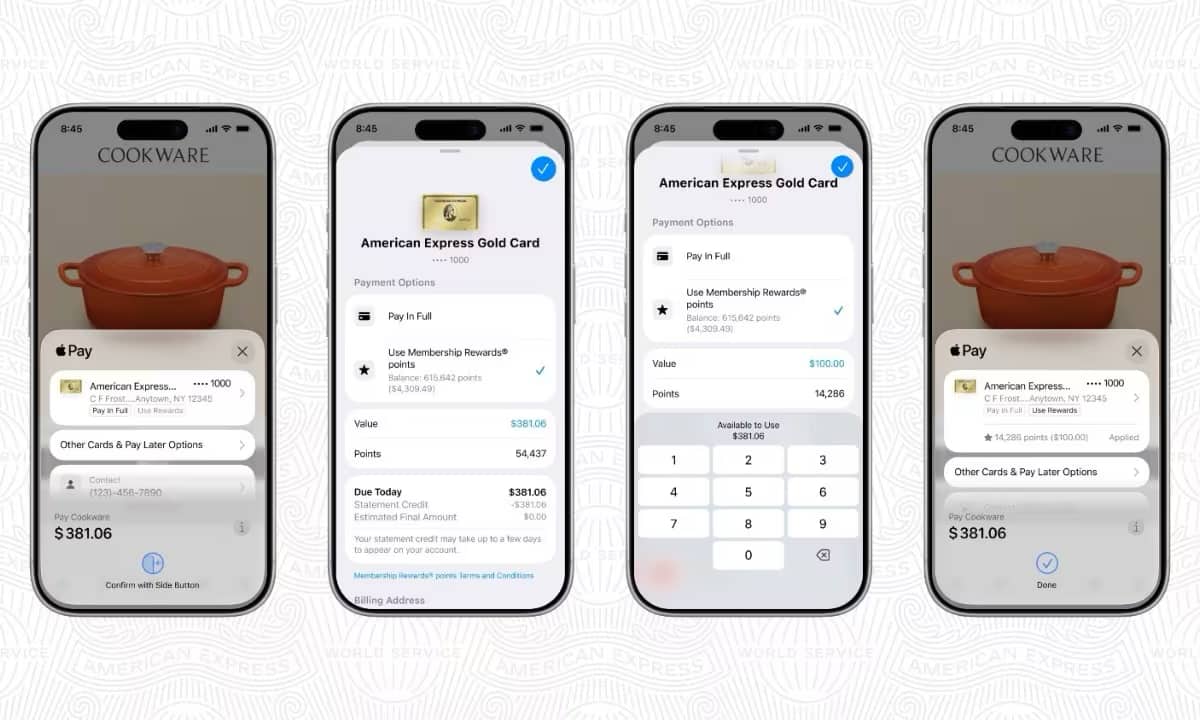
However, as long as you meet both of those conditions, the process seems to be simplicity itself. After selecting your eligible AMEX card, you’ll see badges for “Pay in Full” or “Pay with Rewards,“ with the current mode highlighted and the other one greyed out.
Tapping on Other Cards & Pay Later options and then selecting your AMEX card will show you an option to Use Membership Rewards Points with the balance of points and their dollar value shown in the same box.
Tapping that will bring up a summary that will let you choose how many dollars’ worth of points you want to redeem — split transactions that combine points and a standard credit card payment are fully supported — and once you’ve dialed that in and confirmed you can proceed with the Apple Pay transaction as normal.
Using Membership Rewards points is just as secure as a standard AMEX transaction. AMEX notes that “When a user redeems Membership Rewards points through Apple Pay, Apple does not retain any transaction information linked to the user.”






