
Hide My Email vs. The FBI: Your ‘Secret’ Address Won’t Keep You Out of Jail
 Vasilina FC / Adobe Stock
Toggle Dark Mode
Apple offers a privacy service called “Hide My Email,” which allows Apple users to generate randomized, anonymous email addresses. However, while the service helps you avoid spam, it won’t help you avoid the FBI.
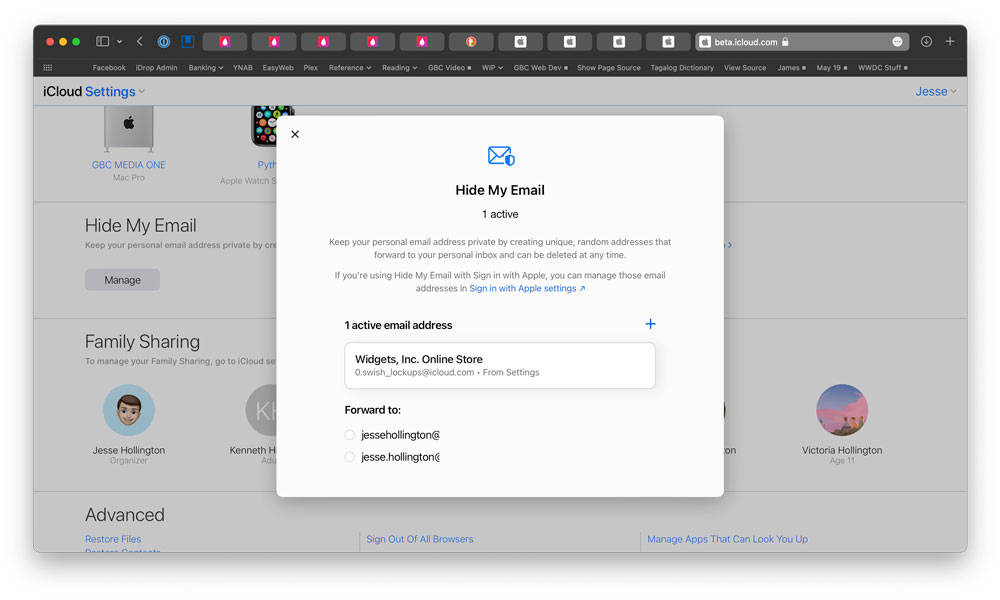
Apple’s “Hide My Email” feature is incredibly useful, allowing you to create random unique email addresses that forward to your real email address. The feature helps protect your privacy by allowing you to sign up and log in to websites, apps or services without sharing your real email address, increasing security against phishing attempts and reducing spam.
You can create a new “Hide My Email” address on the fly when filling in forms in Safari or manually at any time through the Settings app on your iPhone or iPad. This allows you to use a randomly-generated email address with subscription lists, as well as sites and apps that do not directly support “Hide My Email.”
Other privacy protections offered by Apple include end-to-end encryption to keep your data private both on your device and while it is in transit. Sensitive data like passwords, health information, payment information, and iMessages are always end-to-end encrypted, but you can also turn on Advanced Data Protection for an even higher level of security. When Advanced Data Protection is enabled, most of your iCloud data — including your iCloud Backups, Photos, Notes, and more — is protected using end-to-end encryption. This means that no one else can access your end-to-end encrypted data, not even Apple, much less law enforcement agencies.
However, as one Hide My Email user found out, that doesn’t mean Apple isn’t required and able to comply with any subpoenas that may come their way. The user in question found out that using the service to email threats to the FBI director’s girlfriend is a really bad idea.
According to a report from 404 Media, Alden Ruml used a “Hide My Email” anonymized email address to send a threat that included using an assault rifle to shoot FBI director Kash Patel’s girlfriend, Alexis Wilkins, in the head.
When the FBI came a callin’ with a subpoena in hand, Apple had no choice but to provide the requested information, which included Ruml’s 134 anonymized email addresses.
“On or about February 28, 2026, Person 1 received an email from the email address peaty_terms_1o@icloud.com,” the affidavit read. Earlier in the document, it is stated that “Person 1” is Alexis Wilkins. The email includes several disturbing sentences. I’ll leave it to the reader to decide whether to read the entire affidavit.
Some readers may be a bit surprised that Apple turned over the information. After all, Apple is well-known for its multiple refusals to help law enforcement by unlocking terrorism suspects’ Apple devices. However, these cases weren’t a matter of the company merely being stubborn; Apple can’t give law enforcement what it doesn’t have, and everything stored on an iPhone is encrypted. The only way Apple can assist law enforcement in accessing data on an iPhone is to create a “back door” that weakens everyone’s privacy — a move that Apple CEO Tim Cook once famously called “the software equivalent of cancer.”
However, none of this means that Apple won’t turn over unencrypted data, like Hide My Email account details, especially since it’s legally required to do so.
Apple can only refuse to help agencies access a users’ end-to-end encrypted data. The content of this data cannot be accessed by Apple, and there are no laws (yet) that can compel the company to create special methods for law enforcement to decrypt this data.
The following data is encrypted by default:
- Health data
- Home data
- iCloud Passwords
- iMessage and FaceTime
- Payment information
- Siri information
- Wi-Fi and Cellular credentials
It should be noted that Apple stores iMessage encryption keys in your iCloud backup, so if you or someone you chat with uses Messages in iCloud, Apple can retrieve the key from an iCloud backup. The only way to prevent this is to either avoid using iCloud Backups entirely, or enable Advanced Data Protection to make sure those backups also use the most secure level of end-to-end encryption.
However, even with ADP enabled, Hide My Email information is still visible to Apple — as are all the emails stored in your iCloud account. That’s a requirement of how email works; it’s fundamentally impossible to use end-to-end encryption on this data while still allowing email messages to be sent, received, and rerouted across the internet.






