
Check the Battery’s Maximum Capacity
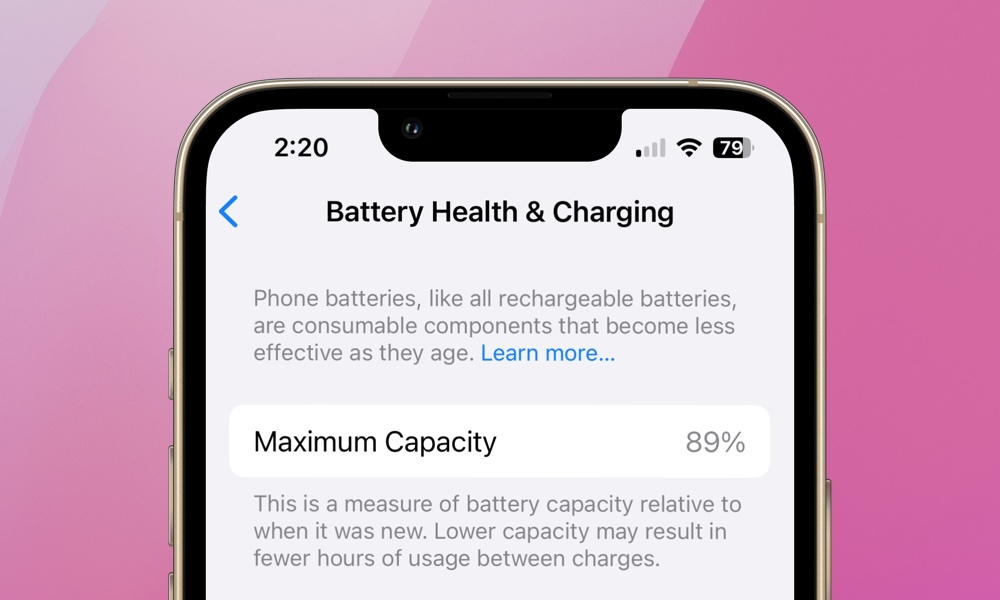
An iPhone’s battery gradually loses its ability to hold a charge as it ages, which is normal. However, that means a used iPhone could look almost perfect on the outside while providing considerably less battery life than it did when it was new.
Again, this is to be expected, but if the original owner didn’t take care of the iPhone’s battery, or if the device is just too old, it might not be worth buying.
Fortunately, Apple includes a battery health feature that lets you check the battery’s condition. This information can help you determine whether you’ll need to spend additional money on a replacement.
To check battery health, follow these steps:
- Open the Settings app.
- Scroll down and tap Battery.
- Select Battery Health or Battery Health & Charging, depending on the model.
- Look at Maximum Capacity, Cycle Count, and any service recommendations.
Maximum Capacity represents the battery’s estimated capacity compared with when it was new. For example, a battery showing 85% maximum capacity can store less energy than it originally could.
Cycle Count shows how many full charge cycles it’s been through. This will only show up on the iPhone 15 and newer models, all of which Apple says are “designed to retain 80 percent of their original capacity at 1000 complete charge cycles under ideal conditions.”
Ideally, you should look for a used iPhone with a battery above 90% capacity and a lower Cycle Count (on newer models that support this feature).
That doesn’t mean an iPhone with 85% battery health is automatically a bad purchase, but if the battery is approaching 80% capacity or Apple recommends service, you should factor the battery replacement cost into the purchase price. This ranges from $69 to $129 for most iPhone models; you can check the actual cost on Apple’s Service and Repair for iPhone Battery page.