
Check the Parts and Service History
Not every used iPhone still has all its original components. Some devices have had their batteries replaced, while others may have received new screens or cameras after being damaged.
There’s nothing inherently wrong with buying a repaired iPhone. However, you should know which components have been replaced and whether the repairs were completed correctly.
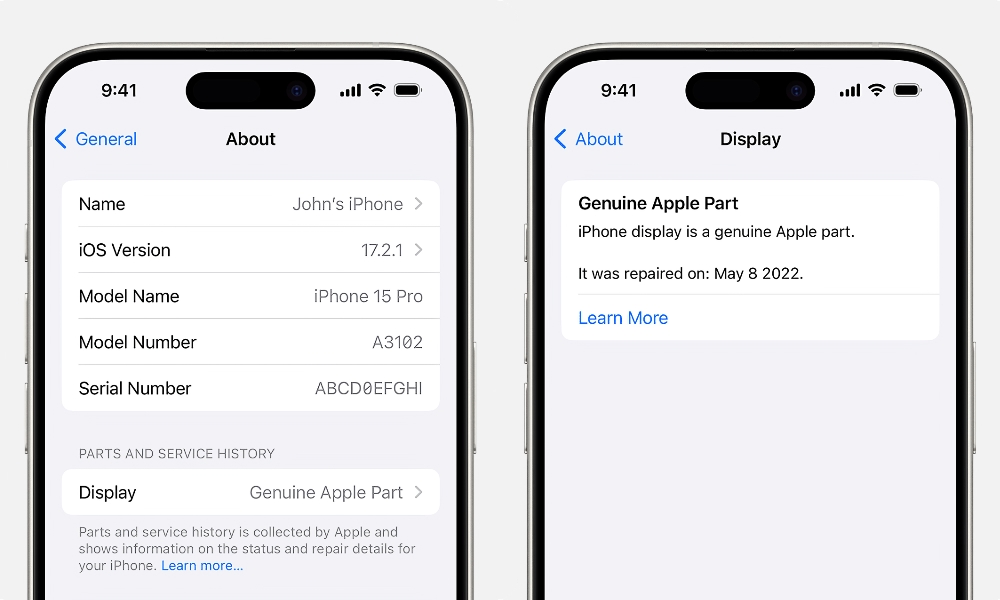
Apple includes a Parts and Service History feature on supported iPhones that can provide information about certain repairs. Here’s how to check it:
- Open the Settings app.
- Tap General.
- Select About.
- Look for Parts and Service History.
- Review any components listed in this section.
Depending on the model and software version, you might see labels such as Genuine, Used, Unknown (or Not Verified), or Finish Repair. Be cautious if you see Finish Repair on an iPhone 15 or later model — since Apple now extends Activation Lock to individual components, a replacement part taken from another locked iPhone can’t be calibrated without signing in to the Apple Account of the person who “donated” that part.
A Genuine label generally indicates that the component has been verified as a genuine Apple part. A Used label means a genuine component was previously installed in another iPhone.
Keep in mind that the information available depends on the iPhone model and software version. If you don’t see Parts and Service History, that doesn’t necessarily prove the device has never been repaired.