
6 Big iOS 27 App Upgrades You Can Try Right Now
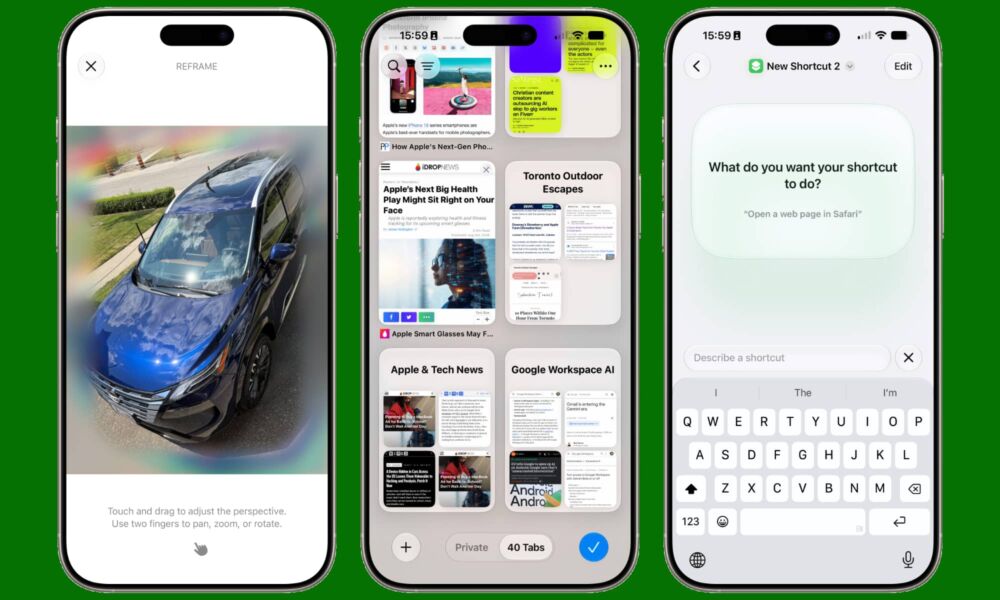
The public beta for iOS 27 is finally here, and while it doesn’t bring everything Apple showed during its WWDC presentation, there are already a ton of new things we can try for ourselves.
There are plenty of cool new features that make the update worth it, but there are also a handful of apps that got even better thanks to Apple Intelligence and other changes Apple implemented.
Apps from Safari to Photos got a huge boost, making them more useful than ever. Plus, Apple is also introducing a new app for our beloved virtual assistant — and it promises to make it really smart this time around.
As we mentioned, not everything is available right now, but read on for 6 of the best improvements to look for in Apple’s first-party apps.
Photos
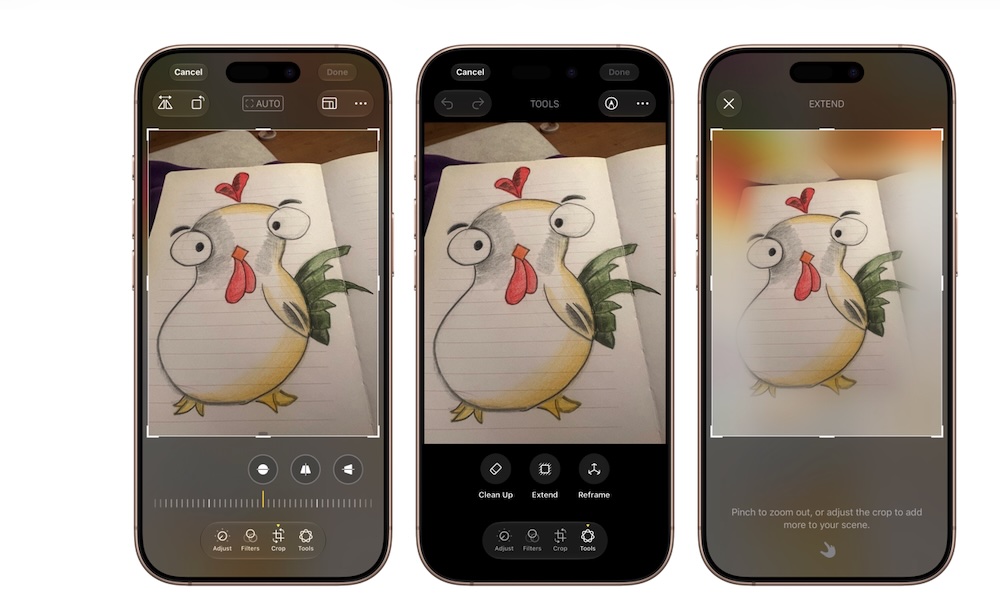
Apple’s Photos app is receiving a couple of extra editing tools thanks to Apple Intelligence, and they’re pretty impressive.
For starters, there’s Spatial Reframing, which lets you shift the perspective of an image. You’ll be able to touch and drag the photo while previewing how the composition changes. Basically, it’ll look like you took the photo from a different angle, while still looking completely natural.
Apple says the effect should feel similar to repositioning the original camera, with new content generated only where the altered perspective requires it.
The Extend tool addresses a different problem. If you captured an image too tightly, Extend can generate additional images around its edges. It may also help you straighten a crooked horizon without cutting out part of the original photograph.
You’ll be able to use Extend when you need a different aspect ratio too. If you want to make a photo wider, you can simply adjust the image to whatever size you want in just a few seconds. Your iPhone will then try to match the background so the generated area looks pretty much the same as the real deal.
Clean Up is also becoming more capable. The current tool, which was introduced in iOS 18.1, can remove smaller distractions, but iOS 27 is designed to handle larger objects and more complicated backgrounds. This could help remove a person who walked into the frame or an unwanted object distracting the real subject from your photo.
All of these features are available in the public beta of iOS 27, and they all work pretty well under the right circumstances. They’ll definitely improve over time, though, which is great news for both casual and professional photographers.
Safari
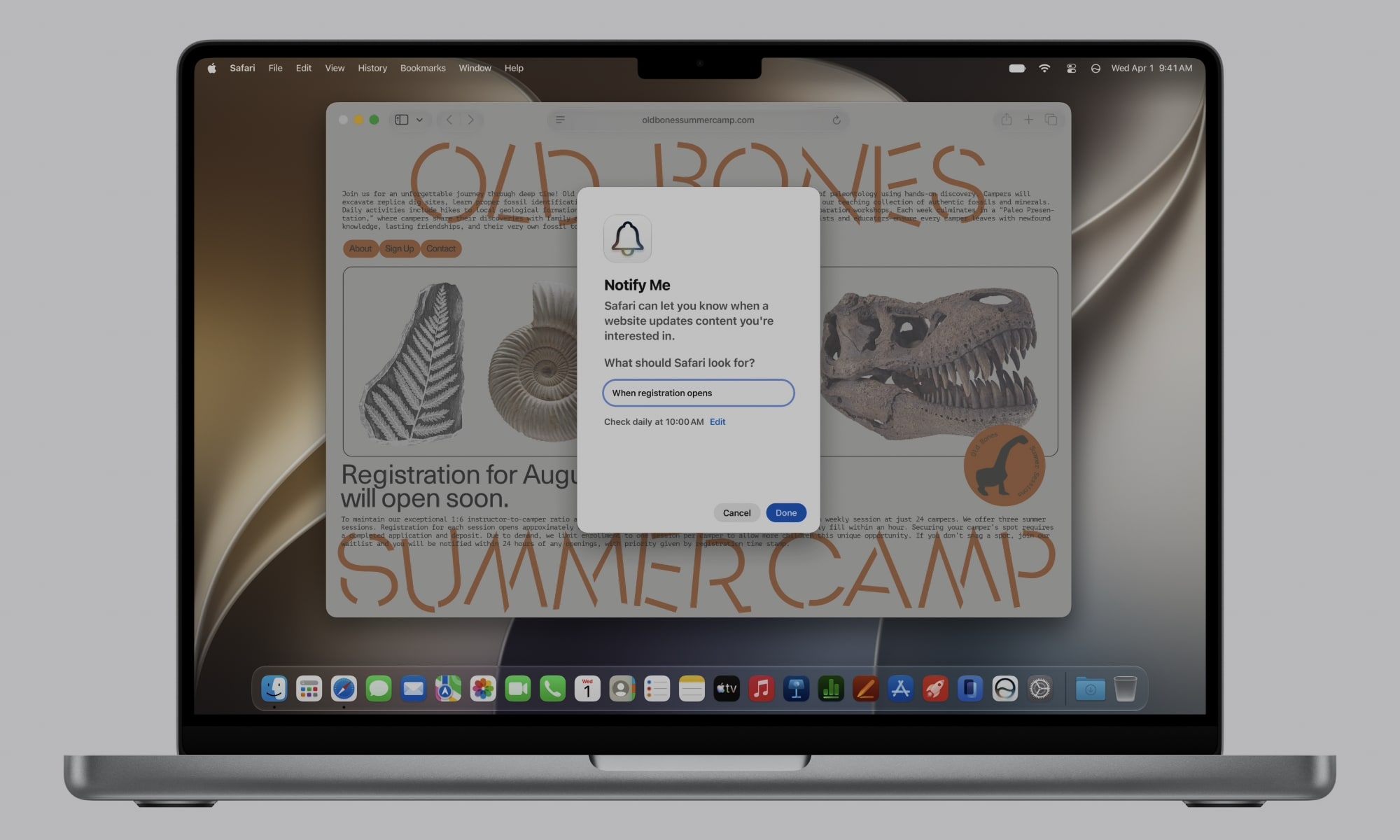
Safari is getting several new features in iOS 27 that could make the browser much easier to manage. The first is automatic tab organization, which groups related pages into topics without requiring you to create each Tab Group yourself.
Suppose you’re researching a weekend trip, for instance. Safari may place airline pages and hotel websites into one group while keeping unrelated shopping tabs somewhere else. As you continue browsing, the new pages can join an existing topic or create another group.
Safari’s Notify Me feature is another major addition. It can monitor supported webpages and send a notification when it detects a change that you asked for.
So instead of having to manually open or refresh the same page, you can just ask Safari that you want to be alerted when there’s a change, like a product is available again, or something similar. It’s a time saver, and it’ll only get better over time.
Apple is also introducing Describe an Extension, which is a really useful feature. You’ll be able to explain to Safari the browser tool you want, and Safari will attempt to create it. For instance, you can create a button to save specific websites or something similar. Of course, it won’t be able to create really complex extensions right now, but it’s helpful that you won’t even have to search for an extension you want to use; you can just ask your iPhone or Mac to create it for you instead.
Passwords
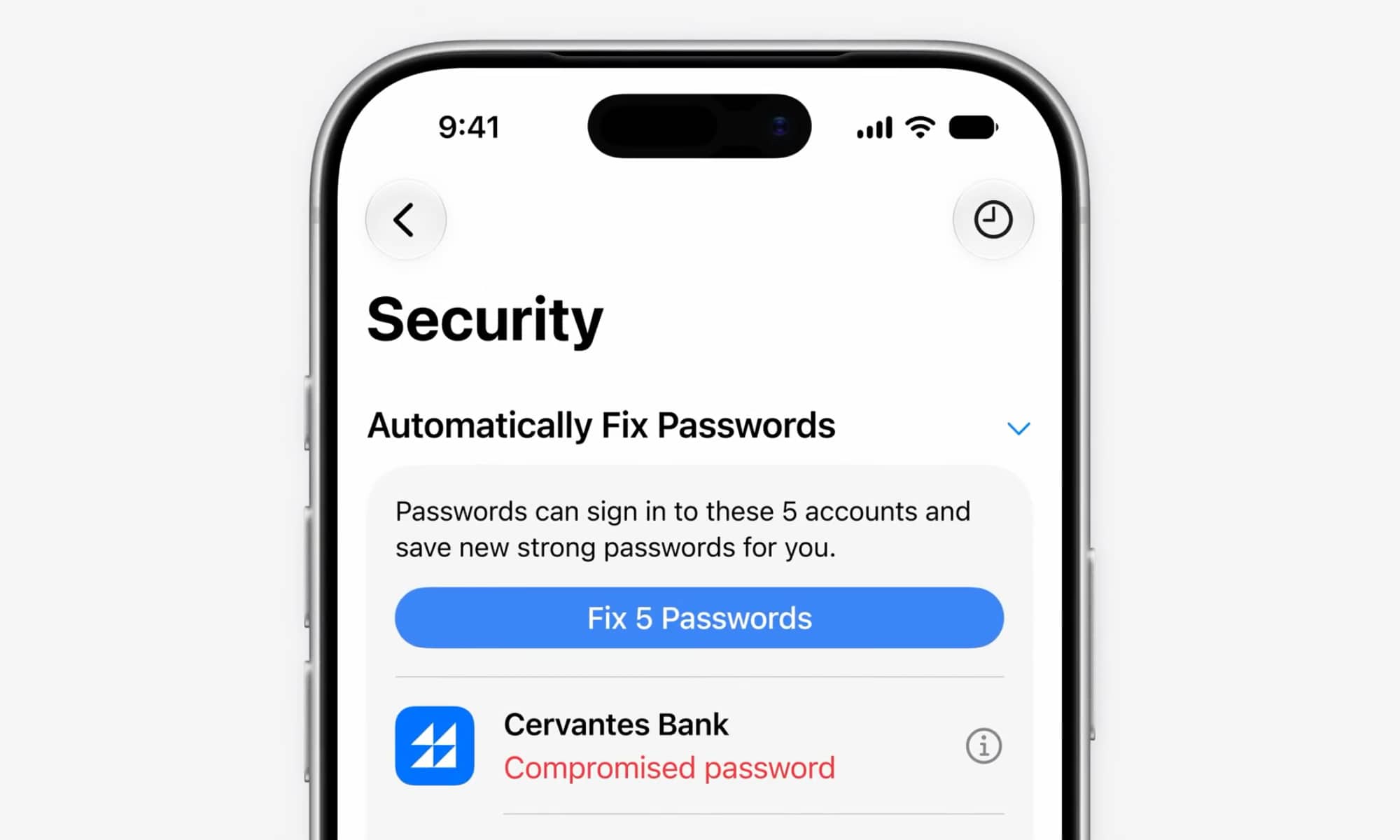
The Passwords app already warns you when one of your credentials is weak or may have appeared in a data leak. Those warnings are really useful, but going over all your passwords, visiting each platform and changing them manually can take a long time. But that won’t be the case anymore.
iOS 27 gives Passwords the ability to automatically fix your compromised passwords. After you select an unsafe password, the app can use Safari and Apple Intelligence to sign in to the account and create a different, much stronger password.
Once the change is complete, the new credentials will be saved automatically in the Passwords app.
This is a huge change, and it makes it easier to always have strong passwords. Of course, it also makes you pretty dependent on Apple’s services, which could be a double-edged sword.
Additionally, this feature won’t work with every account. If a website doesn’t support this feature, you’ll still have to manually change it yourself. But given Apple’s popularity, it’s pretty likely that more websites will start to support this feature in the future.
Image Playground
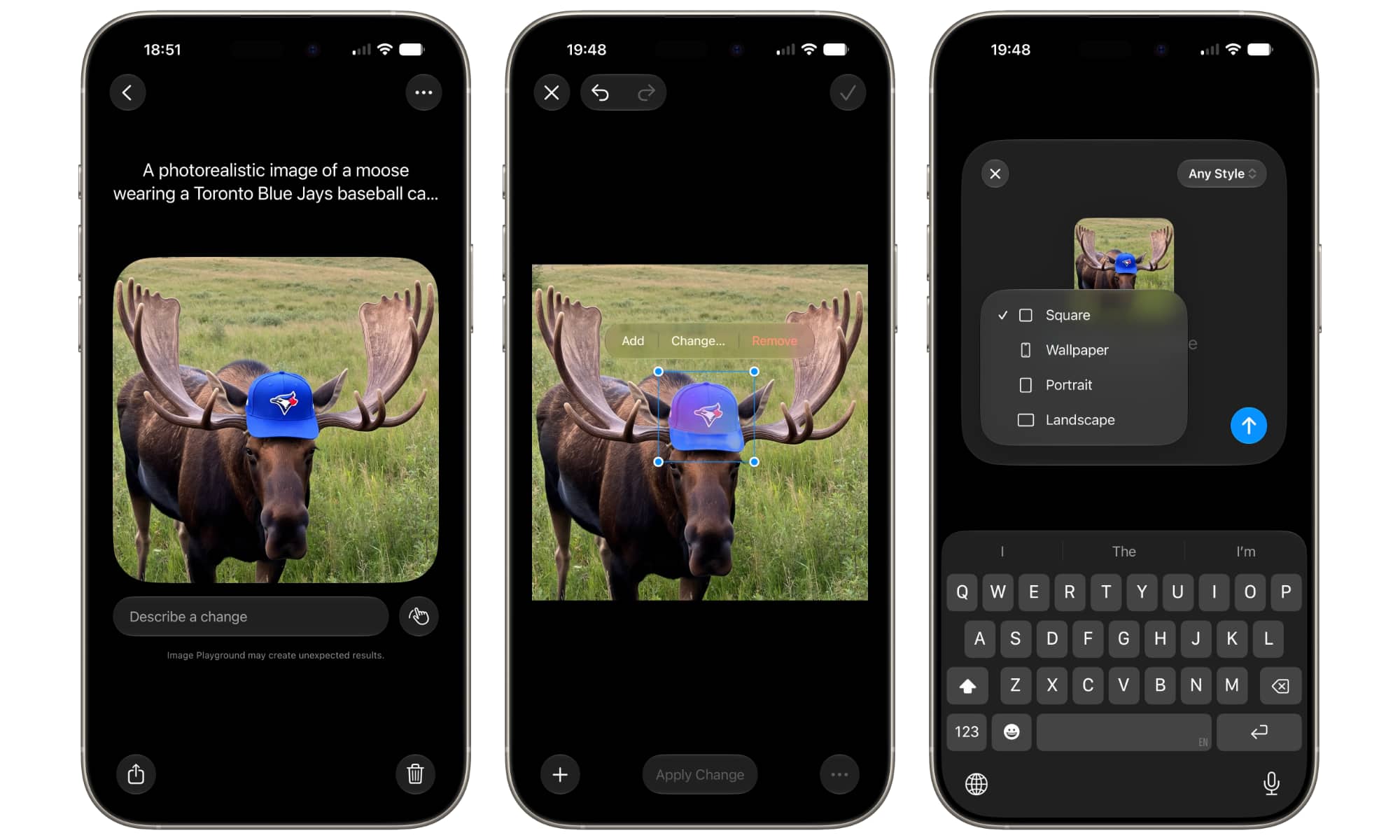
Image Playground is changing considerably in iOS 27. The original version focused on illustrated images, which limited its usefulness for people who wanted something more realistic.
The updated app can now generate images in many more different kinds of visual styles. That includes photorealistic results created with a new model that uses Apple’s Private Cloud Compute. This should give you more freedom when creating a concept or an image for a personal project.
Besides image generation, editing becomes much more flexible too. You’ll be able to describe the change you want instead of trying to edit it yourself. You can even tap or circle an object before telling Image Playground how to modify it.
Image Playground wasn’t everyone’s favorite app when Apple launched it last year, but with these changes, it will be able to compete with other more powerful image-generating apps.
Messages
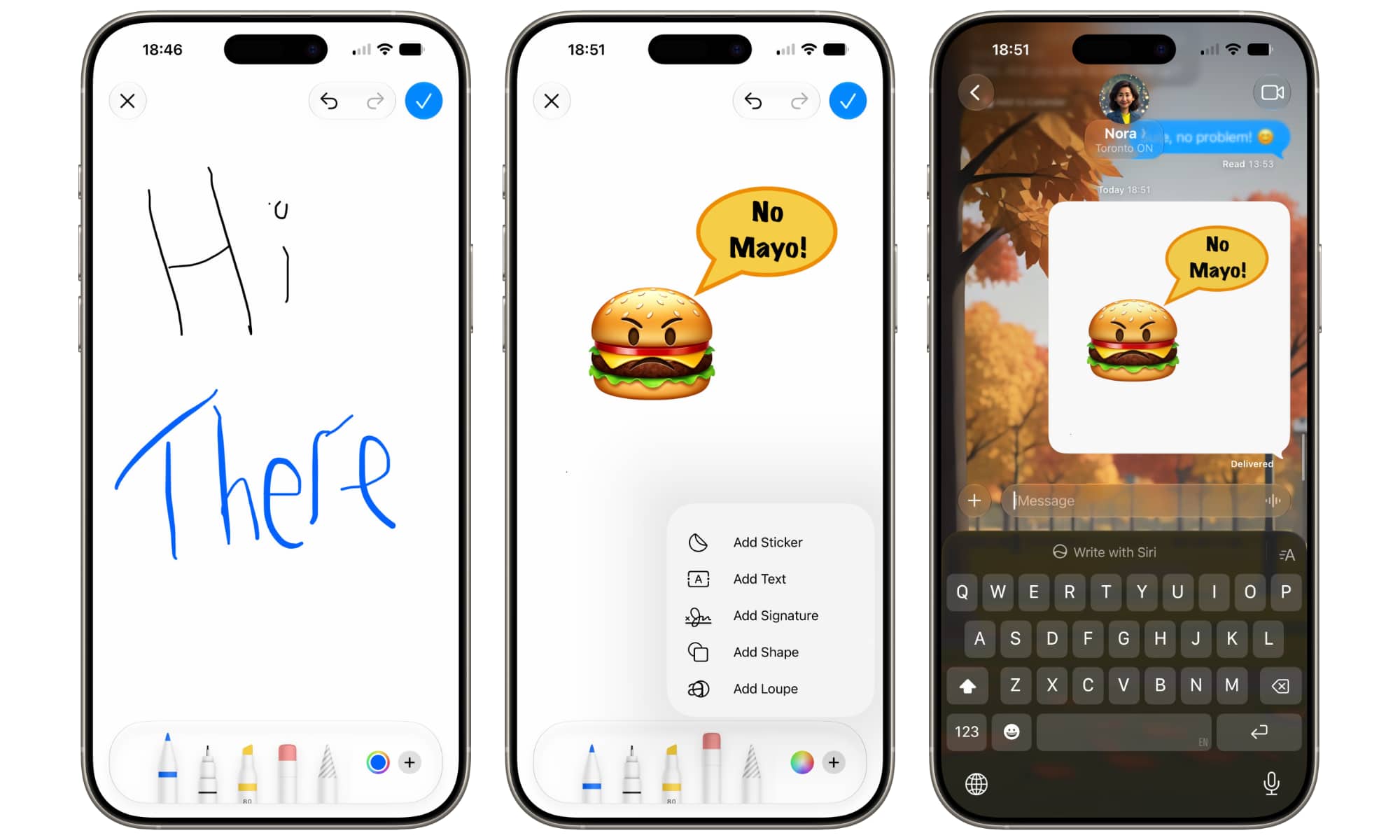
The Messages app is getting a couple of fun features that will make it even better. For starters, it gets new suggestions that appear based on the context of your conversations.
So if a friend invites you to a party, your iPhone will understand that and show you a suggestion to add the event to your Calendar app, so you don’t forget about it. If you get a message with something you need to do, you might get a suggestion to add it to your reminders, or to save the message in the Notes app.
This will work with many different apps, including the Photos app, which should be able to search for pictures from specific places or people based on the context.
The Smart Reply feature is also becoming more personal. With iOS 27, your iPhone will understand and try to imitate your writing style, so the suggestions feel a bit more personal and useful.
There’s also now a drawing option in the Messages app. You’ll be able to create a drawing with your finger and send it as an image. Granted, it’s a really small change, but it’s also a very fun one to have.
The Shortcuts App
Shortcuts is already incredibly powerful, but it isn’t always easy to understand. Creating a complicated workflow requires finding the right actions and arranging them in the correct order.
Luckily, Describe a Shortcut aims to remove much of that difficulty. In iOS 27, you can explain what you want the shortcut to do using regular language. Apple Intelligence then does the heavy lifting and creates the shortcut for you.
As of right now, the feature is fairly basic, but it’s still quite useful. For instance, you can create a shortcut to send a specific message to your loved ones, or one that starts a timer and opens a reading app while also silencing notifications with a Focus mode.
This could make automation accessible to people who’ve always avoided Shortcuts. Of course, you’ll still need to test each workflow carefully, but now everyone will be able to start creating any shortcut they want.
Experienced users should benefit as well. Describing the first version of a complicated automation or shortcut may be faster than building every step from scratch, even when you plan to edit the result manually.
iOS 27 Brings Huge Improvements
iOS 26 brought huge changes to the iPhone last year. And while iOS 27 isn’t redesigning the operating system, it is bringing a lot of new features, improvements, and changes to make it a worthy update.
Right now, you can only download the public beta, which is already working pretty well. But of course, there are still a lot of things missing. Still, there are big things coming in the future, and we couldn’t be more excited. If you’re going to try the beta version right now, just be sure to back up your iPhone and, if possible, use a secondary device in case things go south.