
YouTube’s War on Workarounds: Background Audio is the Next Target
 Szabo Viktor
Toggle Dark Mode
YouTube is once again cracking down on ways for users to get “premium” benefits without actually paying for a subscription. While the streaming service locks down many of the features in its app to YouTube Premium subscribers, it’s long been possible to get around them by visiting YouTube in a mobile browser.
Years ago, that was the case with picture-in-picture, which took an inordinate amount of time to come to the app. When it finally did, YouTube blocked the ability to use PIP in Safari — although it didn’t take long for some clever developers to figure out workarounds.

However, now YouTube is tackling another longstanding loophole: background audio playback. This is something that’s been supported by the YouTube iPhone app for years, but it’s also officially been available solely to Premium subscribers. That was certainly true through the app, but many folks found that they could get around that restriction by firing up a mobile browser.
Well, no more, says Google. “Background playback is a feature intended to be exclusive for YouTube Premium members,” a Google spokesperson told Android Authority. “While some non-Premium users may have previously been able to access this through mobile web browsers in certain scenarios, we have updated the experience to ensure consistency across all our platforms.”
This came to light as a result of numerous complaints from Android users who had noticed that background play stopped working through browsers like Samsung Internet, Brave, Vivaldi, and Microsoft Edge. Starting sometime last week, minimizing the browser or turning off the screen resulted in the audio cutting out.
However, this looks like it could be the start of another cat-and-mouse game. Brave posted a “fix” to re-enable background playback, while a user in Reddit’s r/firefox reported success in bypassing this by changing the user agent to pretend to be an Android VR device.
YouTube has always been more successful at blocking background audio in Safari, as it uses a proprietary video player that forces the browser to follow its rules — including putting the kibosh on background playback and picture-in-picture. That’s something it doesn’t necessarily do for Android browsers, which default to the standard HTML5 Video tag that’s used on desktop platforms like macOS and Windows.
Fortunately, a workaround still exists, and Google doesn’t seem to have figured out quite how to block this yet. A little over four years ago, developer Zhenyi Tan released Vinegar, a Safari extension that tricks YouTube into using standard HTML video, which in turn frees it to use the same background playback privileges as any other web page audio or video stream.
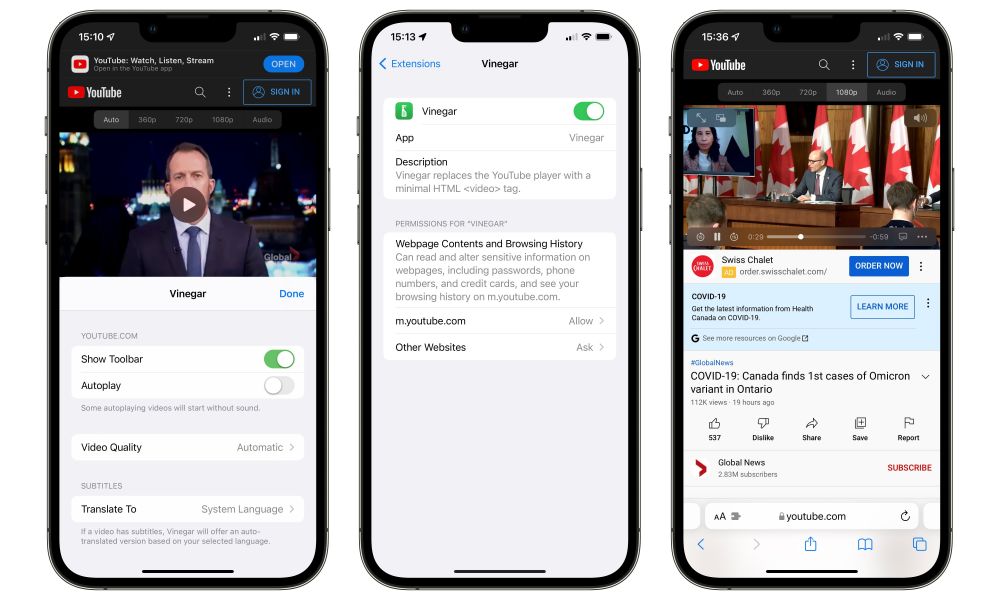
While I’m already a YouTube Premium subscriber, I just tested Vinegar in a not-signed-in private browsing session and confirmed it still handles background playback, with a small twist. The playback will stop when you exit Safari, but the playback controls will remain in the Dynamic Island or Control Center, allowing you to easily restart playback — for now, at least.
Of course, Vinegar has been around for a while, and it’s likely only a matter of time before Google figures out how to block this loophole as well. Vinegar’s developer already had to release a new version of Vinegar that doesn’t block ads following Google’s last crackdown, so it will be interesting to see what happens next.






