
Not a Watch Person? Here’s How Your AirPods Pro Can Help Keep You Fit

Toggle Dark Mode
When Apple unveiled its latest generation of AirPods Pro in September, it showed off new features ranging from Live Translation to improved Noise Cancellation, but by far the most exciting — and exclusive — feature in the AirPods Pro 3 are the new heart rate sensors.
It’s the one feature that’s actually new and unique to the AirPods Pro 3. The other marquee feature, Live Translation, was a software update that also came to Apple’s 2024 AirPods, while everything else is basically the iterative improvements we’d expect from an update.

There’s a reason the AirPods Pro 3 were named one of TIME’s Best Inventions of 2025. It’s fair to say that the heart rate monitoring feature is an absolute game changer for fitness enthusiasts — especially those who aren’t fans of the Apple Watch. Whether that’s because you’re not a watch person at all or you’d rather wear something else on your wrist, the AirPods Pro now fill that fitness gap by letting you close your rings with wireless earbuds that you’ll likely already be using during your workouts.
To be clear, the iPhone Fitness and Health apps have never required you to use Apple’s own hardware to log workout information. Apple allows any third-party developer can write data to the health app, including heart rate and workout data that will be show in the Fitness app alongside workouts recorded from the Apple Watch. However, third-party health trackers typically have to use their own apps to act as a software bridge: the app collects data from its own device over Bluetooth, Wi-Fi, or a wired connection, and then writes that information into the Apple Health database.
That’s fine if you’re already invested in another fitness ecosystem like Strava, but it’s a bit clunky if you want to primarily use Apple’s first-party apps. That’s where the AirPods Pro 3 come in. Apple’s latest earbuds interface with the Health and Fitness apps just as smoothly as an Apple Watch, and while they don’t provide as much data, they give you everything you need to track your exercise routines.
How the AirPods Pro 3 Track Your Workouts

That first thing to keep in mind is that the AirPods Pro 3 can only record your heart rate during workouts, so they don’t provide the holistic health experience of the Apple Watch.
The earbuds’ health features are designed to track active exercise, not daily activity. They won’t track your resting heart rate when you’re sitting at your desk, nor even if you’re running or walking without an active workout running in the Fitness app. Along the same lines, they don’t feed data into the blue Stand ring, nor do they add calories to the red Move ring when you’re not working out (although the iPhone in your pocket still can, as long as it’s running iOS 26).
Still, they’re more than sufficient if your aim is to hit new exercise goals this year. Apple has updated the iPhone Fitness app in iOS 26 to let you start and manage workouts directly, whether you have an Apple Watch or not, and there are even advantages to using the AirPods Pro 3 and an Apple Watch at the same time.
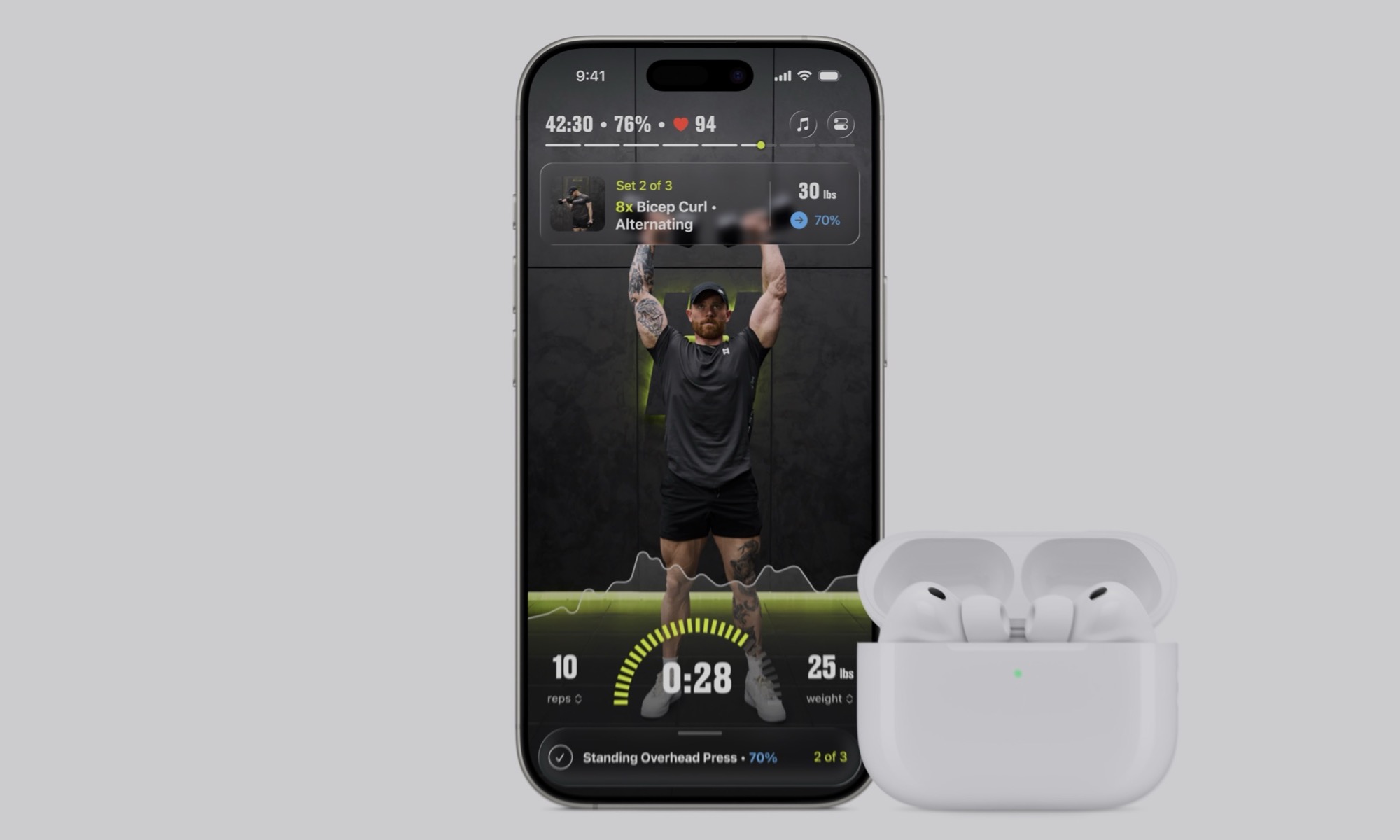
The AirPods Pro 3 use more stable photoplethysmography (PPG) sensors that pulse infrared light into the ear canal to measure your pulse 256 times every second. These tend to provide more accurate readings during high-intensity movement like HIIT, since the ear canal doesn’t move around as much as your wrist does, and the H2 chip inside is designed to filter out the kind of “motion artifacts” that can sometimes affect watch measurements.
The good news is that as long as you have an iPhone with iOS 26 installed, there’s nothing else required to add the AirPods Pro 3 to your exercise regimen beyond making sure that heart rate tracking has been enabled. You’re normally asked to turn this on when you pair them with your iPhone for the first time, but if you’re not sure, you can check this in the iPhone Settings app:
- Connect your AirPods Pro 3 to your iPhone by opening the case or putting them in your ears.
- Open the Settings app on your iPhone.
- Choose your AirPods Pro 3 near the top of the screen.
- Scroll to the bottom and ensure Heart Rate is toggled on.
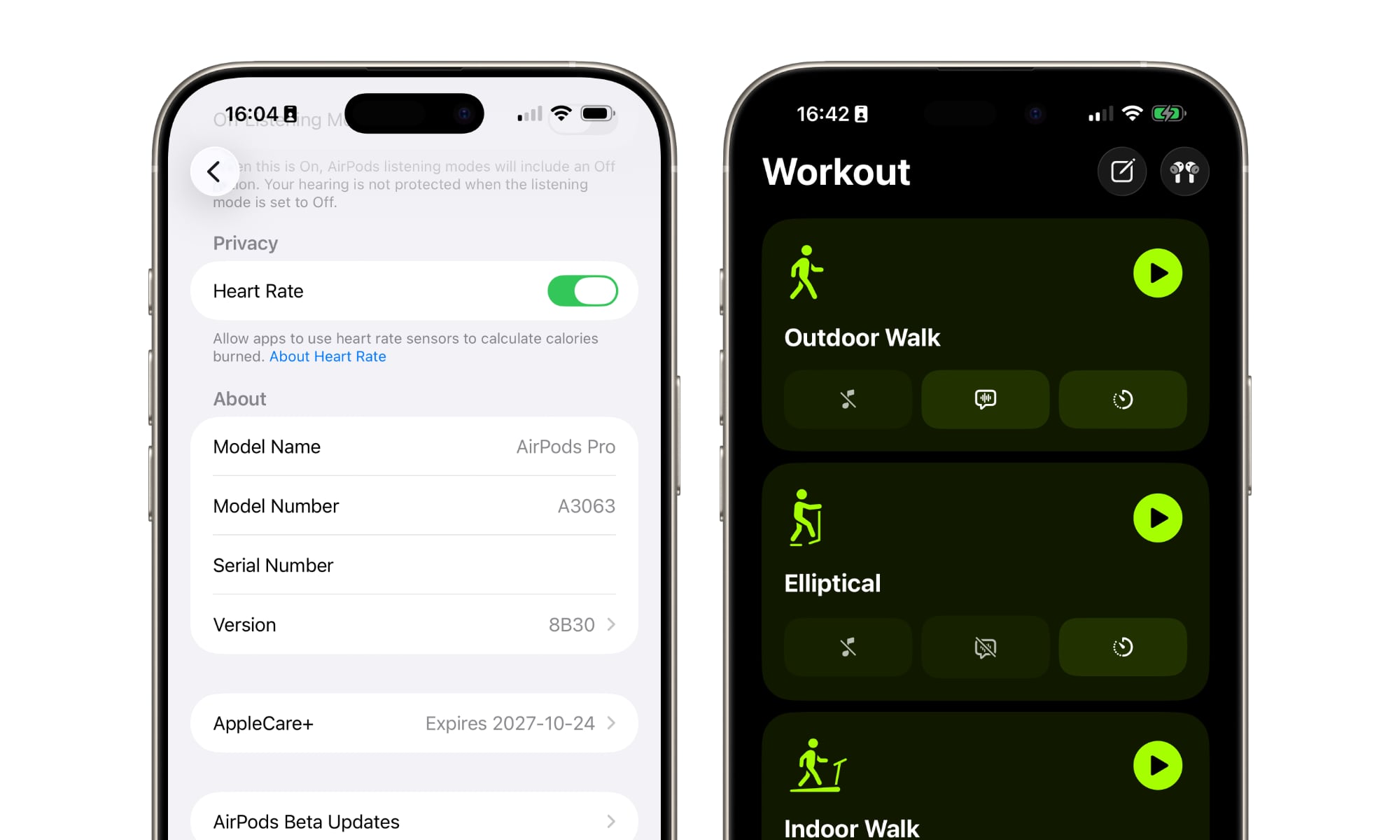
Once that’s done, put your AirPods in your ears, open the Fitness app, and select Workouts from the menu at the bottom. You should see your AirPods paired in the top right corner. Once you choose and start a workout, your heart rate data will appear in the app as you work out, and you can even close the app and keep an eye on it using the Live Activity that appears on your iPhone’s Dynamic Island or Lock Screen.
Since you’re already wearing your AirPods, you can also just ask Siri to start a workout and your AirPods will begin monitoring your pulse and recording your workout data immediately without ever touching your iPhone. Apple’s new Workout Buddy will also kick in to give you real-time feedback in the voice of an actual Apple Fitness+ trainer so you can keep your iPhone in your pocket.
If you’re already wearing an Apple Watch, the process is even more seamless. Start a workout the same way you normally would — from your Apple Watch — and your AirPods Pro 3 will also be used to contribute heart rate data.
To avoid confusing things in this case, Apple doesn’t merely try to average the data; instead, it’s developed a “Sensor Fusion” machine learning technique that takes the data from both the wrist and the ear and determines which one has the highest confidence level at any given millisecond. That data gets recorded to the Health app, while the lower-confidence data is discarded.
Pro Tip — The “Midnight Sync” Rule: If you’re an irregular Apple Watch user who wants to keep your streaks alive, remember that if you workout with just your AirPods and iPhone, you still need to make sure your Apple Watch syncs with your iPhone by midnight to ensure your Activity Rings reflect the combined data correctly.
You also don’t need to wear both AirPods at the same time, nor do you even need to be listening to audio from your iPhone. For example, Apple notes that you can connect your AirPods to an Apple TV 4K to watch your favorite show while working out, and the heart rate data will still be recorded on your iPhone. There’s also more than enough battery life for a typical workouts; while the promised 8 hours of ANC listening drops to 6.5 hours when the heart rate sensor is active, that’s more than enough for anything less than an all-day hike.
As we mentioned earlier, the AirPods Pro 3 aren’t a complete replacement for an Apple Watch, as not only do they only provide heart rate tracking during workouts, but there are some workout types that still require an Apple Watch. Some of these are obvious, such as water-based swimming, surfing, and scuba diving workouts. The AirPods Pro 3 are more water-resistant than ever, but they’re not waterproof. However, other exclusions are ones you might not think of, like kickboxing, rowing, golf, and tennis. That’s because these rely on tracking limb movements, which the AirPods Pro 3 naturally can’t do.
The AirPods Pro 3 also can’t monitor your health in the same way. Apple provides hearing health features for the AirPods Pro in some countries, but things like high and low heart rate detection, blood oxygen tracking, and hypertension notifications still depend on the more accurate and always-on sensors from Apple’s wrist wearable.






