
Apple Seeds iOS 26.3 Beta 1 on the Cusp of Holiday Shutdown

Toggle Dark Mode
Less than one business day after Apple pushed out a surprise Friday release with its OS 26.2 updates, the company has already kicked off the beta cycle for iOS 26.3 and the rest of the gang, with the first developer betas arriving this afternoon.
It remains to be seen what the OS 26.3 updates will bring to the table, but the timing suggests that any major changes may not arrive until after the holiday season is over. Apple has taken a somewhat cautious approach to pre-holiday beta cycles in previous years. While only developers should be installing these betas, it’s still that time of year when Apple’s software engineers are about to head off for a break as Apple Park closes down for the season. It’s unlikely to risk pushing out a potentially buggy beta without having back-end support available for those using it — even if they are just developers.

However, the biggest changes in iOS 26.3 et al might center on compliance with new interoperability requirements in the European Union and elsewhere. Apple already crossed a couple of things off its list with iOS 26.2, which expands App Store freedoms and lets users swap out Siri in Japan, where new laws go into effect this Thursday, December 18. Apple also adjusted watchOS 26.2 to stop syncing Wi-Fi network history in the EU in response to a DMA rule that would otherwise require it to make that same private information available to other accessories (John Gruber has a great analysis at Daring Fireball for those curious on the nuances of how this works).
What’s New in iOS 26.3
Still, there’s more left for Apple to do, including new iPhone-Android switching tools that are supposed to be baked into iOS. Google released its end of the deal in an Android Canary developer build last week, so it’s no surprise that iOS 26.3 is matching this with Apple’s piece of the puzzle.
Transfer to Android
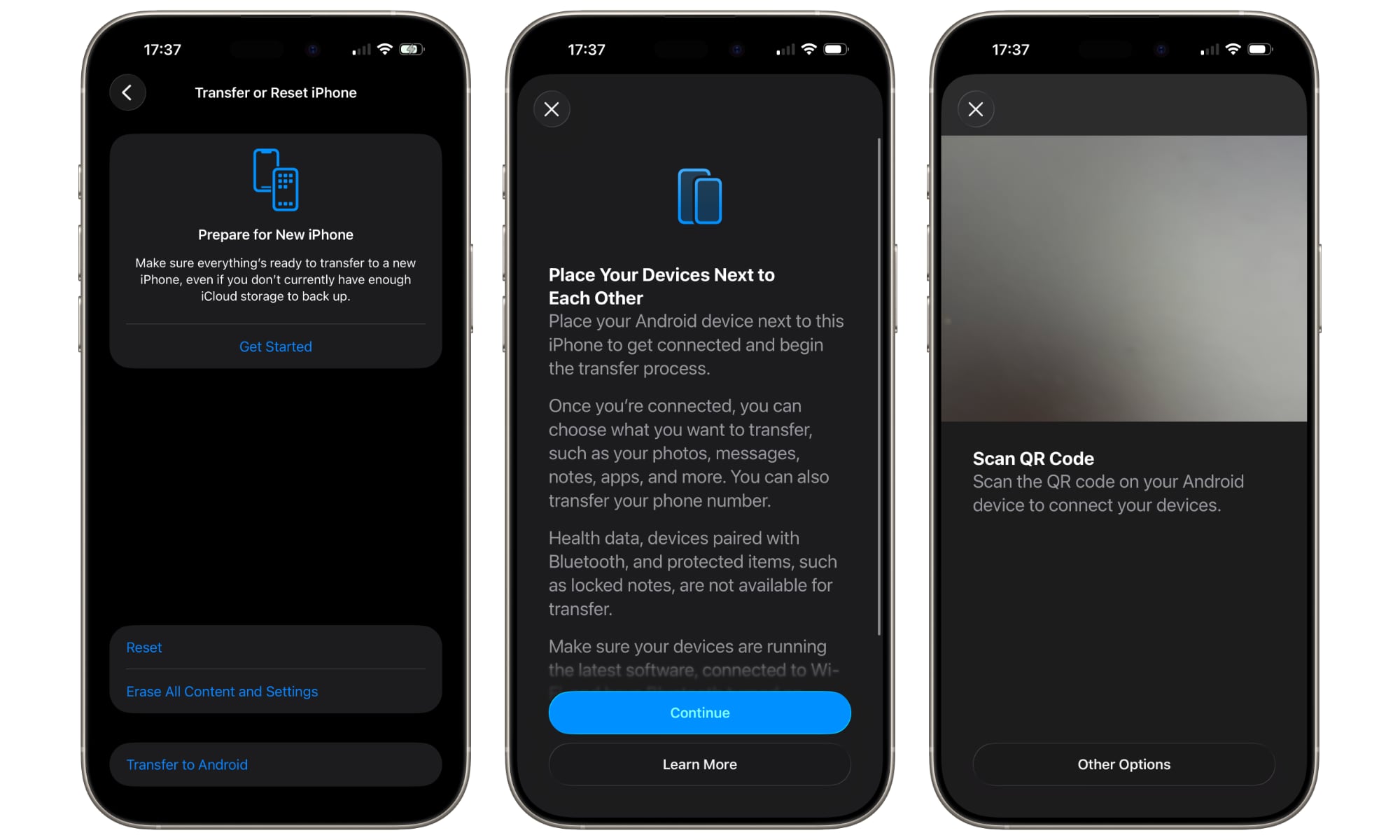
The first beta includes a new Transfer to Android option on the same screen where you can reset or erase your iPhone (Settings > General > Transfer or Reset iPhone). Selecting this kicks off a transfer that requires scanning the QR code from the Android device, which also needs to be running a software build that includes the new transfer capabilities.
Once you’re connected, you can choose what you want to transfer, such as your photos, messages, notes, apps, and more. You can also transfer your phone number.
While the process should transfer everything that’s directly supported on both ends, Apple notes that “Health data, devices paired with Bluetooth, and protected items, such as locked notes, are not available for transfer.” It also seems logical to assume that only those apps that are also available on Android will be transferred, and it remains unclear if paid apps will transfer. If the past is any precedent, you’ll likely need to repurchase any premium apps on the Play Store. We’ll report back once we’ve played with this one a bit more.
Notification Forwarding
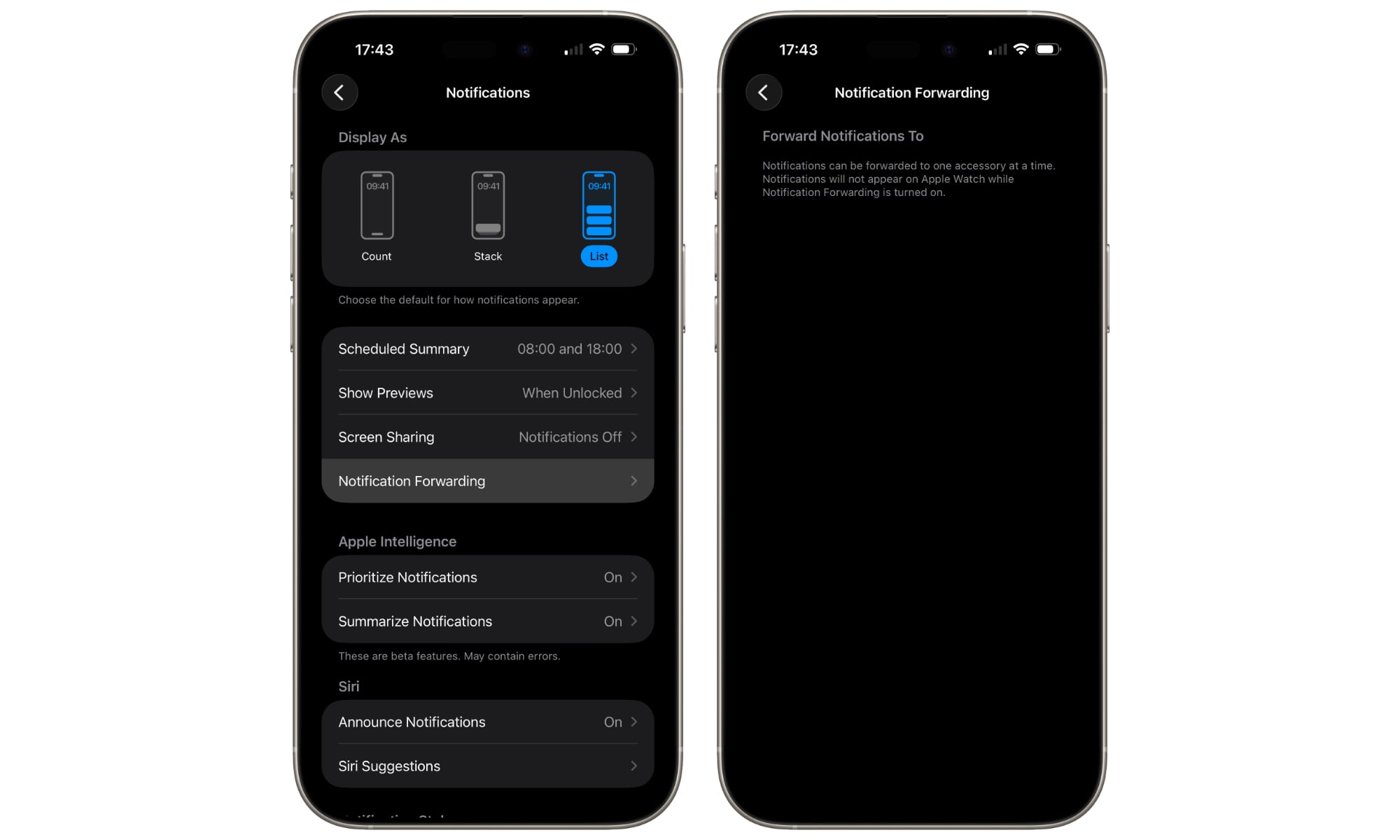
A new Notification Forwarding setting addresses another EU requirement, although it appears Apple isn’t limiting it to the EU — at least not during the beta cycle.
We saw the frameworks for this appear in iOS 26.1, but today’s beta marks the first time it’s appeared in the user interface, where it lives in Settings > Notifications. There’s not much to see here right now, but presumablythird-party accessories like smartwatches that tie into whatever new API Apple has added will be listed here once they’re paired.
Notifications can be forwarded to one accessory at a time. Notifications will not appear on Apple Watch while Notification Forwarding is turned on.
As we’ve expected since this feature was first spotted, it appears you’ll be limited to forwarding notifications to one device at a time. Apple makes it clear that you can’t send notifications to the Apple Watch and another device, but that same limitation likely extends to other paired devices.
It will likely be a while before we see anything appear on this screen, as it’s designed for third-party hardware devices, which will at the very least need software updates to hook into the new API, and Apple has yet to release an iOS 26.3 SDK to provide the needed tools.
So far, that’s all we’ve found from a cursory inspection of the beta. There may be more to discover, but it’s also likely that any new user-facing features are being held off for a later beta. The two that have prominently shown up are likely as much about getting ahead of regulatory requirements and giving those who need interoperability time to work on it. Either way, stay tuned as we’ll continue digging through the new OS 26.3 betas and let you know if anything else of significance shows up.






