
Background Sounds
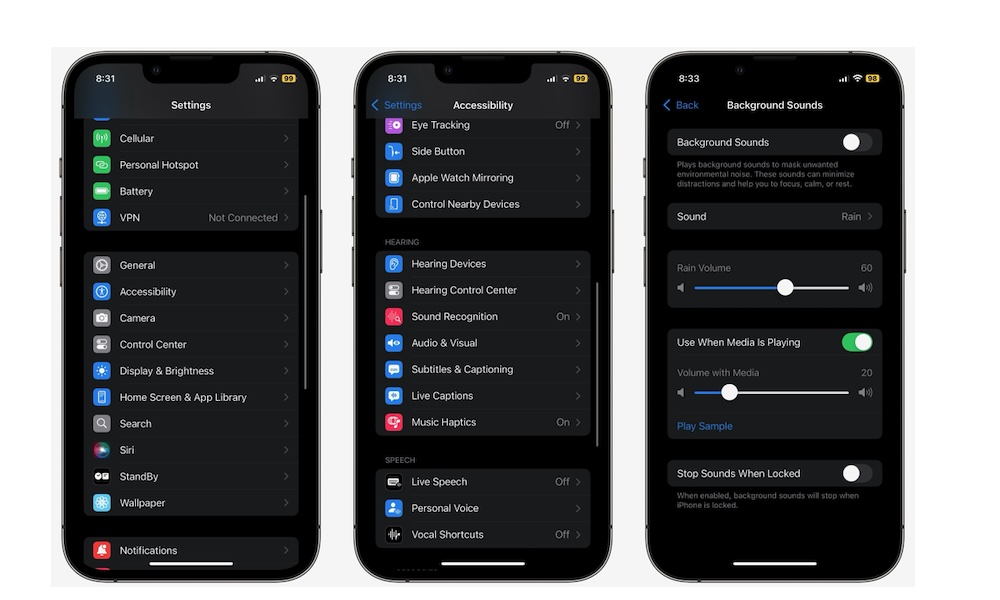
Many people download or even pay for third-party apps to get what Apple already provides with Background Sounds.
As you can probably guess by the name, this feature lets you play ambient audio like rain, ocean, stream noise, white noise, dark noise, and other sound textures directly from your iPhone. Because it’s built into iOS, it is lighter and more dependable than having to open a separate app every time you want some soothing sounds.
This feature is useful in more situations than you may expect. It can help if you’re trying to focus in a noisy office, relax before bed, or take the edge off a distracting environment without opening a music app. It also works well if you want calm background audio under a podcast or other type of music, because you can control whether it plays besides other audio and adjust the volume separately.
To start using Background Sounds, go to Settings > Accessibility > Audio & Visual > Background Sounds, turn on Background Sounds, and pick the sound you want. You can also adjust the volume, playback speed, and other settings to match the relaxing experience you really want.
Pro Tip: You can also add Background Sounds directly to your iPhone Control Center. It’s available either in a dedicated Background Sounds control or as part of the broader Hearing control that also provides access to Headphone Accommodations and Live Listen.