
Use Your iPhone’s Own White Sounds
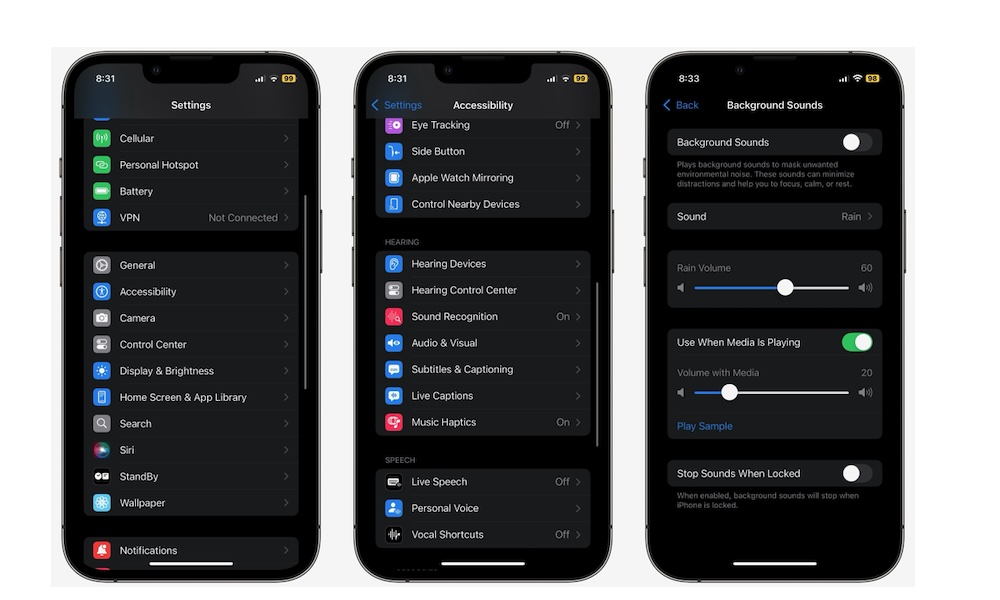
Before we get into third-party apps, there’s a quick free option many people miss: your iPhone has a built-in Background Sounds feature that turns it into a white noise machine. It gives you a handful of solid choices, like balanced noise, rain, ocean, and stream, that you can quickly and easily toggle from Control Center once you’ve set it up. Here’s how to do that:
- Open the Settings app.
- Scroll down and tap on Accessibility.
- Go to Audio & Visual.
- Tap on Background Sounds.
- Turn Background Sounds on, then choose your sound and volume.
You can then customize this feature however you want. For instance, you can change it so it’s turned off once you lock your iPhone. You can also add it to Control Center, so you don’t have to repeat these steps all the time.
Like many of Apple’s first-party apps, it’s a great way to get started, but if you want better mixes, more variety, and features like deeper customization or offline libraries, the third-party apps are where it gets good.