
You Can Finally Create Shortcuts Without Understanding Shortcuts
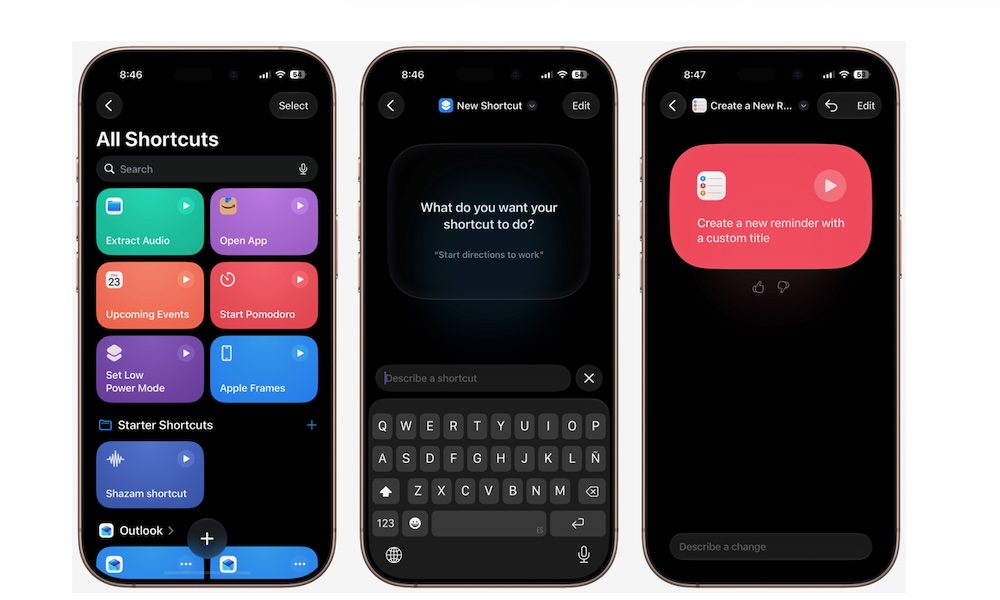
The Shortcuts app can do some incredible things, but there’s always been one problem: you need to understand how to build a shortcut first.
Even something that sounds simple can require several actions arranged in the correct order. Add variables or conditions, and it’s basically like you need to learn to code before you can properly use Shortcuts. Luckily, Apple Intelligence changes this completely.
You can now describe what you want in normal language, and Shortcuts will attempt to build it for you. For example, you could ask it to text your partner that you’re on your way home from work or to automatically turn on Low Power Mode when you’re running low on battery life.
Apple Intelligence figures out which actions are necessary, puts them together, and even gives your new shortcut a name. Of course, after it’s created, you can customize the shortcut further if you want. Here’s how to get started.
- Open the Shortcuts app.
- Tap the + button.
- Describe what you want your shortcut to do.
- Wait for Apple Intelligence to build it.
- Run the shortcut to test it.
This is an incredible use of AI, and it’ll make things so much easier for those of us who don’t know much about Shortcuts. And if you’re already a pro, this feature can help you create the basis for your much more complicated shortcut.