
Safari Can Tell You When a Website Changes
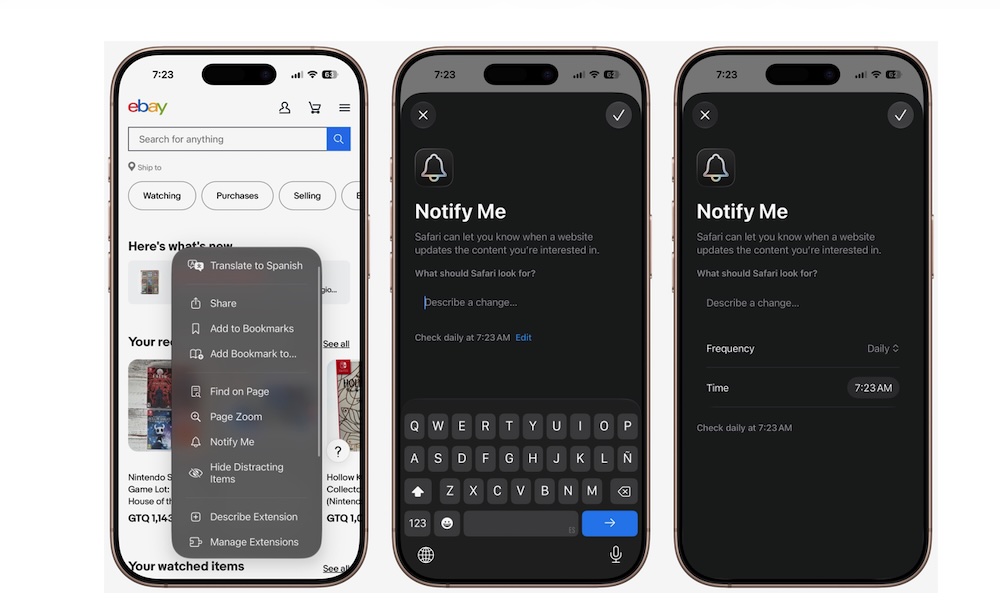
Notify Me might be one of the most useful Apple Intelligence features that Apple has released so far.
The feature lets Safari monitor a webpage for you and notify you when something you’re interested in changes. Instead of constantly refreshing the same website, you can tell Safari what you’re waiting for and let your iPhone check for you.
For instance, if you want to buy a pair of shoes that’s currently out of stock in your size, you can ask Safari to notify you when they’re available again. You could also keep an eye on the price of something you want to buy and receive an alert if it gets cheaper.
Safari even lets you describe what you want it to monitor, so you aren’t limited to a handful of predetermined options.
Here’s how to try Notify Me on your iPhone:
- Open Safari and visit the webpage you want to monitor.
- Tap on the Page Menu button.
- Select Notify Me.
- Describe the change you want Safari to look for.
- Tap on Edit, and adjust how frequently Safari should check the page if necessary.
- Tap the checkmark in the top right corner to finish.
And that’s it. After that, you can forget about the webpage until Safari detects the change you need.