
Turn On Back Tap for a Couple of Hidden Buttons
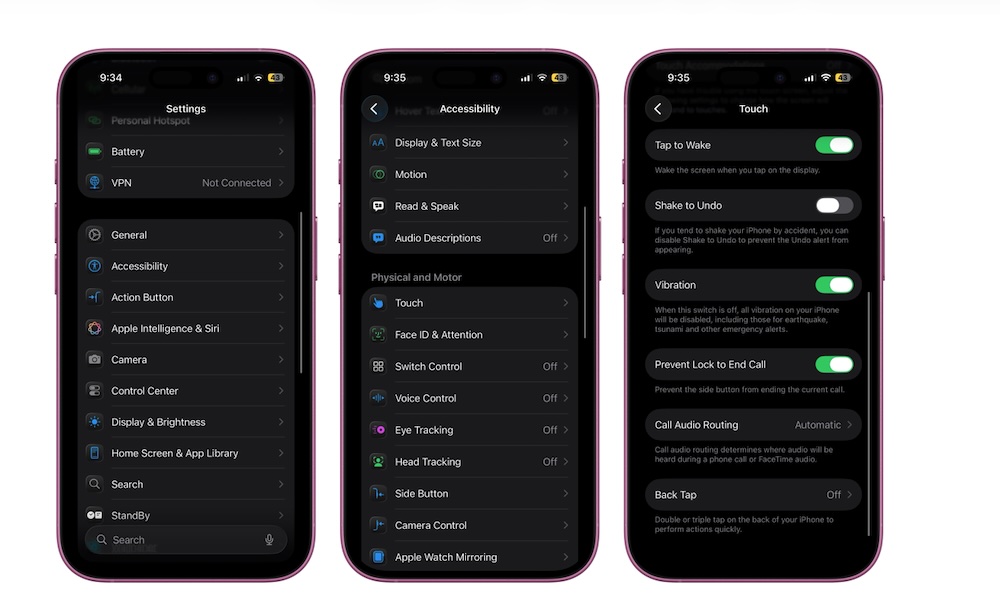
Just because you don’t have the Action button doesn’t mean you can’t still customize one or two extra buttons on your iPhone, and that’s where Back Tap comes in. This feature allows you to double-tap or triple-tap the back of the phone to perform actions.
This essentially turns the back of your phone into an invisible button that can help you do things like take screenshots, open Control Center, launch shortcuts, or activate other features. Back Tap is turned off by default, but here’s how you can start using it.
- Open the Settings app.
- Scroll down and go to Accessibility.
- Tap on Touch.
- Tap Back Tap.
- Select Double Tap or Triple Tap.
- Assign a specific action for each “button.”
Once that’s done, try tapping your iPhone’s back twice or three times and see how this feature works by yourself.