
App Privacy Report
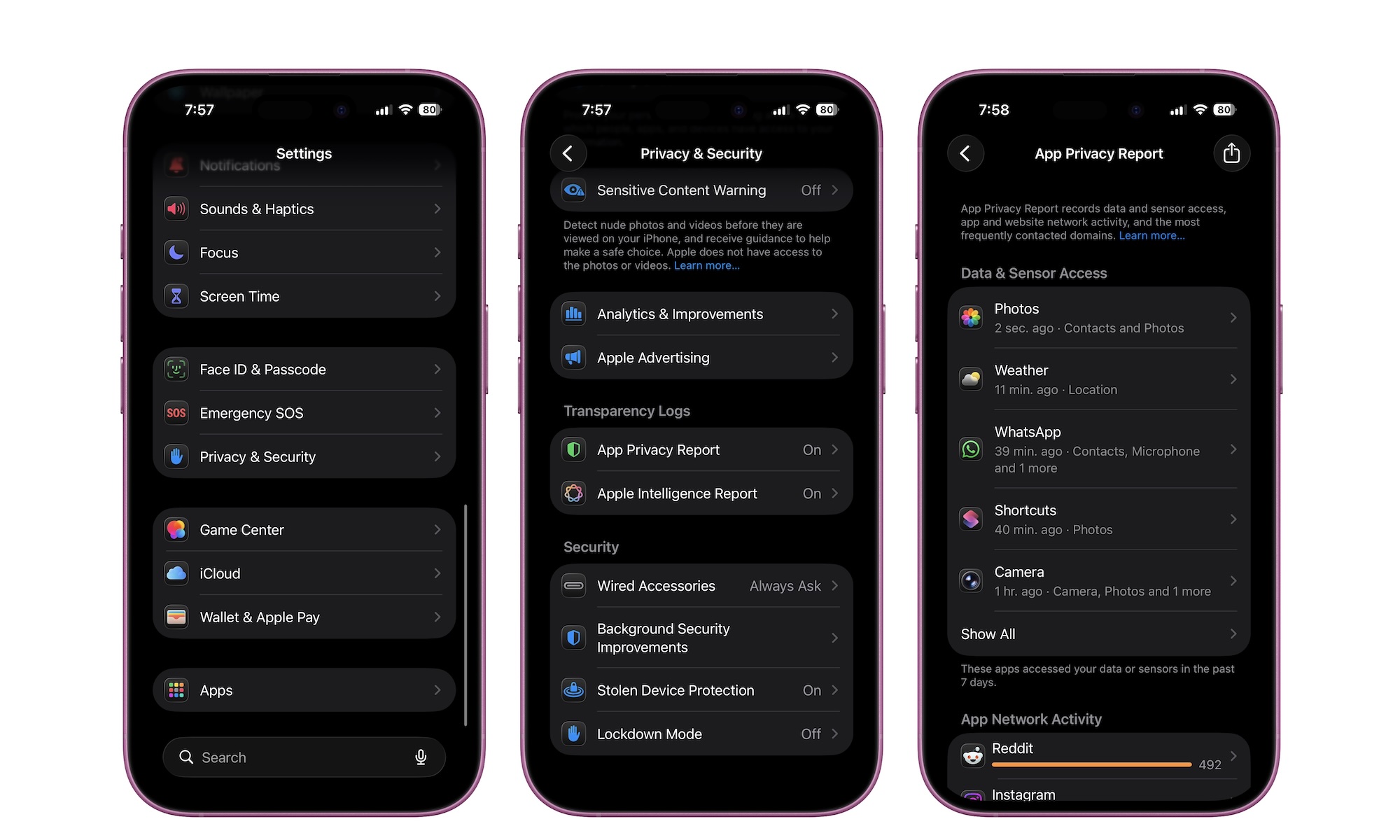
App Privacy Report is a powerful accountability tool. It shows how often apps access sensitive permissions like location, photos, camera, and microphone. It also shows which network domains your apps contact. Even if you don’t understand every technical detail, it’s still useful because you’ll get to learn if your apps are doing what they’re supposed to do.
If an app accesses your location constantly when you only use it once a week, that’s worth questioning. If an app is contacting a huge number of domains, it might be doing more tracking than you want. This report gives you the confidence to tighten permissions without guessing.
Here’s where to find your App Privacy Report:
- Open the Settings app.
- Scroll down and go to Privacy & Security.
- Scroll down one more time and tap on App Privacy Report under Transparency Logs.
From there, you can scroll down and take a look at all the data available. You can tap on specific apps to get more information about them, or check your complete Website Network Activity. Again, this might be a bit too technical for some of us, but it’s still worth taking a look at what your most-used apps are doing on your iPhone.