
Background Sounds
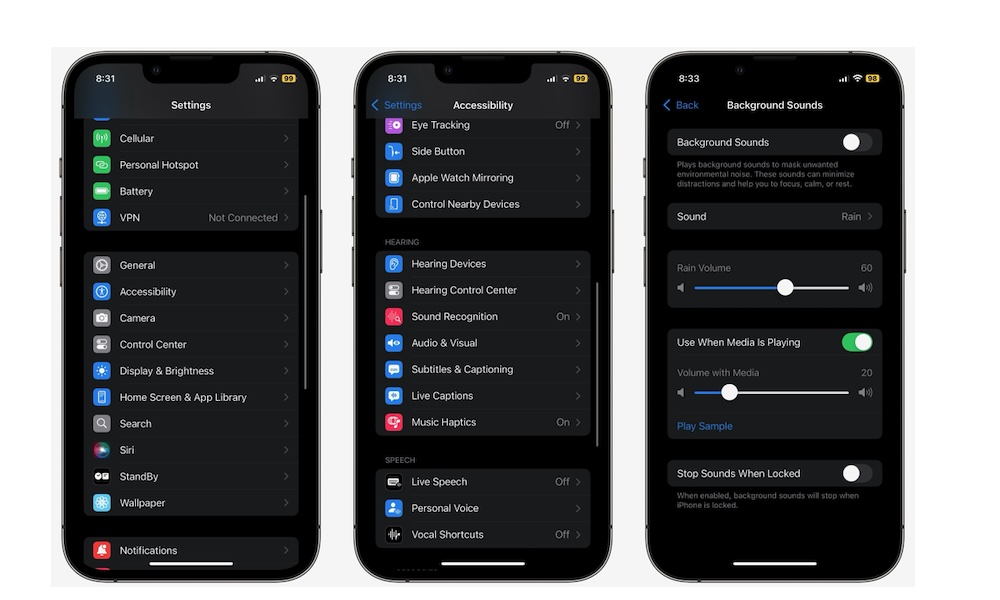
Background Sounds lets your iPhone play ambient noise like rain, ocean, streams, or balanced noise in the background. The best part is that it works system-wide, meaning you can use it while reading, working, or winding down without juggling an extra app.
This feature is great for focus and for quieting down a noisy environment. It can also help if you’re trying to relax at night and don’t want to scroll or play videos. You can turn it on when you want a calmer environment, and turn it off when you don’t.
Here’s how to start using Background Sounds:
- Open the Settings app.
- Scroll down and go to Accessibility.
- Scrolldown and under Hearing, tap on Audio & Visual.
- Go to Background Sounds.
- Turn Background Sounds on and then tap on Sounds.
- Choose the sound you like.
You can also adjust other things, like volume or set a timer to stop the sounds. Also, if you want to make it easier to use this feature, you can add the Background Sounds control to your Control Center.
Pro Tip: Background Sounds work particularly well with the AirPods Pro or AirPods 4 with ANC during those times when you really want to cut out all the external noise so you can meditate or focus on what you’re doing.