
Voice Isolation
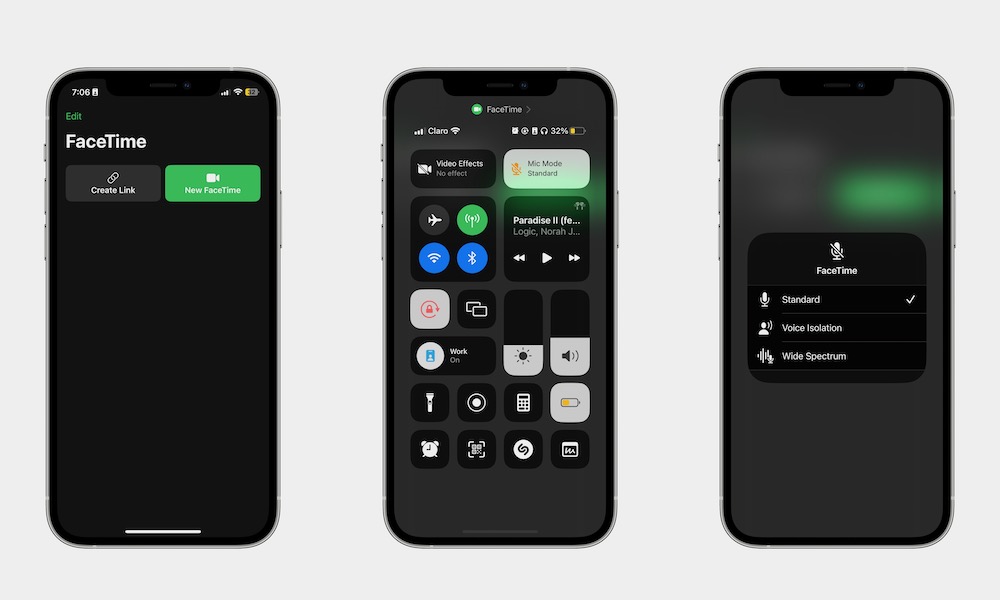
If you take calls in noisy places, Voice Isolation is a must-use feature. It’s a microphone mode that prioritizes your voice and reduces background noise during Phone calls, FaceTime, and supported third-party calling apps. In plain English: you’ll sound clearer, and the person on the other end won’t hear your entire environment.
To start using Voice Isolation, you’ll first need to get on a call. Then, open the Control Center on your iPhone, tap on Mic Mode at the top, and select Voice Isolation. You won’t hear a change, but the difference should be immediately noticeable to the other person, especially if you’re in a loud place.
The downside is that if you make sounds with your mouth or want someone to hear something near you, your iPhone will automatically mute those sounds. However, you can turn it on and off as often as you need to by following the steps above.