
Back Tap
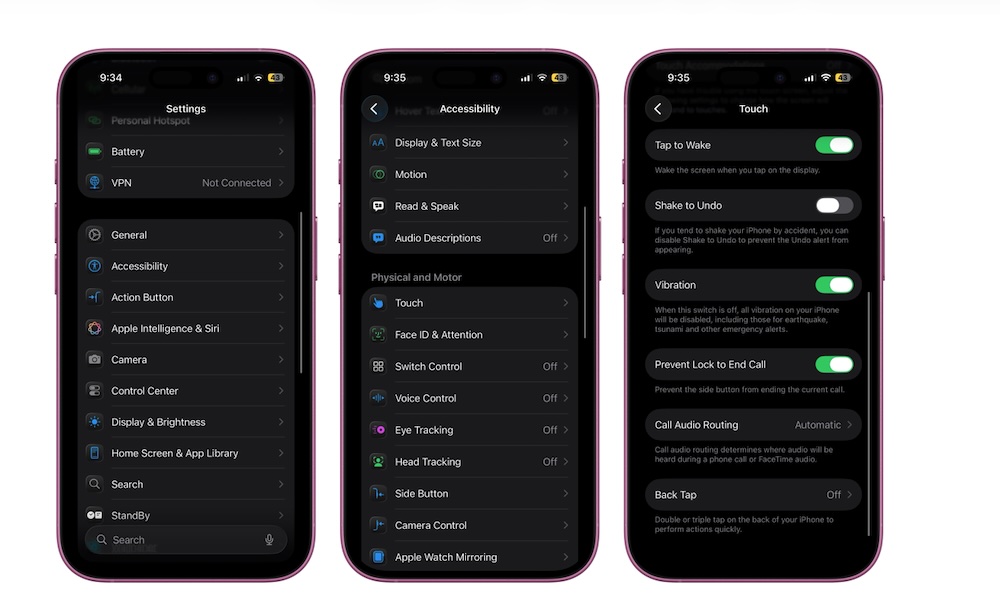
Back Tap turns the back of your iPhone into one or two secret buttons. You can double- or triple-tap the back of the phone to trigger an action, such as taking a screenshot, opening Control Center, launching the camera, or running a Shortcut. It sounds gimmicky until you assign it to something actually useful. Then it becomes a time-saver.
The best way to use Back Tap is to assign it to actions you do frequently. If you always open a specific app, you can assign a Shortcut that launches it and sets up what you need. It’s also great if you’re constantly using one hand, and it lets you access your Control Center or Notifications without having to stretch your thumb or reach across the screen.
Here’s how to find and enable Back Tap:
- Open the Settings app.
- Scroll down and go to Accessibility.
- Tap on Touch.
- Scroll down and tap on Back Tap.
- Select Double Tap or Triple Tap.
- Choose the action you want.