
Reachability
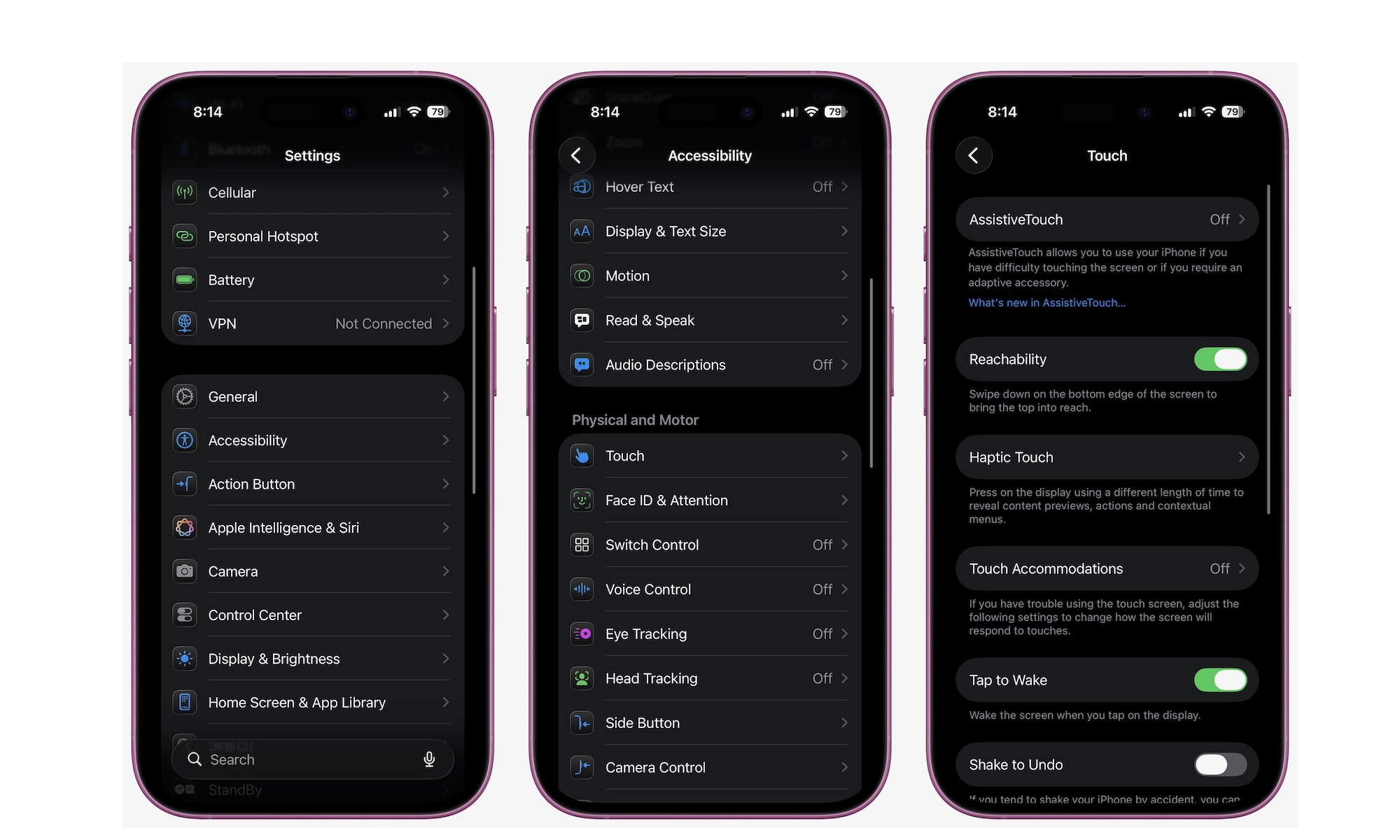
If you have a larger iPhone like a Pro Max, Reachability is one of the fastest quality-of-life improvements you can make. It drops the top half of the screen downward so you can tap it with one thumb. That means less awkward hand gymnastics, fewer accidental drops, and a phone that feels easier to use one-handed.
Once you start using it, it becomes one of those features you stop thinking about because it feels normal. Reachability should be turned on by default, but you can enable it manually by doing the following:
- Open the Settings app.
- Scroll down and go to Accessibility.
- Tap on Touch.
- Turn on Reachability.
Afterward, you can use this feature by swiping down from the bottom of your iPhone. It might be a bit weird at first, but it’ll change the way you use your iPhone once you learn how to use it, and if you find the downswipe too awkward, you can always assign Reachability to a Back Tap.