
Live Activities
Live Activities give you real-time updates right on your Lock Screen, and on iPhones that support it, in the Dynamic Island too. This can include things like timers, ride-share progress, food delivery status, sports scores, flight updates, and more.
What makes Live Activities actually useful is that you don’t need to constantly unlock your phone and check an app. You get the update at a glance.
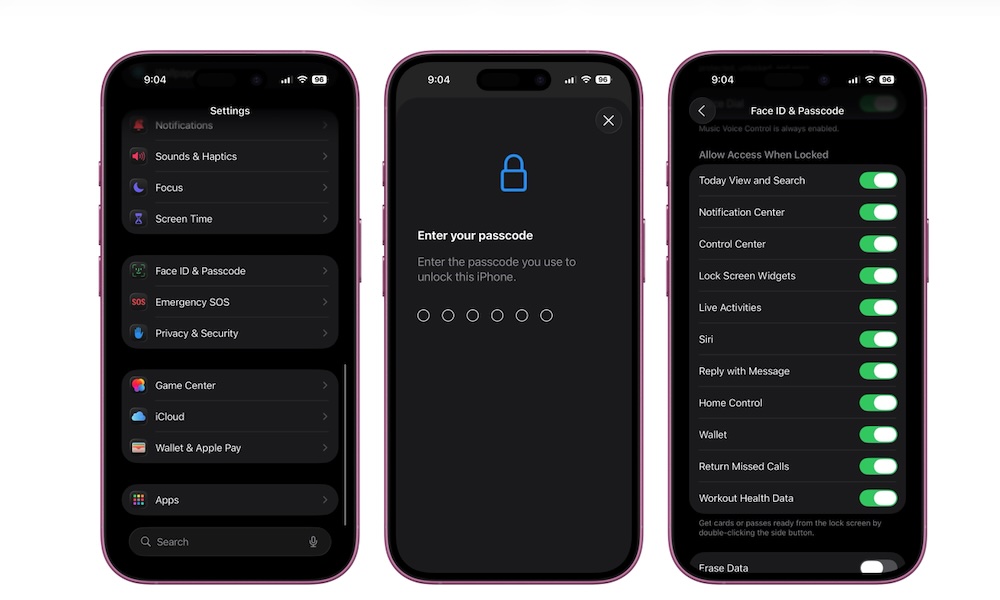
If you’ve ever checked a delivery app ten times in ten minutes, Live Activities are made for you. This feature should be turned on by default so it appears on your Lock Screen, but here’s how you can enable it manually.
- Open the Settings app.
- Scroll down and tap Face ID & Passcode.
- Enter your passcode.
- Scroll to Allow Access When Locked.
- Turn on Live Activities.
After that, Live Activities will appear automatically when you use an app that supports them. If you don’t see them, it may be because the specific app hasn’t implemented the feature.