
Safety Check
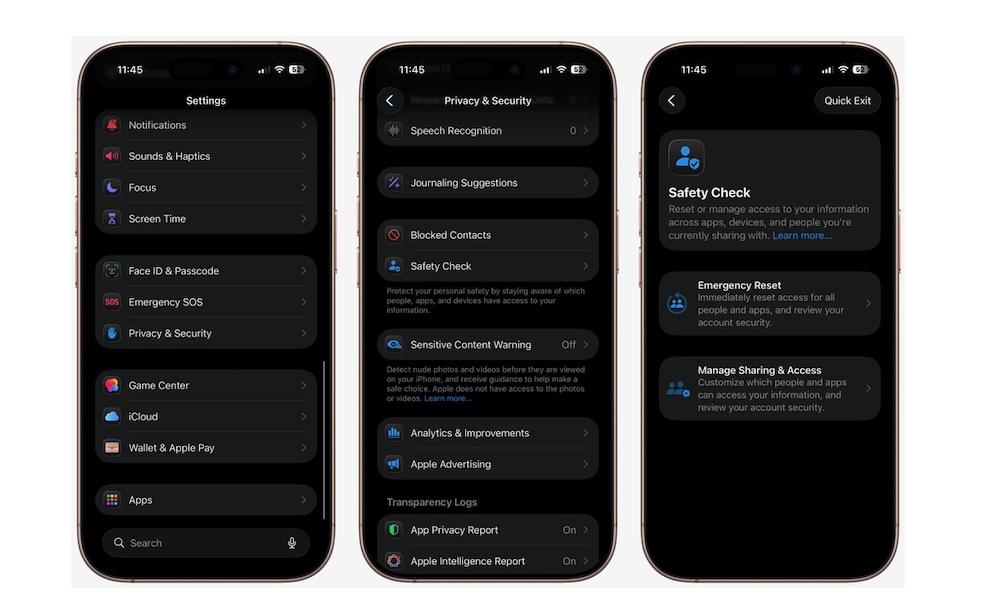
Safety Check is one of the most important privacy features Apple has ever added, and many people still don’t know it exists. It was designed to help people in situations where they need to quickly stop sharing information, but it’s useful for everyone because sharing data can add up over time.
Maybe you shared your location with someone months ago and forgot about it. Maybe an app still has access to data it no longer needs. Or maybe you signed into something on a shared device. Safety Check makes it easy to review who and what has access to your information, then revoke anything you don’t want.
It’s basically the fastest way to audit your iPhone’s sharing and permissions without hunting through a dozen menus. Here’s how to use it:
- Open the Settings app.
- Scroll down and go to Privacy & Security.
- Tap Safety Check.
- Tap Manage Sharing & Access to review who and what has access.
- Follow the instructions on your screen and remove anything you don’t want.
If you ever need a more drastic option, Safety Check also has an Emergency Reset feature, but most people will be using it as a smart privacy clean-up tool.