
Back Tap
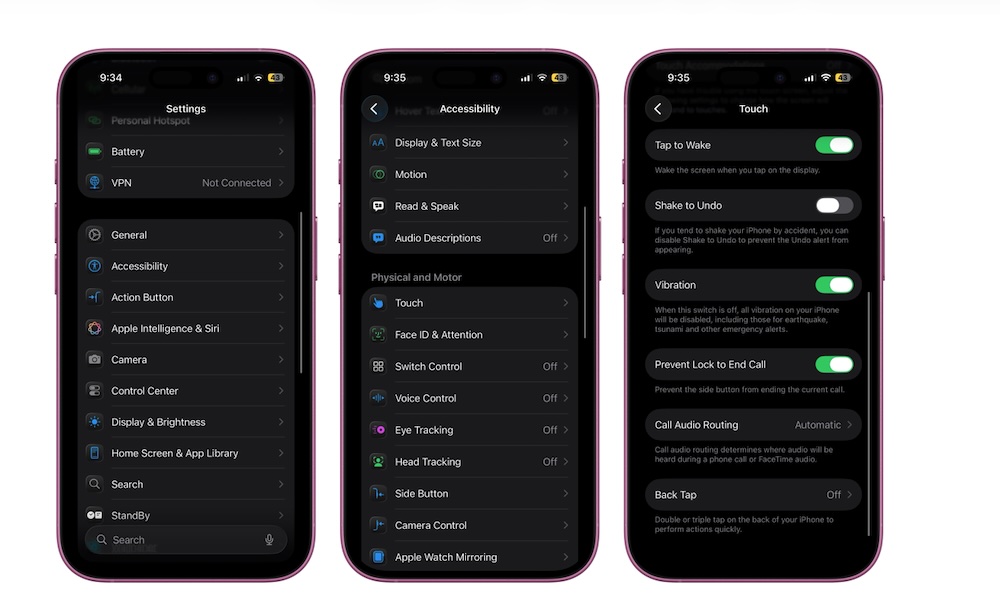
Back Tap is one of those features that feels almost like a secret you never knew you needed. It turns the back of your iPhone into a hidden button you can double-tap or triple-tap to trigger an action. This means that you access a shortcut without changing how you hold your phone. No extra button to press, and no reaching to the top of the screen. Just a quick tap with your index finger.
Back Tap stands out because you can use it for virtually anything. You can take screenshots, open Control Center, pull down Notification Center, launch the camera, trigger an accessibility feature, or even run a Shortcut. Once you get used to it, it feels natural, like the iPhone should have had a programmable button in the back from the start.
To turn Back Tap on, you need to do the following:
- Open the Settings app.
- Scroll down and go to Accessibility.
- Scroll down and under Physical and Motor, tap on Touch.
- Scroll down one more time and go to Back Tap.
- Tap on Double Tap or Triple Tap.
- Choose the action you want for that “button.”
And that’s it. Now you can double- or triple-tap on the back of your iPhone anytime you want to access your chosen features. Just keep in mind that a thick case might reduce its sensitivity, though, so be prepared to tap a bit harder if you’re using something like an Otterbox Defender.
Pro Tip: While not strictly an Accessibility feature, you can also map many of the same functions to the physical Action button found on the side of the iPhone 15 Pro, iPhone 16 and newer models.