
Use Background Sounds Instead of Ad-Heavy White Noise Apps
If you’ve ever downloaded a white noise app and immediately hit a paywall or an ad, you already understand why having an alternative matters. You shouldn’t need a subscription just to play rain sounds.
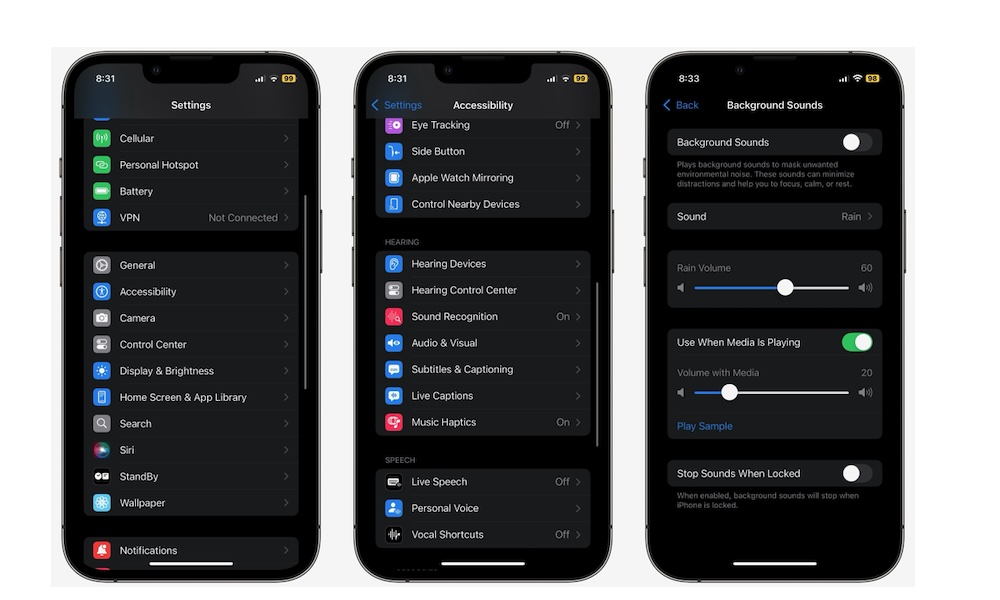
You can, of course, find a cozy video on YouTube and use that, but there’s a better way, especially if you’re offline. Background Sounds are built into iOS, letting you choose different sound profiles, adjust the volume, and treat it like a simple feature instead of a separate app constantly trying to ask for a subscription payment out of you.
This includes sounds like rain, stream, fire, and even airplane sounds. Granted, you can probably find more options on a paid app, but if you only want the basics, this is a solid option.
You can find Background Sounds by going to Settings > Accessibility > Audio & Visual > Background Sounds, and turning on Background Sounds.
Alternatively, if you want quick access, add it to your Control Center so it’s always one swipe away.