
Turn On Bold Text and Increase Contrast
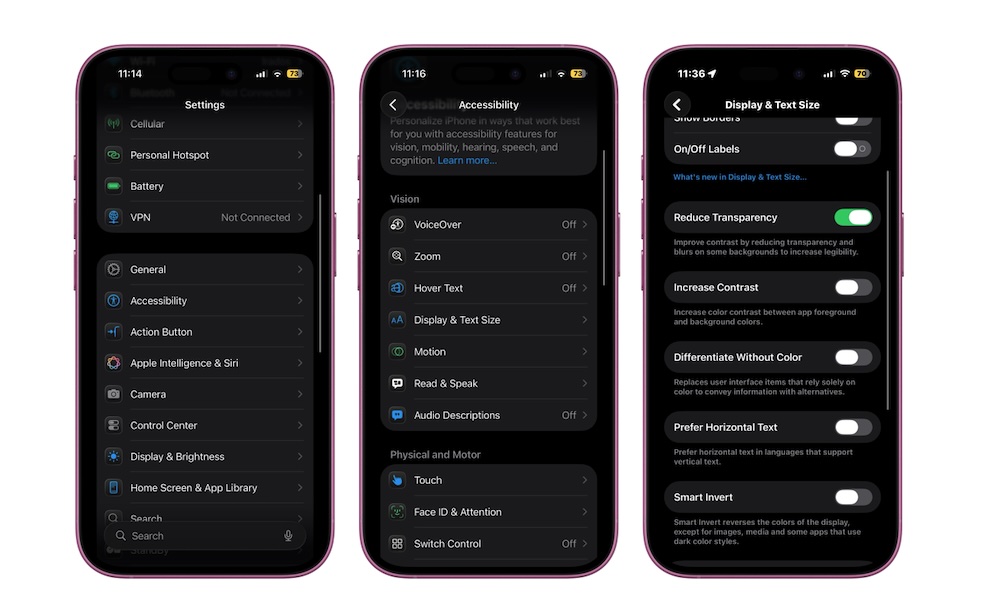
Thin fonts look modern, but they’re not always fun to read on a small screen. Bold Text thickens system fonts across all apps, improving legibility and reducing the effort it takes to scan menus, lists, and notifications. Additionally, tweaking Increased Contrast can also help with eye strain and visual fatigue.
Here’s where to turn both features on:
- Go to the Settings app.
- Scroll down and tap on Accessibility.
- Under Vision, tap on Display & Text Size.
- Turn on Bold Text.
While you’re there, you can also turn on Increase Contrast to boost the contrast between foreground elements and backgrounds.