
Increase the Default Text Size So You’re Not Squinting
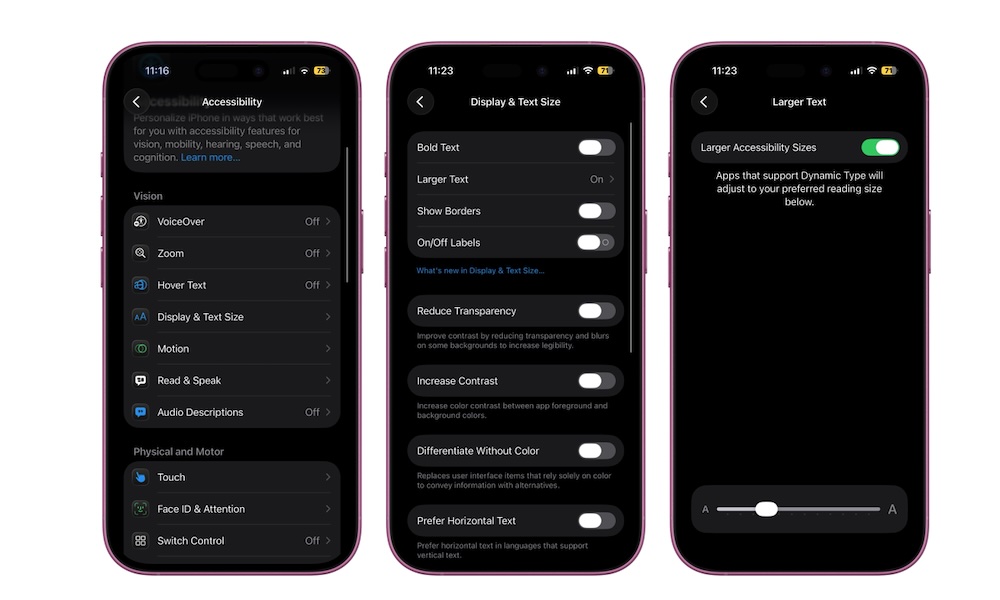
If you find yourself leaning in or squinting to read, that’s a clear sign your default text size is too small. iOS lets you increase text size for your whole iPhone or specific apps, in case you don’t need a bigger font everywhere.
Here’s how to make text larger:
- Go to the Settings app.
- Scroll down and tap on Accessibility.
- Under Vision, tap on Display & Text Size.
- Turn on Larger Accessibility Sizes if it’s available, then drag the slider until the preview text feels comfortable.
You can also add the Text Size control to Control Center to adjust the text size on each individual app you have. Just remember that you need at least iOS 15 to use this feature.