
Let Auto-Brightness Handle Your Display’s Intensity for You
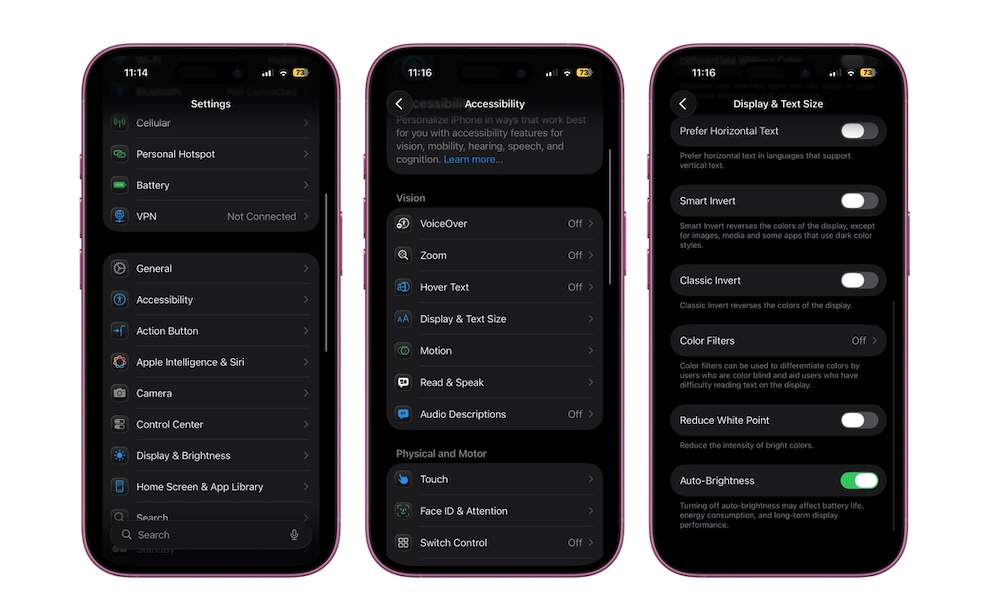
Manually riding the brightness slider all day gets old fast. Auto-Brightness uses your iPhone’s ambient light sensor to raise brightness in bright environments and lower it in darker ones. Used correctly, it prevents the ‘flashlight to the face’ sensation when you unlock your phone in bed while also keeping your screen readable outdoors. You’ll find this setting at the very bottom of the same Display & Text Size menu we just visited in the previous step.
To make sure your iPhone is using auto-brightness, follow these steps:
- Go to the Settings app.
- Scroll down and tap on Accessibility.
- Under Vision, tap on Display & Text Size.
- Go down to the bottom and turn on Auto-Brightness.