
Turn On True Tone So the Screen Matches Your Environment
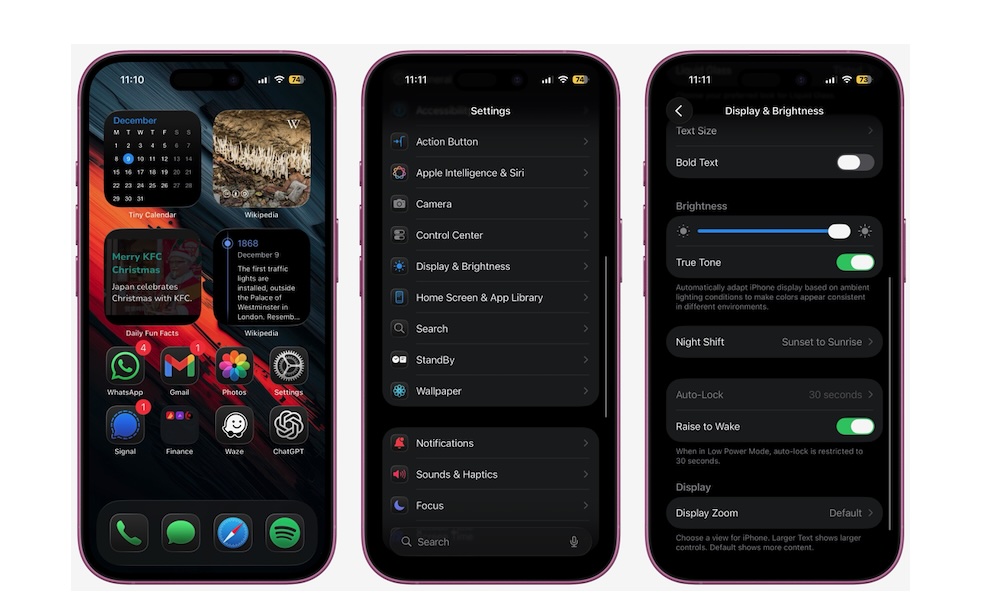
Even with Dark Mode enabled, a screen that’s too bright can feel harsh, especially under warm indoor lighting. True Tone uses sensors to measure ambient light and subtly adjusts the display’s color temperature and intensity to match. Whites look more like actual paper under warm light instead of glowing icy blue.
Most recent iPhones support True Tone, but it can be turned off. So if you want to make sure you have it turned on, you can go here:
- Go to the Settings app.
- Scroll down and tap on Display & Brightness.
- Scroll down, and under Brightness, turn on True Tone.
You can also long-press the brightness slider in Control Center, then tap the True Tone button to quickly toggle it.