
Turn On Screen Distance to Build Healthy Habits
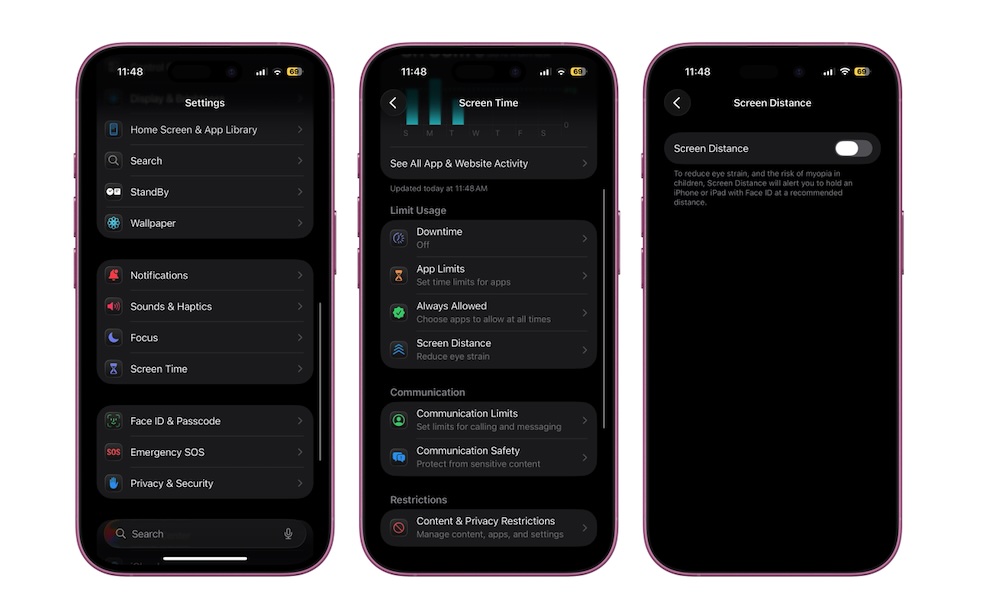
The last tip isn’t about display tweaks but about how close you hold your phone to your face. Apple introduced Screen Distance in iOS 17 as part of Screen Time to encourage both kids and adults to hold devices at a healthier distance.
Using the TrueDepth camera on supported models — that’s any iPhone with Face ID — your iPhone can detect when you’ve been holding it closer than about 12 inches (30 cm) for too long and pop up a full-screen reminder to move it farther away. That matters because prolonged close-up viewing is linked with increased eye strain and a higher risk of myopia, especially in children.
To enable it, do the following:
- Go to the Settings app.
- Scroll down and tap on Screen Time.
- Under Limit Usage, tap on Screen Distance.
- Turn on Screen Distance.
Once it’s enabled, you don’t have to think about it. Your iPhone will quietly watch your viewing distance and give you a gentle nudge when it’s time to hold it farther away.