
Use Smart Invert for High-Contrast Relief
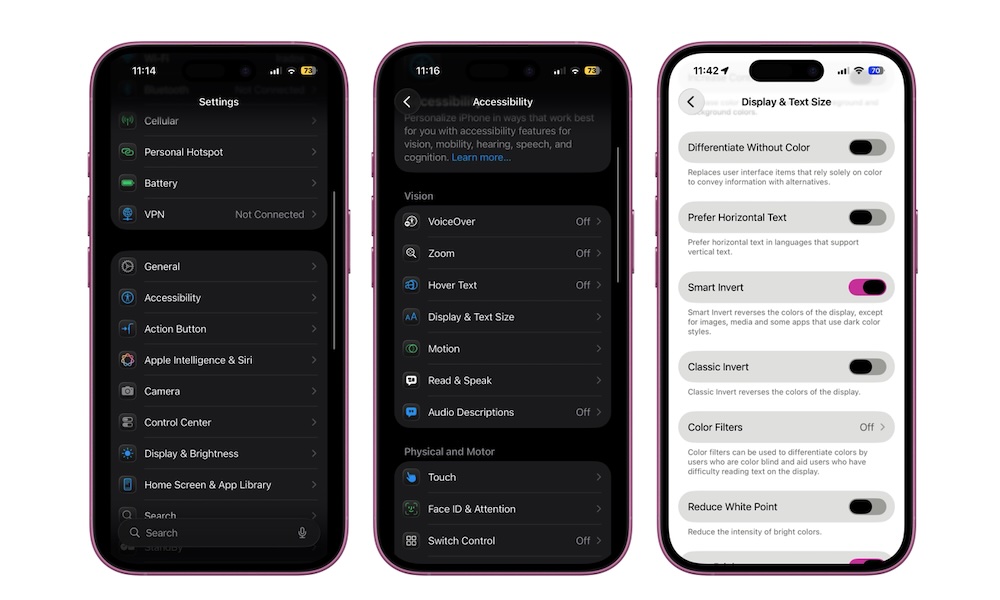
Smart Invert is a bit of a hidden gem. Instead of flipping every pixel like classic invert, it inverts the system UI while trying to keep photos, videos, and other media looking normal. That essentially gives you a “dark-by-force” mode in apps that don’t natively support Dark Mode.
This can be especially handy for late-night reading in stubbornly bright apps or websites. It’s not perfect (some elements may look weird), but it can still be a game-changer.
- Go to the Settings app.
- Scroll down and tap on Accessibility.
- Under Vision, tap on Display & Text Size.
- Turn on Smart Invert.