
Dim Flashing Lights in Video Content
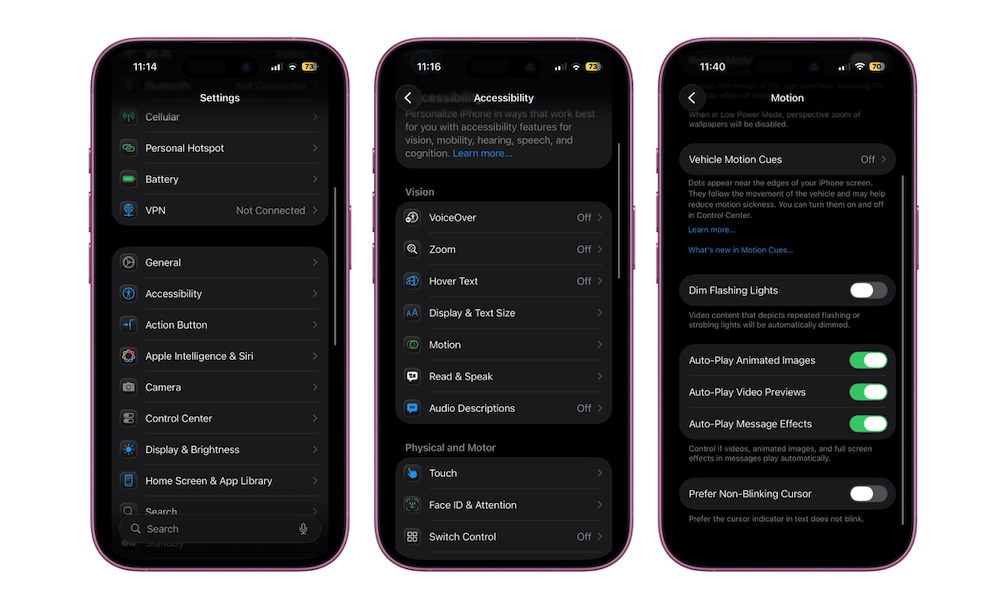
Rapid flashing and aggressive visual effects are uncomfortable for almost everyone and genuinely dangerous for some users. Since iOS 16.4, Apple has included a Dim Flashing Lights setting that automatically detects and dims flashing lights in videos across apps.
Even if you don’t have epilepsy or migraines, this can lower the overall “stress” of watching certain shows or action-heavy clips. To turn it on:
- Go to the Settings app.
- Scroll down and tap on Accessibility.
- Under Vision, tap on Motion.
- Turn on Dim Flashing Lights.
Once enabled, iOS quietly dims most flashing sequences in supported videos across many third-party apps. It doesn’t change everything, but for many people, it will be a noticeable comfort tweak.