
Add Home Screen Widgets for Useful Information and Shortcuts
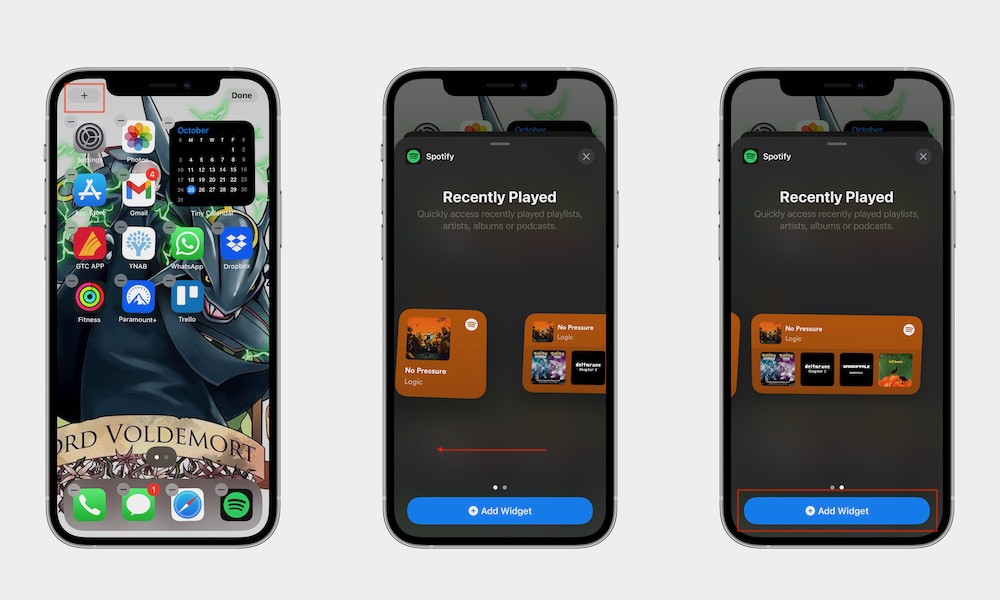
Widgets help transform your Home Screen from a simple grid of apps into a dashboard of useful information. Many apps offer widgets that display things like weather forecasts, calendar appointments, reminders, and battery levels.
The simplest widgets will work as a shortcut to a specific app or action, while other widgets will let you do specific actions without having to open the app, like checking things off your Reminders list.
This makes it easier to check important information quickly without constantly opening apps. Here’s how to add a new widget to your Home Screen.
- Touch and hold an empty area on the Home Screen until apps start to jiggle.
- Tap Edit in the top left corner.
- Tap Add Widget.
- Choose a widget and size.
- Place it anywhere on the Home Screen.
And that’s it! You can add as many widgets as you want, which can help keep your Home Screen more organized.