
Set Up Your Lock Screen so It’s Actually Useful
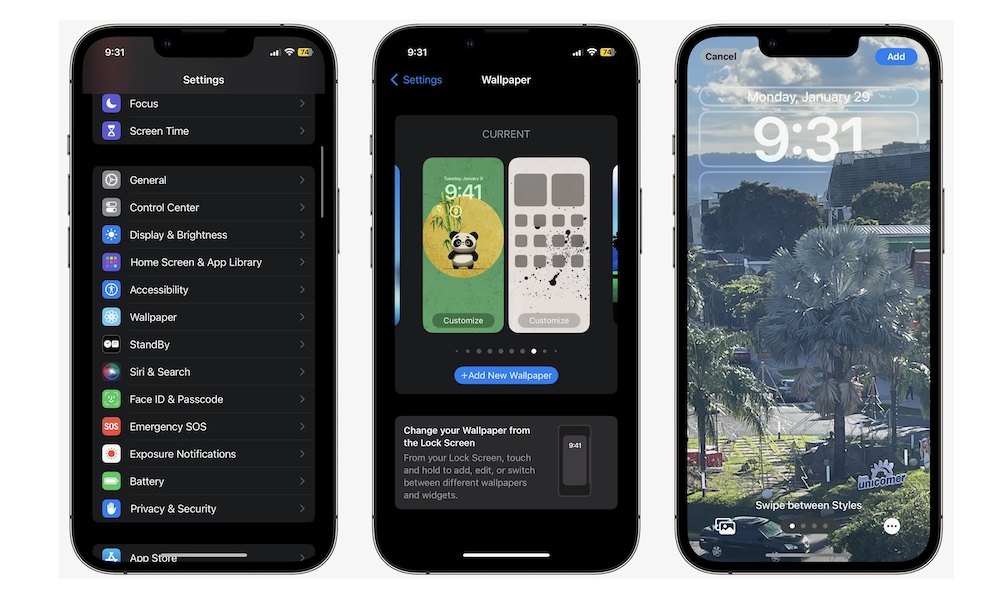
The Lock Screen has evolved into much more than a wallpaper and clock. You can now customize it with widgets, change the clock style, and adjust the shortcuts available right at the bottom of your screen.
Taking a few minutes now to personalize this area can save you time throughout the day. Instead of unlocking the device every time you want quick information, you can glance at weather updates, calendar events, reminders, and more directly from the Lock Screen.
There are a couple of ways to customize your Lock Screen, but this is the most straightforward way:
- Open the Settings app.
- Scroll down and tap on Wallpaper.
- Tap your Lock Screen wallpaper (on the left side) to customize it.
From there, you can add widgets near the bottom or top of the screen, adjust the clock’s size by dragging the handle in the bottom right, or change the controls at the bottom of your screen.