
Use Hold Assist When You’re on Hold
Being placed on hold during a phone call is frustrating, especially if you’re in a hurry or in the middle of something. Luckily, Apple thought about this, which is why it added Hold Assist in iOS 26.
If you’re placed on hold, your iPhone will detect it and ask if you want it to wait for you. If you say yes, the feature monitors the call while you’re on hold and alerts you when a real person returns to the line.
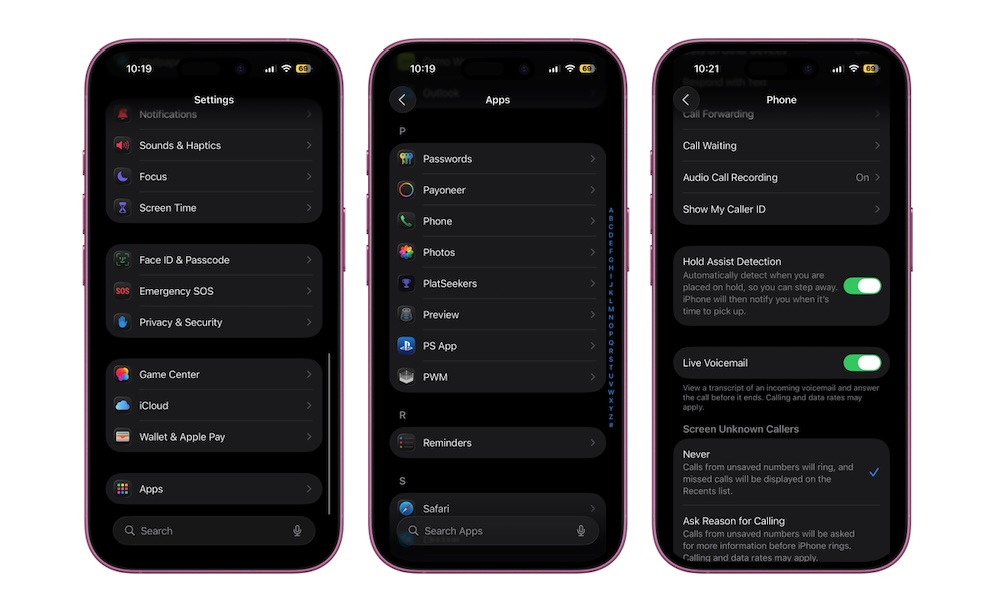
Instead of listening to hold music, you can set your phone down, do anything you want, and wait for your iPhone to alert you. This feature is turned on by default, but you might need to enable the automatic detection by doing the following:
- Open the Settings app.
- Scroll down and go to Apps.
- Scroll down and tap on Phone.
- Go down one more time and turn on Hold Assist Detection.
If you don’t want automatic detection, you can simply tap the three-dot button while you’re on a phone call and select Hold Assist. Your iPhone will start listening for you and alert you when it’s your time.