
Send Later in Messages
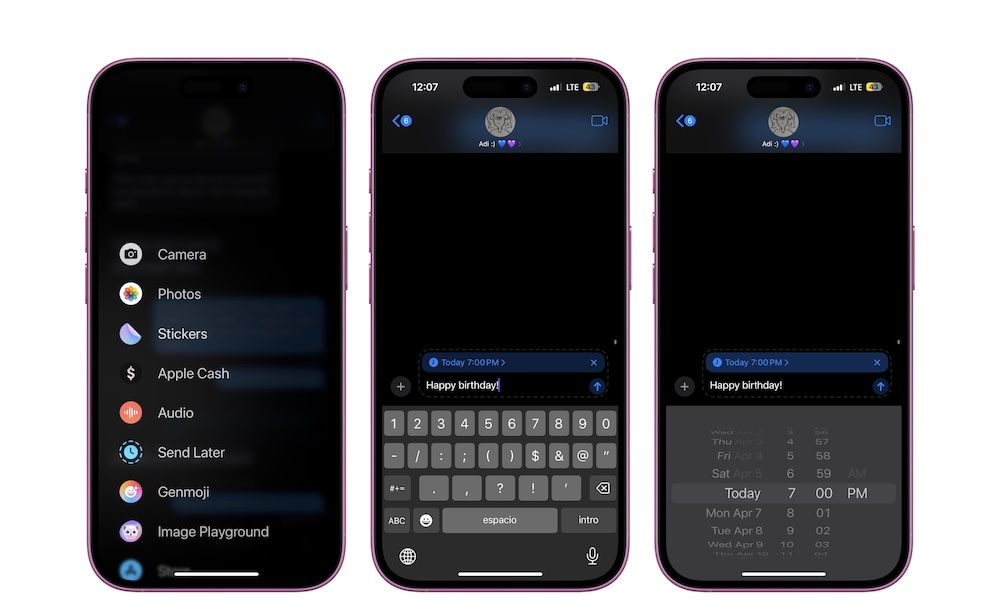
Send Later is a built-in feature that lets you schedule texts, and it’s something that we’ve wanted for years. You can write an iMessage now and have it delivered at a specific time later. That’s perfect for birthdays, reminders to coworkers, and those messages you want to send without being that person who texts at 5 a.m.
It’s a small feature, but it can save you a lot of time and trouble if you use it properly. To get started, open the Messages app and open the conversation where you want to schedule a text message.
Next, tap the + button on the left side, and then select Send Later. Choose the date and time, and then write your message. Send it and forget about it; your iPhone will take care of the rest.
If you have any birthdays, anniversaries, or big meetings coming up, this is your friendly reminder to schedule a text right now. Your future self will thank you.