
Live Voicemail
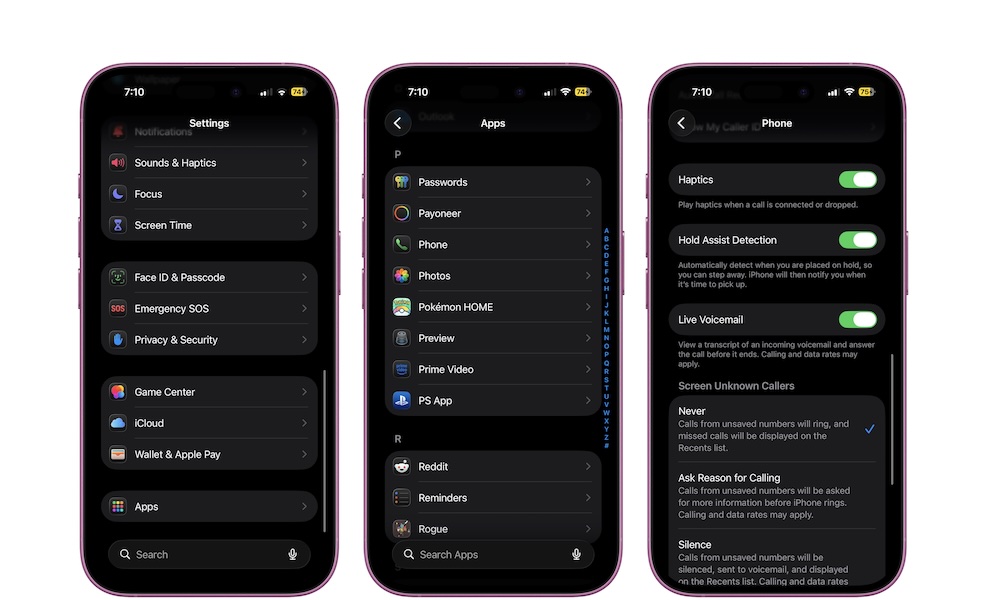
Live Voicemail is a really useful feature that changes how you handle calls by effectively turning your iPhone into a digital answering machine. When someone leaves a voicemail, you can “screen” calls by seeing a real-time transcription as they speak, letting you decide whether the call is worth answering, even if you don’t recognize the number.
This is especially useful if you get a lot of unknown callers or if you’re waiting for something important, like a delivery, a doctor’s appointment, or a job-related call. Instead of guessing or letting everything go to voicemail, you can glance at what they’re saying and pick up if it matters.
Here’s how to start using Live Voicemail:
- Open the Settings app.
- Scroll down to the bottom and go to Apps.
- Tap on Phone.
- Scroll down and turn on Live Voicemail.
Pro Tip: Live Voicemail can also save you a few bucks each month, as it eliminates much of the need to pay for a separate voicemail service with your carrier. With Live Voicemail enabled, your iPhone actually “answers” the call and records the message locally, which means your carrier isn’t involved at all. That said, it can only do this when your iPhone is powered on and has cellular coverage. If you can’t answer the call, neither can your iPhone, so you may want to keep your carrier voicemail service as a fallback if having an always-available voicemail box is important.