
Quick Notes
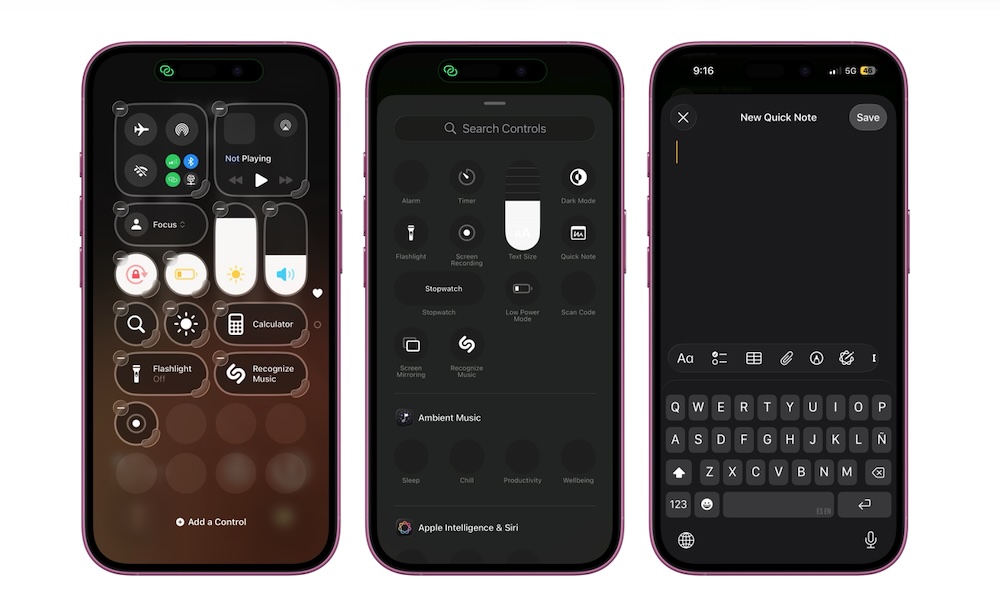
Quick Notes is a feature that makes your iPhone feel more like a tool for capturing ideas rather than just consuming content. It lets you create a note instantly while you’re already doing something else, like browsing in Safari, scrolling through a recipe, reviewing an email, or researching a product.
Instead of copying text, switching to the Notes app, making a new note, pasting, and trying to remember what you were doing, Quick Notes cuts down a few steps, making it feel seamless. It’s especially good for saving links and thoughts when you’re in the middle of something and don’t want to break your flow.
Quick Notes are stored in their own section in Notes, so you can dump everything there without feeling like you’re wrecking your organized notes system.
First, you need to add the Quick Note button to your Control Center. To do this, open your Control Center and tap on the plus icon in the top right corner of your screen. Next, tap on Add a Control at the bottom and use the search bar to look for Quick Note.
Afterward, you can try it out for yourself. Open a Quick Note and write down anything you want. You can then tap on save and continue your day.
Later, you’ll find all your quick notes in the Notes app under the Quick Notes folder.
Pro Tip: If you’re using the Safari app, you can take Quick Notes one step further. Tap the three-dot button in the bottom right corner of your iPhone and select Share. Next, scroll down and tap on Add to Quick Note. You’ll open a new note with the URL already pasted. You can add more text or just tap on Save.