
Haptic Touch Customization
Haptic Touch is the long-press gesture that opens quick menus on app icons, links, and many interface elements. It’s how you quickly jump into actions like taking a selfie from the Camera icon, scanning a document from Notes, or previewing a link without fully opening it. If you’re a long-time iPhone fan, you probably remember 3D Touch from the iPhone 6s. Well, this is its far less cool replacement.
What many users don’t know is that you can control how fast Haptic Touch responds. If you’ve ever felt like iOS is making you wait just a beat too long before the menu appears, changing this setting makes your phone feel snappier immediately. It’s a small tweak, but it makes common interactions feel more responsive, especially if you use long-press menus constantly.
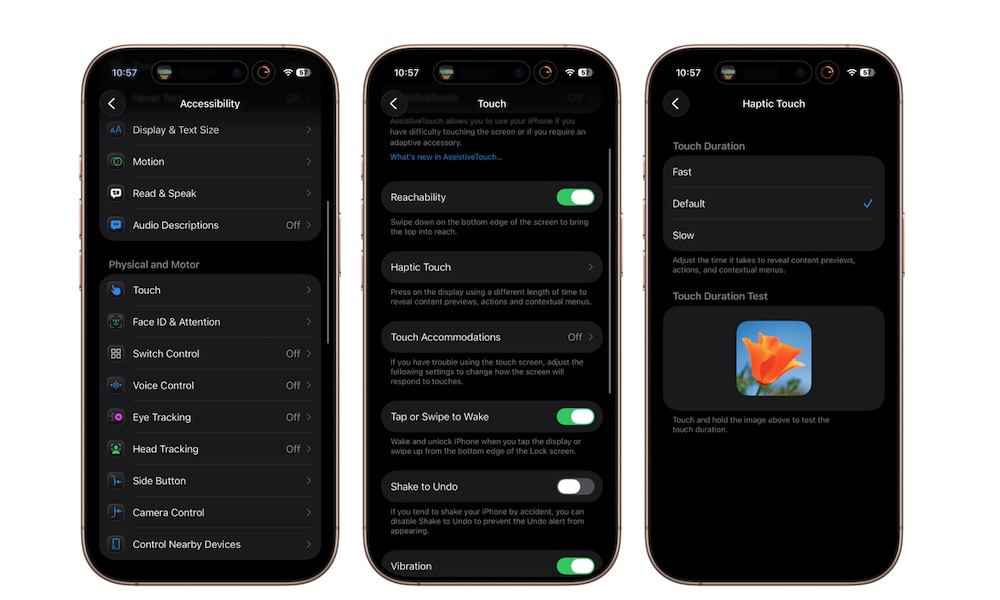
Here’s how you can customize your Haptic Touch duration:
- Open the Settings app.
- Scroll down and tap on Accessibility.
- Go to Touch.
- Tap on Haptic Touch.
- Under Touch Duration, choose Fast.
- Use the test area below to feel the difference.
If you try Fast and it feels too jumpy, you can always switch back to Default.