
Text Replacement
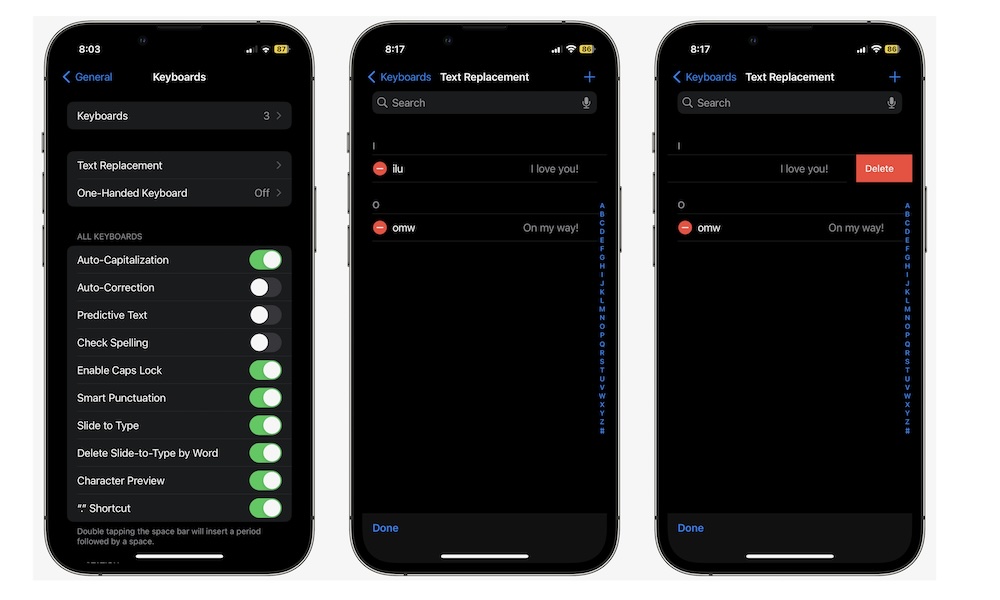
Text Replacement is an iPhone feature that will make you faster at typing without learning anything new. It lets you create custom shortcuts that expand into full phrases. You type something short, and your iPhone replaces it with something longer.
Most people assume this is only for casual stuff like “omw” turning into “On my way.” But you can actually use it for anything you type repeatedly: your email address, your mailing address, your phone number, client templates, a standard work reply, or even a mini paragraph you reuse when you’re answering the same questions. Your only limit is your imagination.
If you write for work, Text Replacement is a huge win. It turns your iPhone keyboard into a personal toolkit. And because it syncs across devices when iCloud is enabled for keyboard settings, you can build it once and benefit everywhere — even on your Mac.
Follow these steps to start using Text Replacement:
- Open the Settings app.
- Scroll down and go to General.
- Tap on Keyboard.
- Go to Text Replacement.
- Tap the + button.
- In Phrase, type the full text you want your iPhone to insert.
- In Shortcut, type the trigger you’ll remember.
- Tap on Save when you’re done.
Pro Tip: Pick shortcuts that you’ll never type by accident. Something like @@ for your email or adr1 for your address works well because it’s fast but intentional.