
Offline Maps in Apple Maps
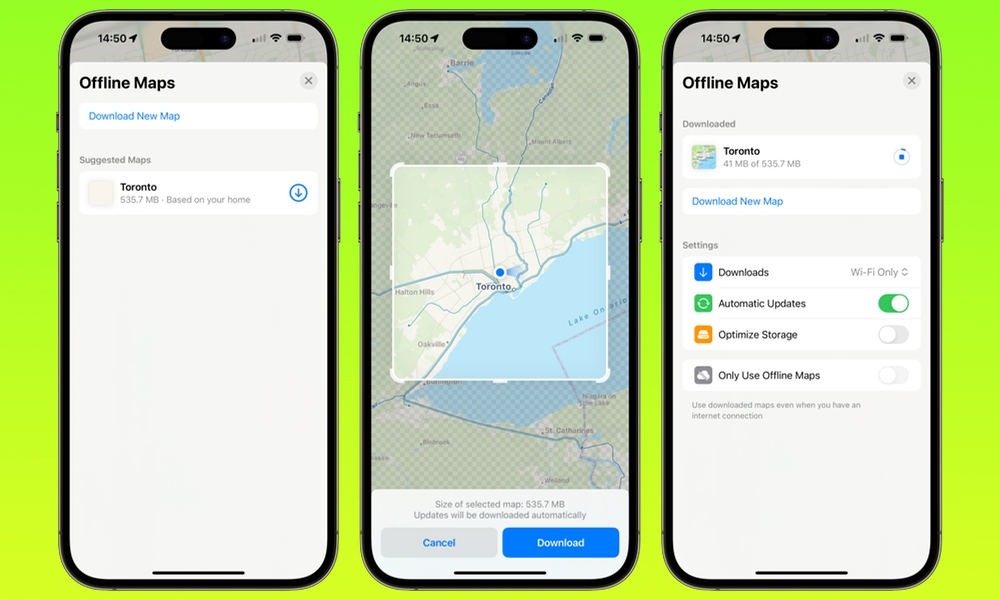
Offline Maps are ideal for anyone who travels, drives through spotty coverage areas, or just wants a backup plan. You can download a region in Apple Maps and use it even when your internet connection is weak or completely gone.
This is useful in more situations than you’d expect. Underground parking garages, road trips, rural areas, or international travel. Offline maps turn Apple Maps into something you can actually rely on when your signal is not cooperating.
Here’s how you can download a map in Apple Maps:
- Open Maps.
- Tap your profile icon.
- Go to Offline Maps.
- Tap Download New Map.
- Search for the area you want.
- Adjust the region size, then tap Download.
You can also manage and update your downloaded maps from the Offline Maps screen, which is helpful if you’re prepping for travel and want to make sure everything is current.