
Zoom
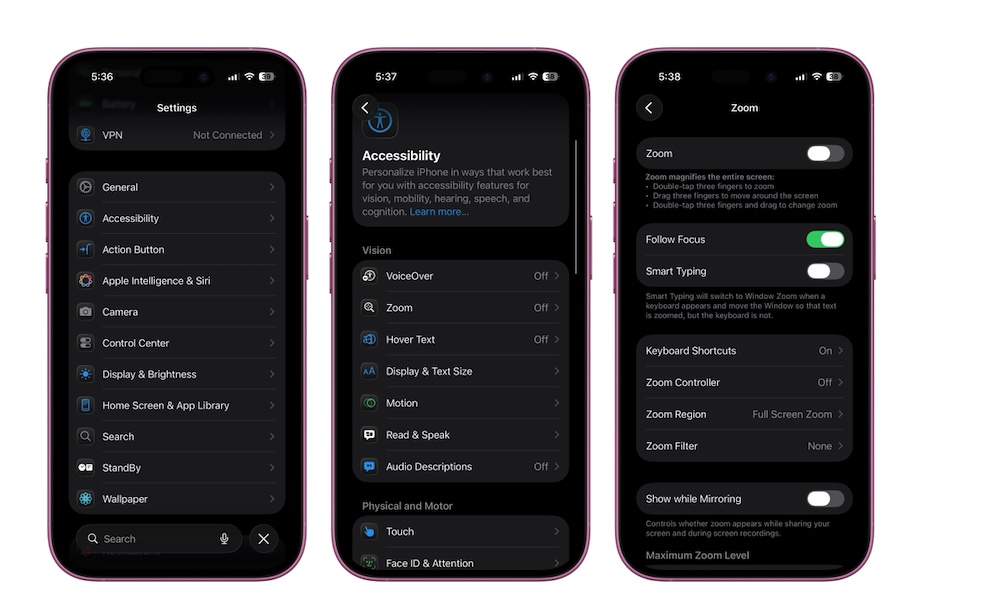
Zoom is the accessibility feature you don’t realize you need until you’re staring at tiny text, dense charts, or an interface that refuses to scale the way you want. Zoom is a system-wide magnification that can enlarge the whole screen or create a movable loupe -like window.
This is incredibly useful in real life. Maybe you’re reading a detailed receipt, checking a form, looking at a small map label, or trying to review something with fine print. Instead of squinting or struggling with tiny UI elements, Zoom lets you bring detail forward instantly.
To turn on Zoom on your iPhone, follow these steps:
- Open the Settings app.
- Scroll down and go to Accessibility.
- Tap on Zoom.
- Turn on Zoom.
You can choose Full Screen or Window, set the maximum zoom level, and enable the Zoom Controller for easier control. Even if you don’t keep it on all the time, it’s a great to know it exists. Plus, you can add it to your Control Center, so you can turn it on and off whenever you need to.