
Live Listen
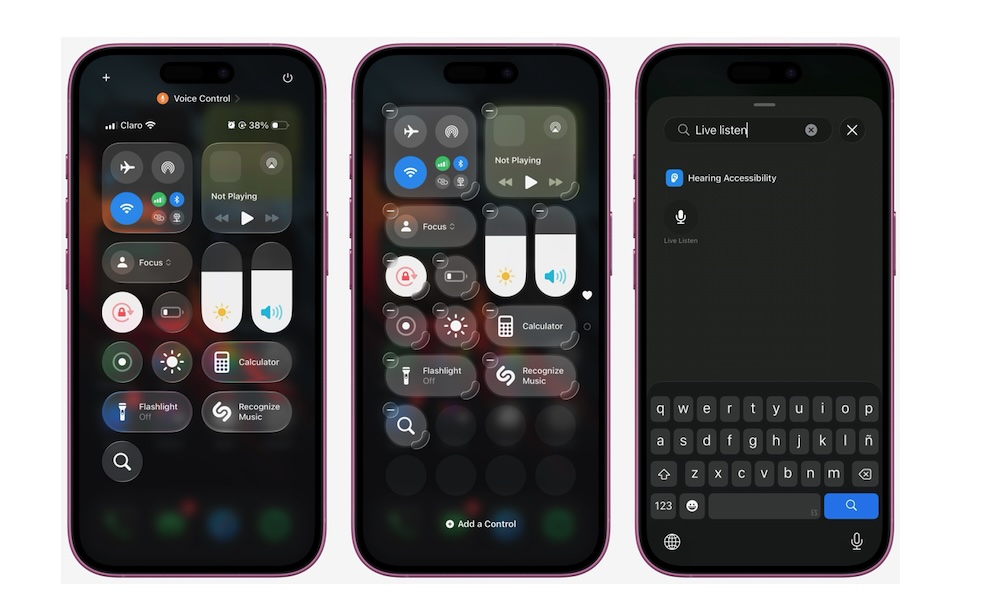
Live Listen turns your iPhone into a remote microphone that streams audio to your AirPods, Beats, or compatible hearing devices. This is incredibly useful in situations where you’re struggling to hear someone clearly, like in a restaurant, in a meeting, or during a lecture. You place your iPhone closer to the person speaking, and your AirPods relay the audio to you.
The beauty of Live Listen is that it doesn’t require special hardware beyond the headphones you already own. It’s also quick. First, you need to add it to your Control Center. Just open Control Center, tap the plus icon in the top right corner of your screen, and then tap Add a Control at the bottom. Search for Live Listen and add the control to your Control Center.
Once it’s added to Control Center, you can use it by connecting your AirPods or Beats and then opening Control Center. Next, tap Live Listen. Finally, place your iPhone near the speaker.
It’s not magic, and it won’t fix every environment, but in many real-world situations, it can make speech noticeably easier to follow. It’s also so good at picking up audio that it often feels like it was practically meant for spying.